lway
Members
-
Joined
-
Last visited
Everything posted by lway
-
I think they are monitored, I've replaced both mine with LED ones off Aliexpress with no issue. There's a whole unit that plugs in instead of the existing one, search for skoda octavia puddle lights to find them After about 4 years one of mine has started to fail and flickers but I've never seen an error.
-
It's in the VCDS tried and tested thread but as said above might differ for the FL models or VRS models. Quoting for above thread: To turn off the dipped beams for CH/LH: Change the following channels: (8)-Leuchte6ABL LC5-Lichtfunktion C 6 from Coming Home oder Leaving Home aktiv to not active (8)-Leuchte7ABL RB1-Lichtfunktion C 7 from Coming Home oder Leaving Home aktiv to not active For maximum illumination change the following channels for the LED DRL strip to be 100% brightness for CH/LH only - it wont affect any of the other operations (side light, DRL etc). (10)-Leuchte2SL VLB10-Dimmwert CD 2 from 35% to 100% (10)-Leuchte3SL VRB21-Dimmwert CD 3 from 35% to 100%
-
-
You can check the model number here
-
Can't say i'm 100% on it it's just what I've read on here from others. I went as far as buying the camera and running the cable from front to back in the car then I read that it won't work unless you have the VOICE button so didn't go any further. All the pictures i've seen of working cameras in this forum all have the VOICE button. I'll try and find out where I read it and why it won't work, but I suspect it was from Sasha who's a bit of an expert on these things :). Edit: found the thread
-
See post by varaderoguy here page 9 to show interchangeability of coolants
-
Only if you have the "VOICE" button on the bottom left of the screen, if it is a "TP" button (like on mine) then a camera won't work.
-
I had it on one car, a 2003 Subaru Forester XT, a green ring of lights around the ignition. I see on the likes of Aliexpress you can buy a glow in the dark ring to stick on around the ignition but that might be annoying as there's no way to turn it off as such, just wait for it to fade. https://www.aliexpress.com/item/1005003182390372.html
-
Sounds like the cornering fogs to me too, on mine if the headlights are on and I put it in reverse both fogs come on. If you are driving below 40mph ( i think 40 is the threshold, it might be 30) and the headlights are on and you steer left then the left fog light goes on, steer right and the right fog light goes on, drive straight and none are on. I find this really useful as I have a dark gateway to drive in each night and the fog light coming on provides extra illumination for me. Try out the above scenarios as maybe someone coded them to perform differently. I can't remember if mine come on when i'm stopped and I indicate as i'm usually the one driving and not looking at the front of my car
-
Post the pic showing the firmware version in the Amundsen MIB1 Firmware thread and ask if there's an update. Someone should send a link, Download the latest version and put it on a USB or SD Card. There are videos on Youtube showing the update in progress and there is discussion in all the firmware update threads on how people did it or any issues they had and the correct format for the update files.
-
If you mean some stations have logos and some don't then you need to download the logos, put them on an SD Card and manually select the correct logo for the station on the infotainment station. If I recall correctly if you move stations around then the logo doesn't stay with the station, you have to manually set it again. It doesn't detect the correct logo from the radio station. I have a folder on my SD Card called Logos with all the ones I downloaded. Have a read here:
-
Sounds like a little glitch, from reading this thread you are not alone.
-
It's possible the screen wash hose has become detached from the nozzle in the boot. I'd first check the nozzle isn't blocked, pop open the hinged cap on the wiper stalk and pull off the nozzle then try the rear screen wash again, it should shoot straight out the back of the car so don't have anyone standing behind it (unless you want to ) , If that works then it's best case scenario and the pump is ok and the pipes are ok so soak the nozzle in Vinegar for a while and clean it out with a needle and refit it. Probably best to clean the nozzle out anyway. If no screen wash comes out and you can hear the pump buzzing when you activate it then remove inside panel from the boot lid and check to see if the pipe has become disconnected there, if so reconnect and clean the nozzle to be sure it doesn't blow off again. If the pump. nozzle and rear connection are all good then it has become blocked/detached further back and there are others here who have had this issue and can guide you better. See other threads in here for guidance. Also check the spare wheel well and carpets for water, it can accumulate in the wheel well and a damp carpet might help identify where the problem is.
-
The link I had to the ones I bought ages ago doesn't work anymore. But these ones appear to have a little clear plastic reflector bit on the end for the driver's view. Maybe these would work. https://www.ebay.ie/itm/2x-Dynamic-LED-Side-Repeater-Mirror-Indicator-light-For-Skoda-Octavia-5E-MK3-/313735308504?hash=item490c14e4d8
-
-
My advice, get the Pro version and don't use the credits and in built one-click changes. My advise is only based on things i've read about issues people have had with those one-click adaptations. I have the pro version myself and prefer to make my own changes so I know exactly what has been changed and from what to what so I can reverse any changes I made easily.
-
That could work but would be a serious downgrade on the Amundsen you already have, you would lose Sat Nav and I don't even know if it'd work with your current screen (others far more knowledgeable might be along later) and you would need it coded to your car. The unit linked looks like the MIB 1 Bolero in my 2015 car. I guess you could always buy a Discman or something similar and use a 3.5mm jack to 3.5mm jack to connect the headphones out port to the Aux in on the car. Way back I had a Discman connected to one of those tape player adaptor thingies so I could listen to CDs on my 1996 Polo which only had a cassette player. You'd need a discman that was battery powered or powered from the car's cigarette lighter and one with anti-skip or buffering for the bumpy roads.
-
Any recommendations on Bug and Tar removers fellow white Octavia owners I've used Autoglym Bug & Tar remover but instructions say apply to rag/towel and rub onto car but I find I need to pour it onto the car directly from the bottle and wait for it to start dissolving the tar. Also tried WD-40 and that Muc-Off bike cleaner as suggested elsewhere but still not great.
-
-
2015 manual1.6tdi and mine is the same as yours Theleffect, nothing plugged into the white connector.
-
Isn't light Assist to do with the headlights auto switching from high beam to low beam when a car is detected approaching, not to do with the darkness levels when the Auto Lights switch on ? https://www.skoda-storyboard.com/en/light_assist_en/
-
With a small budget you might look at a compatible Android unit. Have a read of this thread:
-
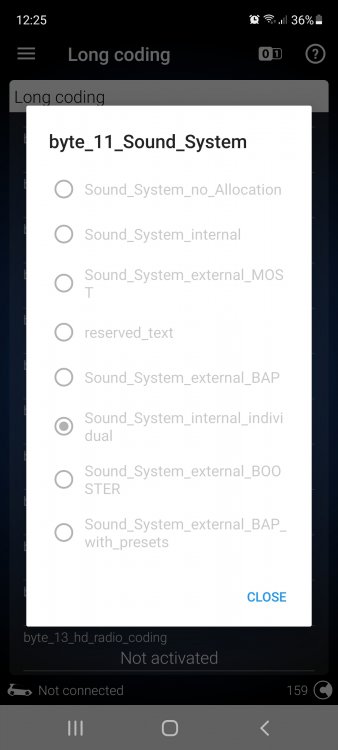
This is where you should get to. In the screenshot I have selected "Sound_System_internal_individual" as I was enabling the Skoda Surround Sound on the missus 2019 FL Octavia. The default factory setting is "Sound_System_internal" I'm not connected to the car, that's why they are all greyed out for me and it says Not Connected down at the bottom
-
In OBD11 you click on "Multimedia" - it has 5F in the little white circle in the top right corner Then Click on "Long Coding" Scroll down to see and then click on "Byte_11_Sound_System" Change this to "Sound_System_internal" from the list of options - this is the factory setting, second one down from the top. Maybe worth noting what it is set to when you get this far, sounds from above that it is incorrectly set to "reserved_text" Click and hold your finger down on the Green Circle with the check mark for a few seconds to apply the change. Exit out of OBD11 and probably best to re-boot the multimedia system by holding down the volume button until it reboots itself.
-
Sounds a bit like this thread, have a read.