




hhcd80
Members
-
Joined
-
Last visited
Everything posted by hhcd80
-
I misread the title and thought "Spoilers? What is there to spoil? The car has been out for a while..." Then the penny dropped...🤦♂️🤣
-
Thank you. Trying to figure out how long the car will be out of action for before the full update is completed. Going to invest in a battery charger first as well just in case.
-
Hi folks. Got a 03xx version Amundsen system I would like to update. How long on average does it take for the system to fully update?
-
Recently ended up with a Mk3 VRS myself. I really wanted one with both front and rear parking sensors. Most of the ones I've seen on sale only had rear ones, which I found a bit annoying. I did toy with the idea of paying for an aftermarket kit but I really preferred something more OEM and wasn't able to find an OEM retrofit specialist in the Glasgow/Paisley/Inverclyde area. Maybe I was just spoiled having them being common on my previous car (Vauxhall Insignia 2016 facelift), but after having finding them useful manoeuvring in tight spaces, I wouldn't go for a car without them (Unless it was more compact than an Octavia). I was lucky to get this one and it had several toys fitted from the factory and the last owner took good care of it to boot. I nearly went for a blue one from a major used car dealer chain, but I really wasn't happy about the colour. Advice wise, like with any used car, I would say if you can, take it for a test drive or at least an example with the spec as close to what you want. I can see why the Octy has been a staple for many minicab/taxi drivers. As a local mechanic said, they are "bulletproof" and so far it's been reliable. And if it sounds too good to be true, walk away. I nearly picked up a 60K mile example from the other end of the country in London, but the pushy sales staff and claims about high interest in the car had me suspicious, especially when the car remained on sale for some time after my initial enquiries and was dropped in price about twice before someone bought it.
-
How difficult was it to replace and as Noms asked, do you remember how it was done? Will personally pay a mechanic to do it if I need to replace the boot button but the steps might be useful for someone more DIY minded.
-
OK never mind. The boot release starting working again. Any ideas what might have caused it to act up and should I be concerned?
-
Apologies for reviving an old thread. I think this may have just happened to me. The boot unlock button no longer opens the boot but I can hold down the boot unlock button on the key fob to open it. Is this the microswitch fault as well or something else?
-
@EnterNameThat's the one I used as well.
-
In my car, it's a 20 Amp fuse. It may vary for you.
-
You need to remove the glove box on the passengers side (Assuming UK right hand drive car). This can be a fiddly process as you need to disconnect a dampener rod as well. Refitting glove box and dampener is even more fiddly. It does help to have a long screwdriver or thin stick of some sort.
-
That's a nice look as well. I personally thought the centre of the wheels looked a bit empty without something in them, so I went for the original logo. However if you are doing the debadging route, I can understand wanting plain centres as well.
-
Used a bolt next to the fuse box, next to where you remove the side panel of the dashboard. Conveniently it had a negative ground spade connector already attached from the previous owner who hardwired a camera.
-
Thanks for those recommendations folks. Just to confirm for the avoidance of doubt, are these safe to leave connected to the battery to keep the voltage stable for say something like an infotainment system firmware upgrade?
-
Can confirm mine is also working properly now after another drive to work. Probably just signal issues.
-
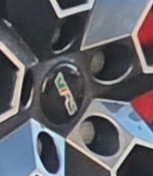
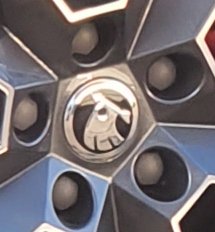
Apologies if this is the wrong place to post this. Thought I might share my experiences with this situation. If you are wanting to change the look of your wheel centre caps but don't want to go with the hassle of removing the wheels to remove them or don't want to go to the expense of buying entirely new replacements, one thing you could check is that the outermost part of the cap is a logo sticker than can be removed. The last owner of my Octy VRS had "VRS" logo centre caps but I wasn't happy with this and wanted something closer to what would've come out of the factory. After reading up on how to remove the caps with the wheels in situ, I tried only to end up removing the logo part and discovered they were just stuck on. Doing some looking around on a certain auction site, I found this listing for plastic outer stickers for wheel centre caps (https://www.ebay.co.uk/itm/4x-Sticker-SKODAs-Wheel-Centre-Cap-Hub-3D-Logo-Cap-56mm-Black-Silver-Stickers/165307982153). When they arrived, they seemed to be made of a fairly sturdy plastic. Removed all the logos and cleaned the surface of the centre caps using some solvent (Sticky Stuff Remover in this case) and Isopropyl Alcohol just to make sure. Then carefully stuck the new logos in place. The result looks pretty smart. If someone looked really closely, they probably could tell they are not OEM but at a normal distance and glance, they are indistinguishable in my opinion. What do you all think?
-
(a) Not without some coding tool like VCDS as far as I'm aware, as detailed in this thread: (b) Probably not unless you intend to disable the S/S via coding as in (a). A quick internet search warns that putting a conventional battery into a S/S type vehicle will result in the battery wearing out faster. https://www.quora.com/Can-I-replace-an-AGM-car-battery-with-a-non-AGM-one?share=1 https://www.yuasa.co.uk/info/technical/start-stop-vehicle-battery-replacement-warning/ This info being provided with the caveat that I'm not an expert and only basing this on what I found and my own experience driving s/s equipped cars previously. Anyone with more expertise than me, please feel free to correct anything I said.
-
Another update. In a bizarre twist, TMC stopped receiving messages on the infotainment system when I checked it just there. At this point I am inclined to chalk it down to patchy reception in my area. Your mileage may vary, as they say
-
I've mentioned in the thread about the map updates but my traffic info started working again during the commute back from work. Didn't do anything different. Guess it was just a signal issue?
-
Quick update. Noticed the TMC updates are now working again during my commute from night shift a few minutes ago.
-
Yeah noticed this as well as mentioned in the thread mentioned previously. I did try rolling back the maps just in case but that didn't fix the issue so far. Probably just a temporary glitch. That or VAG forget to pay for the service. 😜
-
Hi folks. Just wondering what make and models of charger you would recommend for keeping a car battery maintained? It would need to be compatible with an AGM Stop Start battery and ideally something that can deal with providing emergency jumpstarts or close to that as possible, as well as having some "intelligence" beyond a simple trickle charger.
-
Thanks for that info. It seemed a bit strange the timing of what happened. Guess I will just leave it to sort itself out for the next few days then. Was worried I needed to do something else other then just copy the files onto the Card
-
Nope. It is switched on. Definitely was working before the map update and would normally receive TMC data fairly quickly. I will chalk it down to poor radio data signal reception and update further if it persists.
-
It should be as I didn't touch any of the settings before updating the map. I'll double check it but not ruling out a "Layer 8 Error" (i.e. me being stupid 🤣)
-
Tried the new maps. They seemed to work but noticed the TMC (Traffic Information) stopped working. Maybe a coincidence? I tried rolling back to the previous maps to test. If there any possibility the new map files could've affected the reception of traffic data? I noticed someone else had similar issues before a few years ago but no update:



