Frankenfurter
Members
-
Joined
-
Last visited
Everything posted by Frankenfurter
-
Thanks! That's probably a much better solution. Yeah it's a little nuts they tried to fit so much in there behind the gear stick but then leave the massive centre box pretty much empty. I had to hunt around for a super slim case so my iPhone 13 would fit into the charging cradle too. I'm looking to do something similar with a USB port in the centre console box but just for power.
-
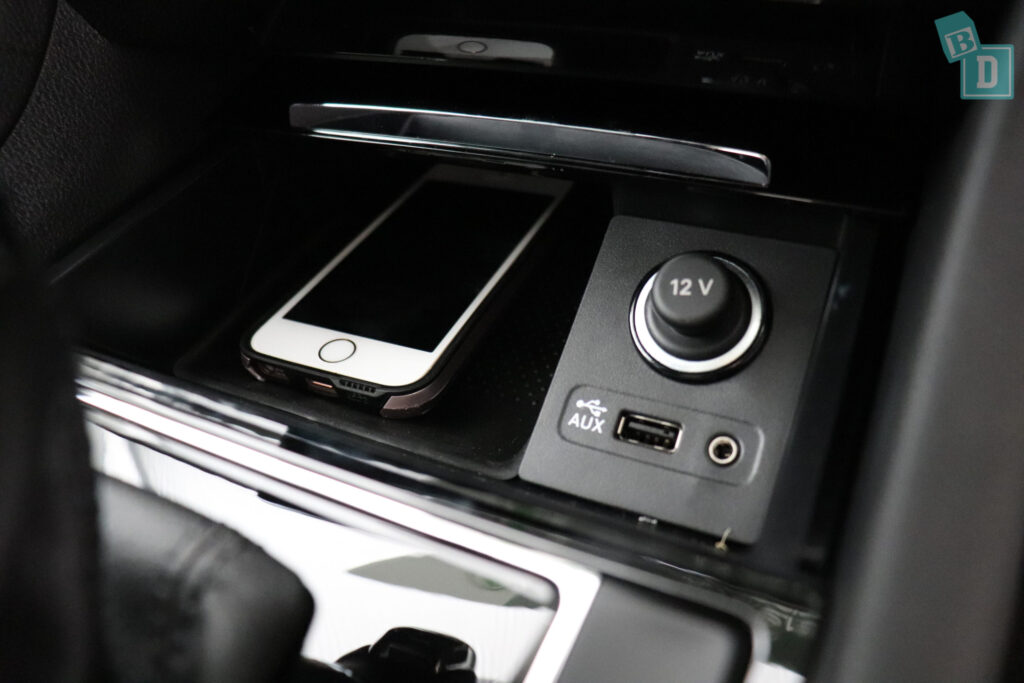
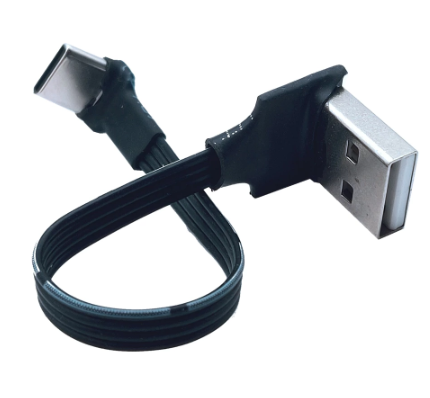
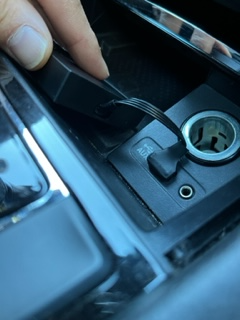
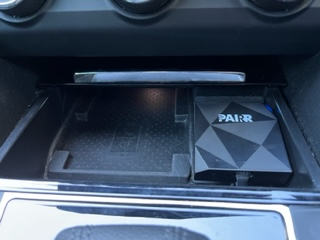
Fitting wireless CarPlay I've found the setup in the Superb for hooking my phone up to Smart Link (CarPlay) less than perfect. With a normal USB cable connected i have to fiddle with the phone and plug behind the gear stick and then there's cables sticking out and the cover doesn't really close. It also makes the wireless charging pad i have in the car redundant. I saw that there were some dongle based wireless CarPlay options out there so I hunted down one i though might neatly fit into the space. The idea was to be able to simply place my phone into the wireless charging space, close the lid on the console and drive away. I found a few dongles that come in a small black square case that have an angular pattern on the front. There's a few brands out there that appear to use the same unit. I chose "Pairr" but there is also "Totree" and others. This is not intended to be an endorsement for these units and they are not perfect by any stretch but they appeared to fit the space nicely. This is a generic photo of the space... My intention was to remove the lighter plug, get a low profile USB cable and place the dongle over the flat face of the sockets on the right. The USB cable was easy enough to find on Ali Express (https://www.aliexpress.com/item/1005001952745125.html?spm=a2g0o.order_list.0.0.21ef1802lllfSP) The dongle (https://www.pairr.co/) arrived and was as small as i'd hoped. However one of the issues with it is that the USB-C plug hole is deeply recessed so I really needed a USB cable with a straight plug rather than a right angle plug. I forced the bugger in and hoped for the best. I placed some stick on velcro patches to the back of the dongle and placed it onto the surface of the plugs as planned. Pretty pleased with the result. The dongle fits neatly in the space, the lid closes and the dongle is functioning as promised. Interestingly the dongle powers up as soon as the USB port is powered when the car is unlocked so by the time i've sat down in the seat and started the car, CarPlay is on the screen instantly with no startup screen wait. Minor Problems: One problem I've noted is that the MIB2.5 Columbus will sometimes forget or not see the USB port being used. This was solved by resetting the unit by holding the power button down Another drawback is that because the unit communicates over the phones wifi signal the resonse on the screen is slightly delayed. This means there is a split second delay on the swiping between CarPlay screens, although the button commands are pretty much instant. Overall pretty happy so far and my cable sadness is all gone!
-
Ok, so i've got the answer through trial and error in case anyone else wants to do this. The 2017 airbag from my Superb 206/280TSI fits the 2019 Kodiaq Sportline flat bottom steering wheel no problem. The profile of the top of the airbag appears to be slightly higher than the new steering wheel but that doesn't really bother me and all the plugs and clips line up without issue, including the DSG paddle plugs. The power was all off during the swap and the car shows no errors, which is unsurprising as I reconnected the original airbag.
-
I have a 2017 Superb 206/280 TSI and have got myself a newer flat bottom steering wheel. the new steering wheel part number is: 5E0 419 091 BT BGW I’ve learned from the forums that the wheels and airbag combination changed around 2018 and that my 2017 airbag and cover will not fit the new wheel. Can anyone help me with part numbers for the airbag I need and whether I can use airbags from any Skoda model from 2018+? Thanks in advance!
-
thank you. That’s helpful and it sounds great. With the edge taken off the rasp it’d be even better.
-
@tmgthis info is super helpful, thank you. I’ve got a 2017 Superb 280 wagon/estate and I want to make it sound better. Do you have any video or sound for your setup you could share? I’ve come from a tuned EJ25 and I’m struggling with the sound of the EA888 on the Superb.
-
Hi guys, Anyone know of the compatibility of seats from other SKODA models or VAG models into the Superb Mk 3 (estate)? Would consider compatibility with seat rails or without and keen to see if some of the other model sport line seats, Passat b8 or RS seats could be swapped in. thanks for you input.
-
Hi everyone, just wanted to say hi. New member from Sydney Australia about the buy a Superb mk3. Thanks for welcoming me to your community!! Cheers!