




Plobber
Finding my way
-
Joined
-
Last visited
Everything posted by Plobber
-
Have you checked under the floor in the boot?
-
I would guess the issue is being caused by the cable not being disconnected and the software/car does not like it. It probably needs the cable removed and reconnected to start a new charging session.
-
Have you tried holding pressing and holding down the infotainment system power button until the system reboots? That usually fixes weird issues like that and you can do it while driving.
-
-
Is this an additional update to the current one for the assist systems ?
-
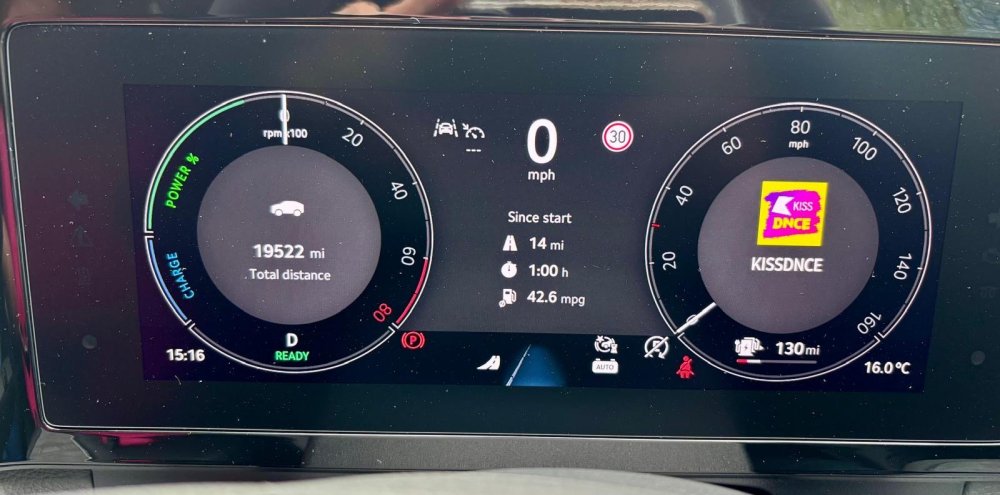
You can adjust the virtual cockpit to show it - It can be set to show permanently on the left hand side screen.
-
Are you using iOS or android? I have a MK2 and use CarPlay with my iPhone all day long and I can listen to the radio and use google maps and Waze with no issues.
-
The software update is already out. Many owners of the MK2 have already had the update or have booked the car in for one. There is no over the air update for the safety system issues. It must go into the dealer for the update. There is a menu on the main screen called “service campaigns”. Press on it and see if it says you have a recall due. I have a MK2 PHEV which needs to go into the dealer for the update.
-
I’m due a service in about a month and I expect they’ll want to do the update at the same time. I may see if I can put the update off for the time being as I can’t be without the car for more than a day.
-
Anyone ?
-
For those that have had the latest software update for the assist system errors, dash/virtual cockpit map fix & the ACC/cruise control 94EW recall, How long did Skoda require your vehicle for? I’ve read elsewhere that Skoda need the vehicle for 3-4 days (sometimes longer) to complete this work? Also a few instances of vehicles no longer starting after the work has been completed or the update failing to download/install. What’s been your experience of the updates? How many days were required? Any issues after the updates?
-
Car was registered in December 2024 so this will be the first service. It appears to the 18,000-20,000 variable service regime as it’s saying around 3000 miles time or 500 days. I’ll get both “services” done on the same visit. Thanks for the info. I have automatic service scheduling enabled on the MySkoda app so the local dealer should contact me soon the arrange the service!
-
Has anyone had their MK2 serviced yet? I’m due an “Inspection” in 4000 miles and an “Oil Change” in 2800 miles. Can these both be done at the same time? Seems rather pointless booking it in twice within a month of each other? I’m currently on 16,000 miles and it’s the 1.5 PHEV.
-
How long did it take or did they want the car for the whole day? I’ve had notification that I have this service campaign but I’ll probably get it down at the same time as the car is being serviced.
-
My passenger side mirror did it but I fixed it by spraying silicon lube all around the hinge and then folded the mirror in and out several times until the noise went away. You need to get the silicone inside and all around the part that folds in. The noise hasn’t come back in 3 months.No, I’m finding the same. I can answer a call with the scroll button but can’t end a call with the scroll button - Like you, it just scroll through the menus.Has anyone had their windscreen replaced on the MK2? Looks like I’ll need mine replaced after it was hit with a massive stone on the motorway at 70mph and I’m left with a large chip with cracks running from it. I’ll be asking for a genuine Skoda windscreen and I know it’ll need to be done at a fitting centre in order to have the camera systems recalibrated. Anything to be aware of for Kodiaq windscreen replacements? Just my luck of late! Only got the car just under 2 months ago. 😒Thanks, that makes sense. I’m just used to having an answer and end call button on the steering wheel - This is my first Skoda.How does it work? Scroll up/down to answer/end call? It’s been driving me mad not being able to answer/end a call from the steering wheel.I take it there are no buttons on the steering wheel to answer an incoming handsfree phone call or to end a call? Is the only option to press the answer/end call buttons on the screen?The point is that for whatever reason, Skoda don’t want to release this particular update OTA. As I said, I’m sure they would like to have but clearly there is a reason they aren’t doing so. Most OTA updates are for minor updates, bug fixes etc. This particular update is to fix a multitude of issues affecting all sorts of things. It’s not as if all Kodiaq updates are going to require a dealer visits. Yes it’s annoying that it’s not OTA and involves a dealer visit. I’d rather it wasn’t as I could do without the hassle but it’s just one of those things.It’s very common, mines has done it from day 1 (I’ve had my MK2 for 4 weeks). There is or soon will be a software update to fix it. It’s not a problem to me as I don’t use the Skoda satnav - Googlemaps and Waze via CarPlay are far superior so even if I could get the maps to load on my dash, I wouldn’t be using it anyway.Well the car is connecting via 4G or 5G. That alone depends on the vehicle having optimum signal strength for the entirety of the download. Some vehicles may be in areas with poor 4G/5G so might struggle to receive and/or fully download the update. The update may corrupt if the signal drops during the download. There are so many variables why some updates cannot be pushed out OTA. As for connecting to home Wi-Fi, not everyone can or will do that. I personally don’t connect my Kodiak or any previous vehicle I’ve owned to home Wi-Fi. I suspect there’s a bigger reason why Skoda want the update completed at a dealership. I’m sure they’d rather be able to push it out OTA than have to book every affected vehicle into a dealership with all the extra work that creates.Due to the size of the update, it doesn’t appear to be available Over The Air. From everything I’ve read about those that have received the update, it’s had to be done at the dealers.

Important Information
Welcome to BRISKODA. Please note the following important links Terms of Use. We have a comprehensive Privacy Policy. We have placed cookies on your device to help make this website better. You can adjust your cookie settings, otherwise we'll assume you're okay to continue.