john999boy
Honorary
-
Joined
-
Last visited
Everything posted by john999boy
-
Didn’t you purchase a clone VCP lead which had been discussed in this thread?
-
@haderz You could of course join Freedom and sell them on here!
-
Fixed that for you.
-
I've moved this to the MK2 section but if it's a MK1 you're after then just let me know.
-
That’s very true and not only do I totally agree, but was what I meant to put. I blame it on a lack of brain to finger coordination!
-
Yes you just walk up to the car and unless you've initiated eurotripwagen's tip above, it will just unlock.
-
187 is the latest version.
-
Hmmmmm? I've had a long hard think about that and the answer's no.
-
Oi.
-
I've got a Kessy key and the battery replacement info keeps flashing. I know that changing a battery shouldn't be hard but I just wish the printed manual actually referred to my key in a more logical way as it doesn't make it straightforward and I don't want to risk breaking it!
-
It does come with the 'proper' size toner unlike the B215 but thanks, I will try and remember your kind offer when the times comes.
-
Funnily enough I've just started following your other thread to see what transpires. It does seem odd that you can't update the firmware yourself though. Anyway, I ordered the 335DNi mentioned above and I'm just about to install it so will see if some of the negative network issues are as complicated as some other people have made out. Hopefully not! It works out as a very reasonably priced printer - as long as it's going to be hassle free.
-
I didn't realise that the personalisation went back to cars from that far!
-
Don't go thinking that this is personal because it isn't - however I defy anyone to check out a reflection type look on a nice sunny day and say they can't see any micro scratches. Usually easier to see if a sponge has been used. Unless people have a religious regime, such as @SC03OTT with his 2BM, then they come sooner rather than later.
-
As with everything on a forum, take whatever advice and then make your own mind up! I think you'll find that most people would rather use a microfibre mitt though. 🚗
-
Have a search in this forum.
-
I had a 2013 Tiguan that when I came to sell it in 2016 was for a lesser price than what I believed it should have gone for if Dieselgate hadn’t happened . In saying that, I’ve not joined any Class Action’s so will definitely not benefit!
-
Well...... I've had one car similar to yours but all the others seem to work better. Read into that what you will.
-
Yes it is the autohold working correctly. Some cars release easier than others though. Maybe turn it off if you have to keep edging forward?
-
The Xpeng P7 is certainly an impressive looking car! I wonder how well it’ll cope with our safety tests though?
-
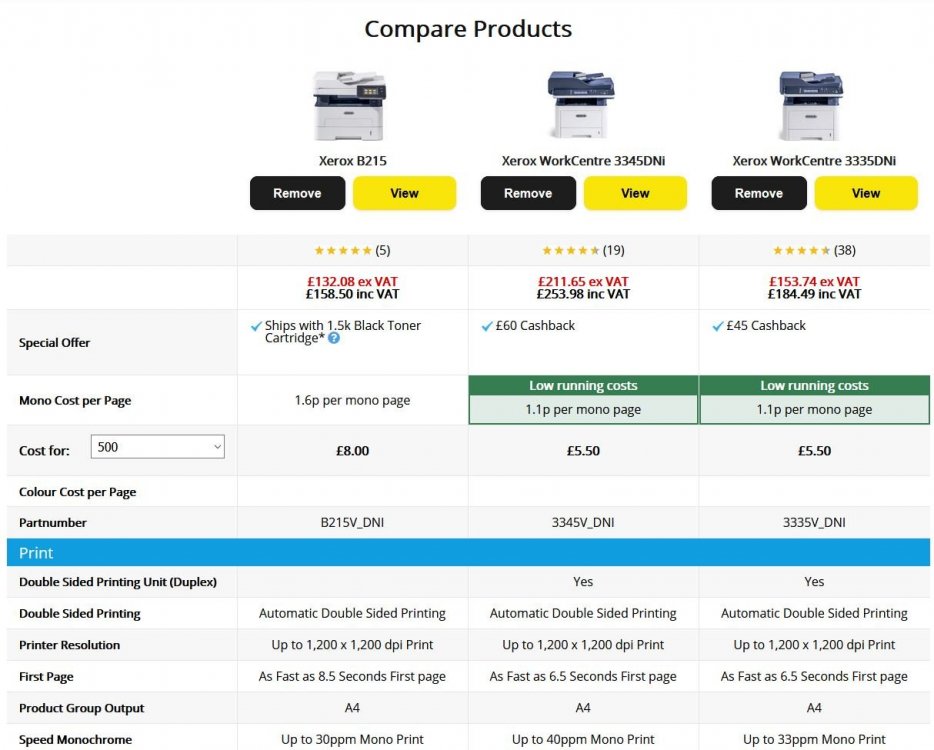
Currently looking at these:-
-
I read this thread at HotUkDeals as a starting point and even though it initially says it was a laser, now think it's an inkjet. It was the ability of HP to do firmware upgrades and kill 3rd party toner use that didn't impress me too much. The other problem is that it's the newer printers which have the newest features and therefore the dearest toners!
-
@Gizmo <<He wasn't - but he is now!
-
Two topics have now been merged as similar answers were being made in both. The only way to make your cable work again is to re-install the software that came with the cable! Just be aware that it has the potential to damage your car. On that note, Briskoda's policy is to not allow any further discussion about pirated software so I will now lock this thread.
-
HP quality is usually good - but expensive consumables as 3rd party stuff isn't always available. I've had no problems with my other colour Brother laser so that's a second Brisky vote for them.