varooom
Resident Member
-
Joined
-
Last visited
Everything posted by varooom
-
I had a hunch that was your version, but I prefer not to brick your entertainment. In 5 minutes I shall send a PM to you for 0480 version
-
If you are planning to do a fair bit with the car, that could be worth every penny. https://www.briskoda.net/forums/topic/262215-list-of-vcds-owners-previously-known-as-vag-com-vcp-owners/ You could also reach out to someone close to see if they can assist, or if you do purchase, add yourself to the list.
-
Scroll up 3x posts, you will see image showing the Software Train Take image and post back what yours is.
-
Yeah I doubt that you would be able to perform the setting with a basic tool. I did retrofit the same headlight technology to a Passat, but did have the tools needed. And having checked the manuals for Skoda it's the same process. VCDS/VAG-COM is an aftermarket tool to scan/clear fault codes, read measuring blocks and to code in features into control units. Then you have dealer/independant tools that are the full monty, but most people are lost in using them as it's a learning curve. The Skoda garage would most likely be using ODIS - Offboard Diagnostic Information System on a laptop to perform the basic settings of the headlamps and make adjustments, then you store the values into the contol module so that the headlight can remember it's levels. You need someone local with VCDS and knowhow to adjust these, or take it back again to the main dealers for them to adjust again for you.
-
Travel mode is missing from his menu's. Still helpful picture for anyone else that needs it. I think he was maybe heading into dealers to get it looked at for sure, but I suspect he has LED with flat beam, so should be ok. Hoping that we can get a nice beam shot against garage door or another wall in the dark so we can put this to bed.
-
Odds are you need to use a decent diagnostic tool to put the headlight(s) into learning mode. This allows you to turn adjust the height as needed, and when done you need to tell the diagnostic tool to save the new position. VCDS can do this for sure on a Passat, process should also work on the Superb. Being 2017 model, you might need the newer VCDS, or dealer tool.
-
Thanks for the feedback. It also helps others that search for the same issue. Enjoy the feature!
-
@john999boy Not sure if you can, or another mod is able to move this to Skoda II Brian did PM me and was a little lost in where to post. I did PM him a link to Superb II @brianmullinYou checked voltage and it was reading ok. Does the issue happen in one location, or all the time now? Do you have access to any diagnostic tools to check if any fault codes have been flagged? We do have members around the UK, and other places that have the tools if not.
-
This is not best forum location for support. For hello and goodbye messages. Careful on using all CAPS in writing, classes as shouting. Odds are you left cap's on writing the fault seen. Try to locate your car model from the list and make a re-post if the mods don't move this. Make sure to post as much information as possible on your car to assist.
-
Damm
-
I know, I did previously mention about the people that did the service need a slap. If it was the main agent 🤐
-
You should do as @J.R.said and lay into them, sure you fixed it... But shouldn't have had to. Do hope you took another picture of the pipe with the top cover removed.
-
Without us seeing your physical beam pattern against a wall/garage door... It's hard for us to say. Really good idea to take a picture as could solve the back and forth.
-
Manual You said when you unlock, the seat moves back, perfect. In theory when you close door and put on ignition it supposed to move forward to your memory position. I was wondering if your final seated position has been stored and paired to your key also?
-
Have you also followed the process to learn the stop position in the manual? Sorry if that's already been tried by you.
-
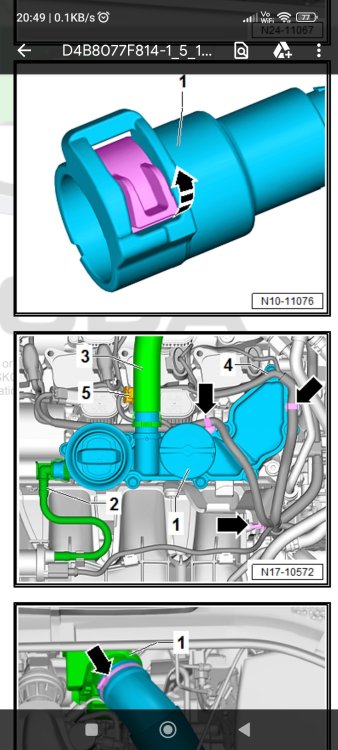
I think I would be taking it straight back to whomever did the service. I've had a pipe left off to turbo once after a service, the exit was straight onto a 60mph road, almost had a lorry join me in my back seat. Luckily for me, I don't just pull out and make a gap, I make sure it's a decent gap. Take off the top engine cover. Take a picture beforehand, and also look to see if it's the picture below Green pipe 3 in image
-
I think you might need to use branded card, so Skoda/Seat/VW due to the Sat Nav reading a CID signature. If it's not on the "list" of valid CID's then it will reject you. Someone will confirm if this is correct for Columbus systems.
-
@john999boy FYI: your signature isn't visible on a mobile phone with web view mode on. Desktop mode on phone browser it shall appear, or in full fat computer browser. In response to your thread you locked.
-
Columbus You can use forum Search for "Columbus" etc
-
Unless you have internal Hard Drive, the SD Card will stay in the slot permanently. So time to load is not applicable.
-
You can find many examples on the Bay of E place. 16GB / 32GB The full map for most of Europe won't fit on 16GB. But if just the UK and a little of Western Europe, then it's around 7GB of size
-
Best to check with Kufatec to verify, then the blame can be dropped on their shoulder's
-
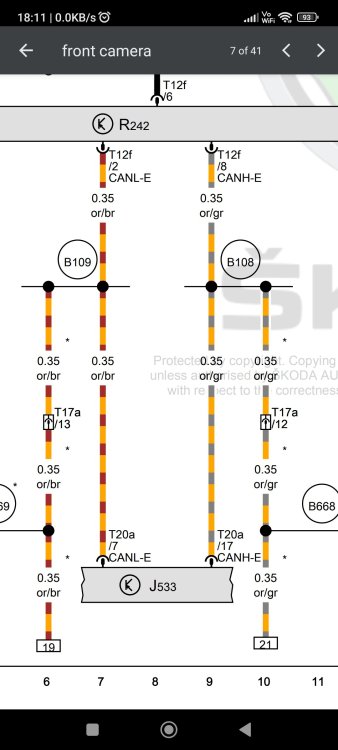
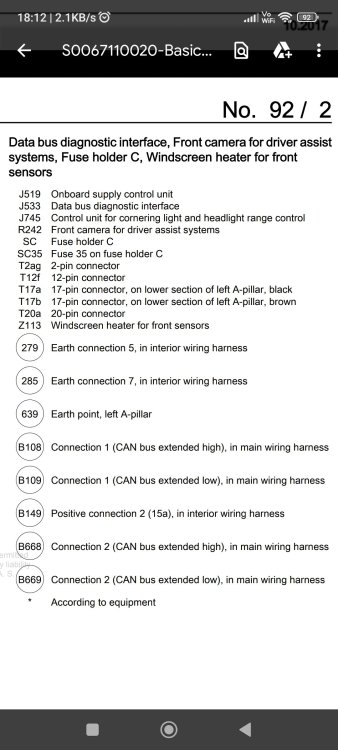
Not sure what instructions you have for your retrofit, and for the record I am no expert on this (I have done own retrofits in the past) Do you have a copy of your instructions to share? Edit: Again, no expert on wiring diagrams, but not sure you actually should be wiring the Front Camera directly into the Gateway? The connection should be made to T17a pins 12&13, which then takes your CANbus messages to Gateway and also to J745 Control unit for cornering light and headlight range control
-
Yes @philaltimas to version 0480
-
I prefer to see the "Software Train" version to be 100% sure I don't send you the incorrect file. Also, you was asked if possible to post request in the correct location. Click Here to post