varooom
Resident Member
-
Joined
-
Last visited
Everything posted by varooom
-
I wish I could say for sure, but not a full time mechanic. I was aware of GPF being a possible cause, but was not sure when they got fitted to the 2.0l until I looked up dates just now. Maybe a small oil leak is coming out and hitting a hot part and a small amount might burn off quickly, but produce your smell. Do you smell this in your cabin whilst driving?
-
There is no free solution I have ever seen. Make contact with someone here to perform a static regen, or actually just drive the car to get a regen done.
-
It's not a document I have seen, but also this whole thread has descended into chaos, so not wanting to post too much on the subject. https://www.urbandictionary.com/define.php?term=derailing a thread I have said this before, I feel sorry for the OP @iirfansk25 here is a static link on the erWin site for approved oils, if they post this, I am happy enough to use what is on this list myself. https://erwin.volkswagen.de/erwin/downloadStaticFile/skoda/files/oil/oil_pdf.zip
-
I was looking up the 2.0 ltr engines and GPF, didn't know when they got fitted to the cars, but upon research it was 01.2017 they began to be used.
-
I was checking if you had a GPF filter for particles, which is DKZA, DKTB which could explain your burning smell.
-
@Pantersen Take a read here, but not sure if you can clear fault if your VCDS is not able to communicate clearly (seems you have older) https://forums.ross-tech.com/index.php?threads/18798/
-
This will be because the car was not able to talk to the factory to verify the update (you may remember the screen asking for diagnostic connection test) It's a stored "non" fault, it doesn't affect operation.
-
Do you know your engine code? It's printed on your V5 if not.
-
Unless mistaken, 5274 is the latest version for your hardware, and 6276 is for a different hardware revision.
-
-
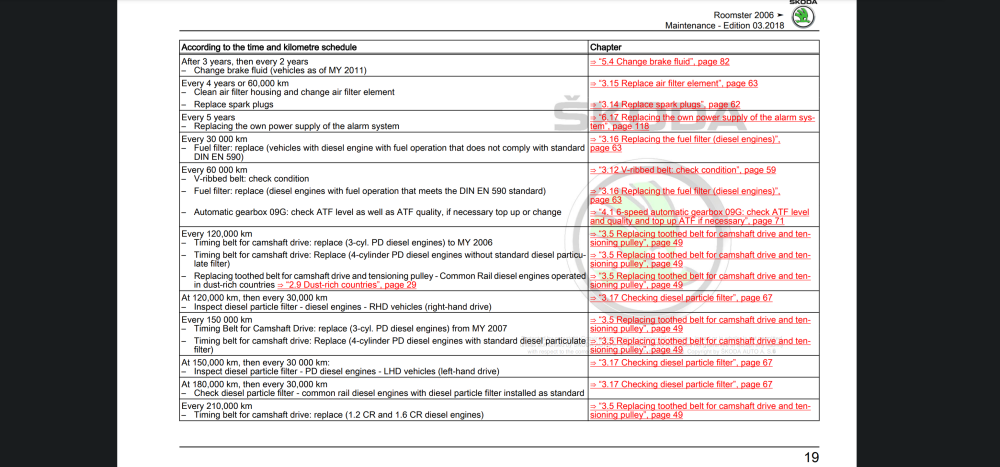
Here you are, it does state check level and quality, so might be a good idea to possibly change for peace of mind. Edition 03.2018
-
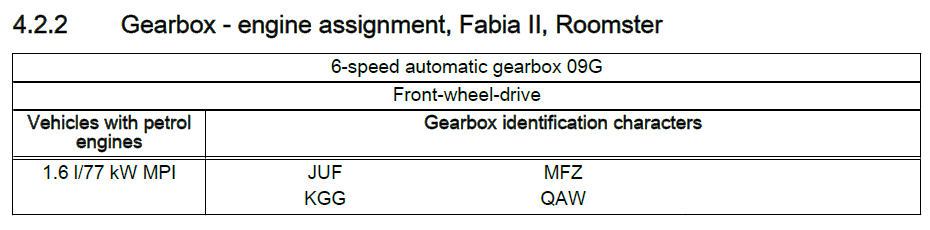
You have an 09G 6-speed automatic box All I could see in maintenance is to check the levels of ATF fluid every 60,000km (40,000 miles roughly speaking) No mention of a change in fluid being needed. @toot Has all the charts for such changes, and will hopefully see the post now and let us know if there is a fluid change schedule I missed.
-
If you have a 1.6l BTS engine code, then it's a chain Part 4 https://www.lllparts.co.uk/catalogs/skoda/CZ/RO/481/1/109/109060
-
Very good, I will send you update now. This is also the screen you need to use for updating.
-
I have sent you a link to MIB1 firmware
-
MST2_EU_SK_ZR_P02xxT Is this what your SW Train reads like, or with PQ in that location?
-
Odds are high on getting update to 0253 version, press and hold down your Menu/Setup button for about 10 seconds to enter the engineering menu, then you can see Software Train
-
You need to unpack the Zip to Desktop, or any other temporary folder. Then you need to copy all the folders and files to the root of the USB drive So for example F:\MIB31_xxxxxxxxx, not F:\OI_P41_EU_202025_Offline_Update folder name I am sure someone will tell you soon the update to map will not work, perhaps it wont (also there is no "update" map button, it does it in the background after a few hours if it does indeed load)
-
You will have a PM already
-
It is 0480 version
-
-
1896 is available as "standalone" update, I have not seen 1900 available, so this is at factory/OTA only at the moment. It might land possibly on the dealer network as a standalone in the future.
-
Still current version.
-
Menu's or pop it physically out and take a picture of label on the top.
-
We reloaded the firmware for this chap, and his German language was gone at the end, he could change to English afterwards. You need to be able to find out what firmware is currently loaded, and then you also need to be able to burn a CD. Then a firmware file can be sent for you to try and load. If that fails, as mentioned by pab567, you will need someone to wipe the storage chip.