



Skip to content

Vibration at speed

Featured Replies

Hello fellow Briskodians,

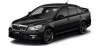
I have recently (April 10th) picked up my ex demo Octavia VRS Blackline in black magic. I am absolutely loving the car so far and have made a few mods already thanks to living round the corner from Eddie.NL (thanks mate). Will post pictures soon I promise.

Anyway reason for the post is to see if anyone else experiences a pronounced vibration at elevated speeds of 100mph or so (on a private road or trackday of course) It feels like a wheel is out of balance, but surely I would feel that all the time.

Any ideas as I am having a hard time convincing the dealer that it needs to be looked at.

Cheers

If it was wheel balance it usually occurs at double the speed, so if you dropped to 50 mph it should be there and then tail off until 100 mph, this is generally a way of disguishing it from other vibrations.

However i'm sure someone on here just the other day reported that they had a driveshaft causing vibration and took a bit of investigation to find, try searching for that thread.

Also could be very minor wheel buckle, basically as you say they need to check this out for you!

HTH

  • Author

Thanks interesting point on the half speed I will try that out this evening. The driveshaft theory is defo worth checking into as well.

Cheers

No problem, it was something i did when in the trade(half speed checks).

But surely on a 13 plate it shouldn't be a driveshaft!! Maybe just an over-keen valeter soaked the wheels in g101 and then power washed your weights off :-)

Rule of thumb is if it's the wheels which need balancing, the fronts cause vibration through the steering wheel, the rears cause it in the seat, sometimes footpedals.

Pretty basic but I had a similar feel from a bubble in a tyre. No?

Create an account or sign in to comment

Recently Browsing 0

  • No registered users viewing this page.

Important Information

Welcome to BRISKODA. Please note the following important links Terms of Use. We have a comprehensive Privacy Policy. We have placed cookies on your device to help make this website better. You can adjust your cookie settings, otherwise we'll assume you're okay to continue.

Account

Navigation

Configure browser push notifications

Chrome (Android)
  1. Tap the lock icon next to the address bar.
  2. Tap Permissions → Notifications.
  3. Adjust your preference.
Chrome (Desktop)
  1. Click the padlock icon in the address bar.
  2. Select Site settings.
  3. Find Notifications and adjust your preference.
