



Skip to content

Hi all

Featured Replies

Hello there,

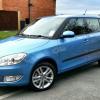
Picked up the better half's daily driver last week - a 2013 Fabia 1.2TSi 105ps DSG Elegance with a few extras - Amundsen Sat Nav, electric rear windows, reverse parking sensors, spare wheel, 3 spoke MFSW & small leather pack cornering fog lights, in Denim Blue, and with the zero cost 16" Elba alloy option. We're already fighting over who drives everywhere! :devil: Being used to my 130ps 1.9TDI PD powered Sharan, this little thing flies!

post-102881-0-54976700-1367339766_thumb.jpg

I co-run the Ford Galaxy Owners Club (www.fgoc.co.uk) which also has a lot of Alhambra & Sharan owners as the cars are 90% identical, all being made in the same Setubal VAG factory. Most of the electrics and engines are VAG based on all the cars so know my way round VCDS, Vag Tacho, & VDS Pro as there are modifications to the MFU that can be done with all 3 of those on the Galaxy to give some extras not added at the factory.

My previous Galaxy won some show awards as it was a bit different. Don't think the Mrs will let me do the same to the Fabia, but time will tell :bandit:

post-102881-0-59587100-1367339933_thumb.jpg

Hoping to contribute as well as ask questions, seems a nice place to mooch for a while :happy:

Paul

Edited by G9LXY

Welcome to Briskoda, Paul. You should be at home here. :)

Hi and welcome aboard.

Create an account or sign in to comment

Recently Browsing 0

  • No registered users viewing this page.

Important Information

Welcome to BRISKODA. Please note the following important links Terms of Use. We have a comprehensive Privacy Policy. We have placed cookies on your device to help make this website better. You can adjust your cookie settings, otherwise we'll assume you're okay to continue.

Account

Navigation

Configure browser push notifications

Chrome (Android)
  1. Tap the lock icon next to the address bar.
  2. Tap Permissions → Notifications.
  3. Adjust your preference.
Chrome (Desktop)
  1. Click the padlock icon in the address bar.
  2. Select Site settings.
  3. Find Notifications and adjust your preference.
