



Skip to content

XDS activation

Featured Replies

Hello,


Is it possible (or a good idea) to enable XDS on my pre-fl CR VRS?


The car has the standard "ESP" button, so I guess this means EDL as standard.


Just like to know if it is doable with VCDS really, or am I liable to break something!


Here's the ABS part  of an Auto-Scan I performed the other day, which might help.


-------------------------------------------------------------------------------
Address 03: ABS Brakes (-----)       Labels: 1K0-907-379-60EC1F.clb
   Part No SW: 1K0 907 379 AD    HW: 1K0 907 379 AD
   Component: ESP MK60EC1   H35 0104  
   Revision: 00H35001    
   Coding: 163B601C09220002680D06ED901B00826C00
   Shop #: WSC 73430 790 00000
   VCID: 74E73A5BD74EF4BE80B-8021
 
No fault code found.
 
Ta.
 

It didn't appear until after the first round of FL cars so I doubt you'll be able to get it.

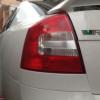
If you have a cr then you have a face lift. Your pic is of a facelift too.

I don't think AD supports XDS

If you have a cr then you have a face lift. Your pic is of a facelift too.

The CR engine actually came in before the FL car but you're right, the rear light is a FL one.

Is'nt it hardware dependant? You need the right sensors and wiring rather than just ticking a box?

it is the pump that allows the function


Like Hill-Hold

If you have a cr then you have a face lift. Your pic is of a facelift too.


I have a pre-FL CR :P

  • Author

I have a pre-FL CR :p


Me too, and many others.


This looks like no go then, if even early fl models didn't have it.


I suppose VAG felt the need to initially omit it from the Skoda range, as so not to hurt VW sales too much.

Edited by Fr0d

Create an account or sign in to comment

Recently Browsing 0

  • No registered users viewing this page.

Important Information

Welcome to BRISKODA. Please note the following important links Terms of Use. We have a comprehensive Privacy Policy. We have placed cookies on your device to help make this website better. You can adjust your cookie settings, otherwise we'll assume you're okay to continue.

Account

Navigation

Configure browser push notifications

Chrome (Android)
  1. Tap the lock icon next to the address bar.
  2. Tap Permissions → Notifications.
  3. Adjust your preference.
Chrome (Desktop)
  1. Click the padlock icon in the address bar.
  2. Select Site settings.
  3. Find Notifications and adjust your preference.
