



Skip to content

Hello from a new Octavia VRS TDI owner...
Featured Replies

Hi all  :blush:


My name's Emma, I'm a 23 year old living in the South West. Just taken ownership of an 07 plate, red Octavia VRS diesel. Always been a Ford girl so Skoda is new territory for me!


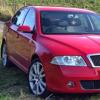
Anyway, here's a pic of the car - 


IMG_1090.jpg


Looks to be completely standard, last owner had it for 4 years, full Skoda service history. Called the dealership prior to buying to confirm what work has been done, been advised the cambelt will need changing around this time next year.   Bodywork-wise it's got some light scuffs to the rear bumper, presumably because it has no rear parking sensors, so I'm getting that sorted out and sensors fitted at the same time too. Already found an old National Trust windscreen sticker in the back dated November 2012  :giggle:


Current plans are to keep it pretty much OEM, the callipers could do with a repaint, I have my double DIN stereo, Mcgard Ultras and some Bosch wiperblades to fit all round. Might map it in time but for now it brings a smile to my face, it's far quicker than my TDCi Fiesta!


Hope to hear and possibly meet some of you soon, and you'll have to forgive me if I ask some pretty basic questions about the car in the near future, I have a Haynes manual winging it's way over to me as I type...


Emma

Hello Emma - Welcome to the forum!   :rock:

Hi & welcome

Very nice looking octy RS

  • Author

Thanks guys, I'm looking forward to getting involved with the forum :)

Create an account or sign in to comment

Recently Browsing 0

  • No registered users viewing this page.

Important Information

Welcome to BRISKODA. Please note the following important links Terms of Use. We have a comprehensive Privacy Policy. We have placed cookies on your device to help make this website better. You can adjust your cookie settings, otherwise we'll assume you're okay to continue.

Account

Navigation

Configure browser push notifications

Chrome (Android)
  1. Tap the lock icon next to the address bar.
  2. Tap Permissions → Notifications.
  3. Adjust your preference.
Chrome (Desktop)
  1. Click the padlock icon in the address bar.
  2. Select Site settings.
  3. Find Notifications and adjust your preference.
