



Skip to content

Nick's Nissan Leaf

Featured Replies

Looks really nice mate, I just wish these went a bit further in terms of motorway driving and I'd have one straight away!

More pictures please! :-)

sent from my Galaxy Note 4

Its definately the way forward...and Im sure you like it

BUT why do Nissan have to design such an odd looking car?

Im pretty certain, that if it looked better, more would be sold

Just my opinion

Good luck with it

Nissan made a call to make a car that looked a bit different.

Where a lot of manufacturers coming later are making EVs to blend in.


Personally I'd prefer if it looked a bit more wacky.


Congrats on your LEAF OP, with the cheap rates you should have got it's a very cost effective way to have a new car.

I get what youre saying

I saw one recently on a trip to Iceland

It really did look odd and even my wife who judges a car on its colour only, said, "What on Earth is that?"

I think Nissan did the right thing with the odd styling.


It's an EV so why create a 'normal' looking car when it's not one.

I guess the unusual styling goes hand in hand with the new-age all EV power plant.

Fair play, had I done more miles I would have gone this route.

  • Author

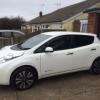
Covered 160 miles over 3 days going to a wedding during the week then running everyone around. Seen here recharging for free!

post-119919-0-61996900-1428256338_thumb.jpg

Nice car! I've got a red one!

You get a lot of kit for the money. Enjoy it!

  • 4 weeks later...

Covered 160 miles over 3 days going to a wedding during the week then running everyone around. Seen here recharging for free!

attachicon.gifimage.jpg


I sometimes wished that I had bought a electric car as my first car, They are so cheap to run. Aren't they?

  • 4 weeks later...

I sometimes wished that I had bought a electric car as my first car, They are so cheap to run. Aren't they?

Once over purchase cost it's a very sensible idea

Create an account or sign in to comment

Recently Browsing 0

  • No registered users viewing this page.

Important Information

Welcome to BRISKODA. Please note the following important links Terms of Use. We have a comprehensive Privacy Policy. We have placed cookies on your device to help make this website better. You can adjust your cookie settings, otherwise we'll assume you're okay to continue.

Account

Navigation

Configure browser push notifications

Chrome (Android)
  1. Tap the lock icon next to the address bar.
  2. Tap Permissions → Notifications.
  3. Adjust your preference.
Chrome (Desktop)
  1. Click the padlock icon in the address bar.
  2. Select Site settings.
  3. Find Notifications and adjust your preference.
