



Skip to content

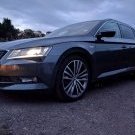
The new dog wagon

Featured Replies

https://goo.gl/photos/wjsWjh9jGqBNBa2a9


Hope the link works so optional extras on this car include


  • Full Panoramic Sunroof
  • Tinted Glass
  • Front and Rear Parking Sensors
  • Park Assist
  • Electric Boot
  • Upgraded 10 Speaker Sound System


Owned  by a lease company for the past 3 years


  • Full Service History
  • 31k on the clock
  • New Goodyear Tires all round


Stunning in Brunello Red with beige leather interior


Pick it up in a weeks time


Happy Days


Going from my partners Ford Focus 1.6 Ecoboost Titanium to the Superb is revolutionary will be so much easier to transport the dogs in. Add a boot liner and a few bits of heavy duty canvass stitched together with Velcro should make a great boot liner too.

Edited by Zenbasses

Congrats - car looks great and very clean. 


The dogs will love it...


gallery_142547_2007_68330.jpg

My dogs love mine! There's even enough space for a double buggy along with two dogs in the boot :-)

20160508_164635.jpg

  • 2 weeks later...

Our pup loves our Wagon....


1235h1l.jpg


and we are not putting him in the back seat, even with Skoda's special restraint harness.....


6p9hk8.jpg

Wow 3 dogs is impressive it feels like this one barely fits in...

post-96501-0-80750800-1464950214_thumb.jpeg

Wow 3 dogs is impressive it feels like this one barely fits in...


Well, a lot depends on the size of the dog  :D


I am getting three in comfortably but I  should say that's 1 large dog (a Lurcher - think big greyhound in my case - not a bulky dog) and 2 medium (think of the Collies you see on "One Man and His Dog").


They are also extremely well behaved in the back (mostly due to simple good luck with their natures - only a minor credit to any training from me!).

Create an account or sign in to comment

Recently Browsing 0

  • No registered users viewing this page.

Important Information

Welcome to BRISKODA. Please note the following important links Terms of Use. We have a comprehensive Privacy Policy. We have placed cookies on your device to help make this website better. You can adjust your cookie settings, otherwise we'll assume you're okay to continue.

Account

Navigation

Configure browser push notifications

Chrome (Android)
  1. Tap the lock icon next to the address bar.
  2. Tap Permissions → Notifications.
  3. Adjust your preference.
Chrome (Desktop)
  1. Click the padlock icon in the address bar.
  2. Select Site settings.
  3. Find Notifications and adjust your preference.
