



Skip to content

Passenger side wing mirror not auto dimming.
Featured Replies

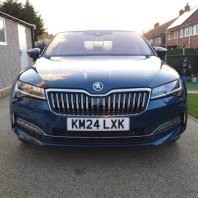
Ok. Loving my 2024 L&K but the non auto dimming passenger wing mirror bugs me.

Bean counters saving a few quid on a £45k car. ☹️

So has anyone retrofitted? Is the wiring loom still fitted to the mirror?

Given the mirror glass alone is £300-odd quid (you might get one from a breakers of course) I couldn’t justify it, but I know how annoying it must be.

Hi,

Same tupid feeling I had in my Scout 23.

In Skoda I ordered original complete mirror without cover. In my country cost cca 220€ (3V0072538A without area view). Change was for 1 hour original Skoda service. It is simply plug and play. But car is in warranty.

78s12-235940-2000-2000-0-1.jpg

Edited by Dushkyto
Uploaded image

My SEL is exactly the same, drivers door mirror dims but not the passenger side, but on the wife's Octavia SEL both mirrors dim, it's no big deal for me but strange there seems to be no consistency throughout the range.

  • Author
On 20/04/2025 at 15:49, Dushkyto said:

Hi,

Same tupid feeling I had in my Scout 23.

In Skoda I ordered original complete mirror without cover. In my country cost cca 220€ (3V0072538A without area view). Change was for 1 hour original Skoda service. It is simply plug and play. But car is in warranty.

78s12-235940-2000-2000-0-1.jpg

Ah, thanks for that.

I'll need the other side with it being LHD.

So the mirror comes with wiring that will plug into existing loom in the door?

image.png

Yes, this I recieved complete mirror with cable. Only carefully you car must have dimming back mirror (I don't know exact name in english) inside car. This mirror sending info to door mirrors + correct equipment, side assist or area view. Exactly what you have now on car, because connector could be diferent :) But I think on LHD, your driver mirror have dimming function.

Interesting topic.

I also judge stupidly unacceptable cheaping out of a mirror ... in my soon-to-be-gone 2000 P38 Range Rover, both dim, and both dip when in reverse ... oh well.

Dimming or dipping?

My passenger-side should auto-dip and it’s stopped doing it. Needs a reset or something but can’t remember what I need to do

  • Author
10 hours ago, travs said:

Dimming or dipping?

My passenger-side should auto-dip and it’s stopped doing it. Needs a reset or something but can’t remember what I need to do

Dimming. 😁

For dipping don't you just move it to the required position while in reverse and it remembers?

35 minutes ago, logiclee said:

For dipping don't you just move it to the required position while in reverse and it remembers?

he about both side dipping

got the same "upgrade" in my 2023 Mk3.FL L&K

left - heating + dimming

right - heating + dipping

while previous 2016 Mk3 had dimming on both sides

In reality, the OE supplier might be charging these to VW at €25 a side. So x that by ‘000s of vehicles and you get why they’ve deleted the passenger side autodim unit.

22 hours ago, travs said:

Dimming or dipping?

My passenger-side should auto-dip and it’s stopped doing it. Needs a reset or something but can’t remember what I need to do

Dimming AND dipping. Apparently, "flagship" in English at Solihull was not translated properly in Czech at Mladá Boleslav ... 😁

Mine stops when I leave the stupid switch in one position, left or right, dont remember, which ... try all of them and sometimes it wakes up again!

I also have the Martini "upgrade" 🙄

Create an account or sign in to comment

Recently Browsing 0

  • No registered users viewing this page.

Important Information

Welcome to BRISKODA. Please note the following important links Terms of Use. We have a comprehensive Privacy Policy. We have placed cookies on your device to help make this website better. You can adjust your cookie settings, otherwise we'll assume you're okay to continue.

Account

Navigation

Configure browser push notifications

Chrome (Android)
  1. Tap the lock icon next to the address bar.
  2. Tap Permissions → Notifications.
  3. Adjust your preference.
Chrome (Desktop)
  1. Click the padlock icon in the address bar.
  2. Select Site settings.
  3. Find Notifications and adjust your preference.
