



Skip to content

Octavia mk2 estate suspension questions ?
Featured Replies

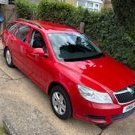
My 2011 1.6td estate has a saggy arse as it’s sitting low compared to front and pics I’ve seen of others

The shocks were an advisory last mot as was an suspension arm for corrosion ,

What parts would you replace apart from shocks ?

And where would you buy them from ?

MOT due December

IMG_1302.jpeg

IMG_1301.jpeg

IMG_1300.jpeg

Edited by Redestate

4 hours ago, Redestate said:

My 2011 1.6td estate has a saggy arse as it’s sitting low compared to front and pics I’ve seen of others

The shocks were an advisory last mot as was an suspension arm for corrosion ,

What parts would you replace apart from shocks ?

And where would you buy them from ?

MOT due December

In the first place I wouldn't replace the dampers because they don't control the ride height.

What I would do is investigate the rear suspension for broken springs, probably up at the pig ears.

springs...

dampers may be gaving their own leakage issues possibly, but its the springs.

could be broken pigtails, or... more likely, a previous owner has replaced them with "these are definitely the right ones for your car sir" cross platform compatible (ie they fit a golf, a3 and a leon too...) springs. which arent the correct rating for your vehicles exact weight.

ohhh the thread count for "why is car sitting so low at the back with my new springs" is likely in the hundreds here, just in the octy sections..

When I replaced my rear springs a few years ago due to one breaking it was a minefield trying to decide which were the correct ones. Eventually I took a wheel off and managed to find the coloured marks on the springs. As I have owned the car from new I knew that the ones fitted were original.

Create an account or sign in to comment

Recently Browsing 0

  • No registered users viewing this page.

Important Information

Welcome to BRISKODA. Please note the following important links Terms of Use. We have a comprehensive Privacy Policy. We have placed cookies on your device to help make this website better. You can adjust your cookie settings, otherwise we'll assume you're okay to continue.

Account

Navigation

Configure browser push notifications

Chrome (Android)
  1. Tap the lock icon next to the address bar.
  2. Tap Permissions → Notifications.
  3. Adjust your preference.
Chrome (Desktop)
  1. Click the padlock icon in the address bar.
  2. Select Site settings.
  3. Find Notifications and adjust your preference.
