



Skip to content

New Tyre issue/s - RESOLVED.
Featured Replies

Hi all -

'CREDIT, WHERE CREDIT IS DUE'

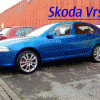
A recent thread regarding the addition of TOYO PROXES4 tyres on my Vrs have now been resolved........ previous thread= http://www.briskoda.net/forums/octavia-ii/tyre-wear-inside-edge-all-4-wheels/99026/

After only a few short telephone conversations and with much needed help and advice from Alan at Toyo Tyres, the manufacturer has, WITHOUT quibble, has agreed to a FULL refund on the tyres and requested me to return the vehicle to the Tyre dealer who have been authorised to give the full refund and to fit ANY make/manufacture of tyre back onto my vehicle, that i wish to have.

I would like to thank Alan personally for resolving this dilemma for me and can honestly say that i have had the utmost respect for his involvement in eliminating all angles of the tyres and the possible reason/s for their inability to return the Vrs driving characteristics to it's former glory!

I will now be returning to the original, factory-fit Dunlop SP01 sports for my Vrs.

A big thankyou to TOYO and for their customer relations. :thumbup:

Regards - John.

It's always nice to hear a good outcome.

4 Michelin Pilot PS2's coming your way then I should think

  • Author

Nearly forgot........ A big thanks also to :

VrStu and Stuart_J for their help and advice which was as always, there when you need it!

'CHEERS VERY MUCH GUYS'


:woohoo:

Create an account or sign in to comment

Recently Browsing 0

  • No registered users viewing this page.

Important Information

Welcome to BRISKODA. Please note the following important links Terms of Use. We have a comprehensive Privacy Policy. We have placed cookies on your device to help make this website better. You can adjust your cookie settings, otherwise we'll assume you're okay to continue.

Account

Navigation

Configure browser push notifications

Chrome (Android)
  1. Tap the lock icon next to the address bar.
  2. Tap Permissions → Notifications.
  3. Adjust your preference.
Chrome (Desktop)
  1. Click the padlock icon in the address bar.
  2. Select Site settings.
  3. Find Notifications and adjust your preference.
