Pete
FREEDOMLite
-
Joined
-
Last visited
Everything posted by Pete
-
Average, according to the car after 2000 miles is 36.2. Best I have seen is 42.5. 51.5 seems almost unbelievable - was it downhill most of the way?
-
Nope, not me - quartz grey estate here.
-
I have travel assist on mine which has road sign recognition. Automatically stopping the vehicle from overtaking on the right when using ACC/travel assist only happens when the car oddly starts to read and display the road signs in kph. This happens randomly. It’s as if the car has suddenly decided it should be driven on the right side of the road, rather than the left, the speed limits are in kph, rather than mph. When the road signs are being recognised in mph, the car will not slow when you are overtaking on the right, but will do if you approach a slower vehicle on the left as intended.
-
My previous superb estate did this, but normally when it was raining properly. In light rain, can’t recall it coming on automatically. It seemed fine. It comes on much more eagerly in the Octavia and when not needed.
-
I have one on my new vRS. No problems. Has separate capacitive touch/swipe areas to both open and close either the blind or roof. I’m 6’2” and headroom is fine.
-
I have thought the exact same.
-
The idea of having checklists is hilarious! I now want you to make them and let us all have them!
-
Mine groan a little on the Octavia and it is exactly the same groan as my folding mirrors on my previous Superb. Never really thought much of it.
-
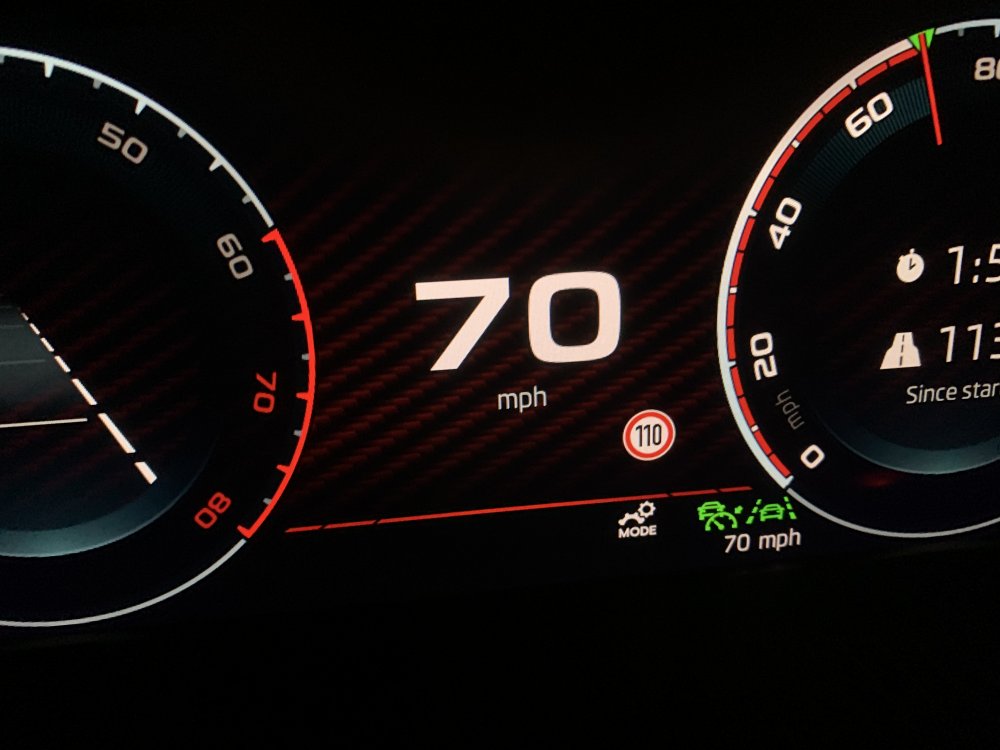
Thought to share a picture of my Travel Assist recognising the national speed limit as 110kph rather than 70mph. It will automatically change the set speed to 68mph, but I had already set it back manually to 70mph, which is shown in the picture. Noted the same is happening in the Kodiaq: https://www.briskoda.net/forums/topic/486758-travel-assist-steering-wheel-sensor-faulty/page/2/
-
Mine has this option and is stuck on right hand, and cannot be changed to left hand.
-
I haven’t got a heated steering wheel, but hopefully these software gremlins will get sorted. 🤦🏼
-
I have the same problem on my week old Octavia vRS fitted with travel assist randomly reading road signs in kph and braking the car. Any news or luck from the dealer on a fix?
-
I also have this issue. The car slows when overtaking as it detects the car on the left. My previous superb never did this.
-
My screen did this today while using Waze with an iPhone connected via a cable. The only solution was to flick back to the Home screen and back to CarPlay, but of course, after a while it did it again.
-
I received my new Octavia vRS 245 estate yesterday and it has Travel Assist. I can see that others have had issues with the satnav displaying distances in kilometres, but has anyone else had issues with travel assist recognising speed signs in kph instead of mph? Oddly, and at what appears to be random, the car starts to recognise signs in kph, and if travel assist is activated, adjusts the speed of the car to match in kph, while displaying mph. For example, national speed limit signs are recognised and a 110 speed sign pops up on the display, and the speed is then automatically set to 68mph. Speedo and the set speed are in mph. I have had 40 and 50 signs recognised in kph so the car will set the speed automatically to 24mph or 31 mph. After a while, the car will revert back to recognising signs in mph but then revert back to kph some time later. My satnav displays distances in miles and not kilometres. All settings are in Imperial, including on the Skoda app. Perhaps more bugs - what is disconcerting is having the car brake to slow to 31mph when you enter a 50mph speed limit, or 24mph when you enter a 40mph speed limit, requiring you to take action to correct it (and irritate all the other drivers around you as the car brakes to slow too much). The only other thing of note is that apple carplay is a little sluggish when connected using a cable, and the screen becomes distorted when using Waze (pixilated and distorted with the colours bleeding around the map displayed on the screen) occasionally. Hitting the home button and heading back to apple carplay fixes this with Waze temporarily.