Pete
FREEDOMLite
-
Joined
-
Last visited
Everything posted by Pete
-
-
Blocked pump filter screen…common issue.
-
Yes it’s mildly annoying…interesting that it’s happened on both my cars suggesting a server or account problem potentially.
-
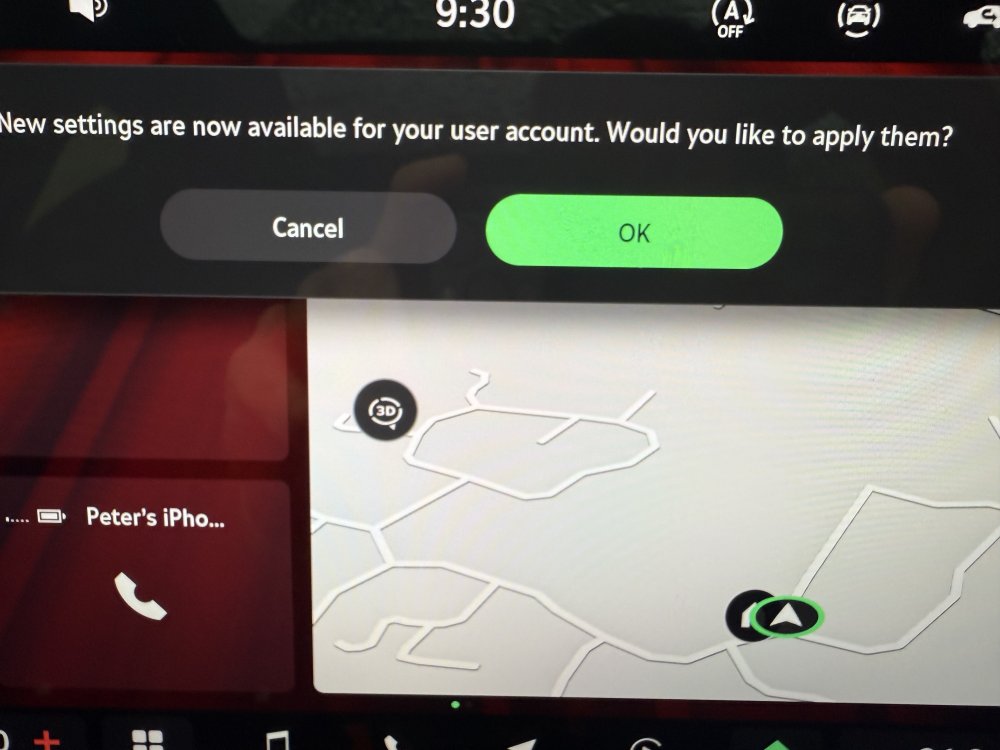
This has started to pop up every time I start my Mk 4.5…”New settings are now available for your user account. Would you like to apply them?” I also saw this message from time to time on my Mk 4. Selecting cancel just means it prompts again, and selecting ok changes some of my settings in an odd way - e.g., resets my climate control. It’s not the same settings changed each time you hit ok. Today it swapped Travel Assist to Adaptive Cruise. It also seemed to randomly change settings on my Mk 4 in the same way. Any ideas?
-
Yes. I have a 25 plate with this option and it’s only self park which I have used on a single occasion to try it out!
-
Assuming the pump is still sounding (you have a rear dribble suggesting this to be the case), likely blocked pump filter. I have had this happen repeatedly. You'll need to pull the pump and clean the filter.
-
I had an Octavia 4, and yes, you could enter a config menu and choose what you wanted to display or not in terms of options. All options were available for the right or left side. I now have an Octavia 4.5, and there appears to be no config menu, and one set of options are available for the left, and a different set of options are available for the right. Also noted that you cannot display the gearbox temp anymore. I went searching for the config menu, like you, and didn't find one!
-
Just thought to share that having a pair of blocked filters yet again, both pumps also failed. I always thought that the pump for the front and rear windscreens was rather weak from new as the flow seemed poor compared to all other Skodas I have owned. So I ordered an aftermarket pump (https://amzn.eu/d/3Wi5NR6) for the windscreens which I installed this morning. The flow has substantially improved! It’s much more powerful, especially at the rear including the camera. Much better than the OEM pump even with crystal clean but annoying filters.
-
I recently bought these which are pretty close to OEM for a better price. I have only had them on for a few days, and time will tell if they last: https://www.ebay.co.uk/itm/402286485733
-
I had the same experience the first time that this happened to me shortly after receiving the car - the garage wanted to completely replace the tank and pumps claiming that I had contaminated the tank...cleaning the filters fixed the problem until it has now come back some years later.
-
My fronts stopped working today. It also happened three years ago. Annoying! Likely the filter again.
-
-
Thanks so much mate! Updated and all working well.
-
Central vents chucking out cold air regardless has annoyed me for sometime…I end up closing them in the winter.
-
It’s somewhat like a semiautonomous driving system. It will steer, slow down, accelerate etc. It also has traffic assist, and when activated and stuck in traffic, it stops, starts and moves the car without input from the driver along with the traffic. I find this helpful when stuck in traffic. If you use it in town or cities, it can get confused with multiple lines on the road in places. Zig zag lines have caused the car to rapidly steer left and right 🤦🏼 which was disconcerting the first time I experienced it.
-
Yes, the M11 along with others. I have to travel a lot for work. And of course, the A11.
-
I have Travel Assist on mine. A pull of the lower stalk on the left of the wheel engages Adaptive Cruise Control and a then push of the button on the wheel activates Travel Assist. I can confirm that with Travel Assist fully activated the car will steer itself - hence, adapative lane assist or guidance or whatever you want to call it. It is part of Travel Assist. I find it helpful on the motorway for sure.
-
Mine was also slow following the update. I did a factory reset and paired my keys again and all was fine.
-
Helpfully, turns out you can turn them off. You can only access the settings when the car is stationary.
-
Does anyone know how to turn these off? I assume they come with the Traffication app? They get annoying quickly when in a busy city with traffic and navigating using Waze or another app via CarPlay. The warnings obscure the whole screen, and force you to have close them, distracting the driver further when you are trying to navigate unfamiliar territory using a map. Whoever designed these warnings has not actually thought them through. An audible warning with something small on the corner of the screen would of course be too sensible for Skoda!
-
I’ve had this repeatedly on mine with travel assist. Updates have improved matters, but not gotten rid of the bugs entirely. I think some of this may be due to errors with the maps. I note that there are points on the A14 where this happens consistently. Other places, it seems random.
-
Perhaps just to add, on my 2021 Octavia vRS with this problem, the dealer replaced them free of charge.
-
This is for 1941 rather than 1969.
-
Would assume new software is on the way as SEAT have had it for a few months: https://www.vagupdate.com/blog/general-news-and-informations-about-vag-cars/seat-has-just-released-new-software-version-1969-for-leon-and-formentor
-
I got a text from the DVLA about it.