
Skip to content

SkudMissile21

Members
  • Joined

  • Last visited

Everything posted by SkudMissile21

  1. That’s not the right switch unit for mine as it has the mirror adjuster and both rear child lock buttons instead of a single one to disable the rear window buttons If anyone can find this one part number I’d like to know anyway!
  2. Thought I’d post a few pictures now my subwoofer install is completed and been working for a few weeks. I was inspired by JohnnyType2’s thread in the octavia 3 section and took some advice and tips from him but haven’t gone to anywhere near the extremes of neatness or upgrading he did! I’m not an installer nor was I going for the ultimate installation, I just wanted it to be functional and neat enough to not look naff and I like to think I’ve achieved that. First hurdle was the main power feed, I tried to use the main grommet behind the battery but couldn’t get anything through there so I ended up using the spare access grommet in the drivers footwell where the clutch would be if I didn’t have the DSG. The main issue with this is the cable run had to be longer as it needs to cross the engine bay and also it comes up behind the turbo in an area that obviously gets rather hot! I covered the cable in high temperature silicone coated fibreglass shielding from the battery right through into the footwell (2M length cost £28 on eBay and is rated for 260 degrees Celsius continuously, I’ve checked the cable with a laser thermometer probe and it’s well below that and not in contact with the engine or turbo anyway. Once through to the footwell i pried the side trims up just enough to tuck the cables under both sides (power and remote for the LC2i drivers side and speaker pickoffs and amp remote switch passenger side) Again, I wasn’t quite prepared to remove the trims though I know it would’ve been better to do so. I dropped the glove box down and fitted a connects2 CT10SK03 harness adapter which I spliced a couple of bullet connectors to for the rear pickoffs. I would have like to go full plug and play with some iso plugs but couldn’t find anything off the shelf to do a straight through with tails for the speakers (as unlike Johnny’s install I was only adding the sub and keeping the standard head unit controlling the standard speakers) - word of caution here, it’s easy to stuff the harness adapter into a nice space at the back when refitting the glove box then discover later that the air con recirculating flap motor no longer works cos it’s obstructed! (I sorted that once I realised...) Amp and LC2i mounted on the back of the rear passenger seat with a couple of m4 tapped cap head screws for each (secure but didn’t want to drill anymore holes than I had to) and the sub is strapped in place with a 4 pole speakon connector which also has a loop through to the amp remote so I can remove the sub when bootspace is required and not worry about the amp being on with no load. Initially I tried the LC2i with the auto on technology but changed this to an ignition switched supply after discovering it was powering up the amp just by unlocking and opening any of the doors or boot which I wasn’t happy with and didn’t trust it being left. I mounted the LC2i remote inside the drivers cubby hole for easy access while driving so I can adjust the sub volume easily without looking down. It’s made a big difference to the low down bass (as you’d expect at 500W RMS!!!) and has a proper thump at medium to high volumes with no roll off so I didn’t have to setup the accubase function on the LC2i at all and have it disabled. I was fairly impressed before with the bass levels around 7-8 but wouldn’t expect the speakers to last long like that whereas now it’s running at 0 and the sub is dealing with the 20-120Hz ranges nicely. Finished tidying up the amp wiring today so the only job left is to re-carpet the sub and re-spray the grill again as it’s around 6 years old now and looking a bit worn to say the least.
  3. I’d suggest something like mp3tag and load the whole sd root folder in it. Takes a bit of understanding but once you do it’s very powerful and easy to do stuff like name or number multiple files at once and also makes sorting the artwork out a doddle
  4. I’m sure I read somewhere you need 4 keys inserted to remove the touchscreen so maybe that’s your issue? I only wanted to get the head unit out that’s located in the glove box and that only has two but I believe it’s the same keys
  5. I recently purchased these and they seem to work. I only released the MIB2.5 unit a bit as I ended up dropping the glove box to get at the connector on the back anyway due to the loom not being long enough to fully extract anyway. https://www.ebay.co.uk/itm/332699579992
  6. Finally spoke to the dealer today and got booked in for a few weeks time to look at it. I tested the switches with VCDS today and have screenshots of all four drivers door switches showing “implausible” when pressed fully down to the one touch opening position yet other times they will all work at random. seems pretty clear cut the switch unit is failing but will have to hope the dealer tech is able to see the same on the day and not have one of those “can’t replicate the fault” situations
  7. I successfully cleared the "1555 - Check Software Version Management " fault that Carista was showing as 01555 motors for central locking SAVE" today using my new VCDS lead from Gendan UK so I'm all sorted now.
  8. Edited post as I've now sussed this out, enabling the Seats menu and comfort entry toggle as below: Long coding byte 3 bit 1 to enable comfort entry: Then byte 9 bit 6 (part 1) and then adaptions gen2 menu display seat configuration (part 2)
  9. Also I confirmed the coding for the MFD startup splash screens as below: Version 6 is Sportline on mine as I posted originally.
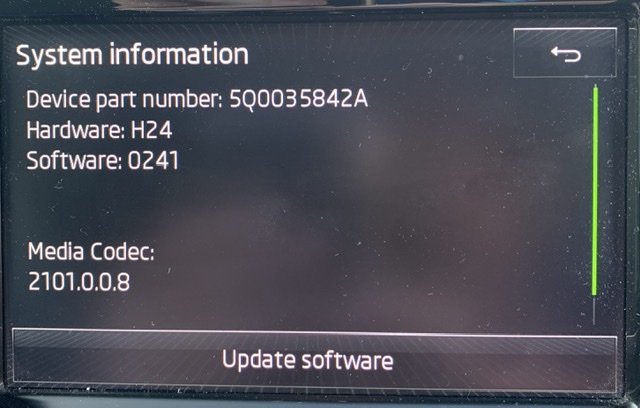
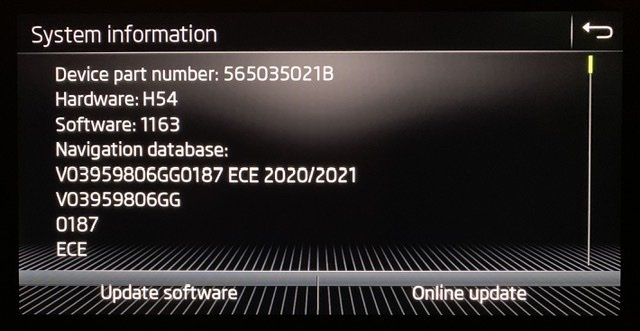
  10. Sasha, how did you enable the menu in the infotainment for the seats? Mine doesn't have it, now I've got VCDS I have compared the coding after changing it with Carista and confirmed its byte 3 bit 1 to enable or disable it but I can't seem to get that menu to show on the touchscreen.
  11. Still doesn’t explain all the pre ownership “my vRS is so much better than your 280/272 superb” comments then went and bought one which then wasn’t good enough so had to be remapped which then turned into a “my car is so economical yet it’s obviously much faster than everyone else’s” (Harry Enfield sketch comes to mind...) and now suddenly it’s being traded in for a 150 diesel. Something doesn’t add up, I’m with Nick-H even though I’ve only owned for a few weeks I ain’t getting rid of this one for years!!!
  12. Well this is a turn up for the books! Can't really understand why you would want to get rid of the car after doing the stage 1 and singing its praises over the vast pages of this thread for fuel economy and performance when required. As others have said it feels like theres something you're not telling us and also I can't believe any main dealer is going to a: let a car of this spec and rarity go straight to auction and b: sell it as is remapped with all the mentioned concerns about warranty issues etc. My previous car (traded in) was restored back to standard from the bluefin and has been sold to someone now (tax, mot and insured) but I bet the dealer probably applied the dieselgate update to it at the very least which would have overwritten the map even if I had left it on there. Private sale I can understand declaring it's been modified and letting any potential buyer choose if they want it that way but a car of this age is gonna go through the forecourt (unlike my old 10 year old 60 plater) for sure so they will want to protect their integrity and avoid any unneccessary warranty issues by making sure it has the latest offical skoda software versions on it IMHO....
  13. Another update, seems the fix was short lived - front passenger side one touch open hardly ever works (though normal open and close does usually), drivers side is intermittent on both one touch and normal open (sometimes works, sometimes stops and starts and other times it works fine) and the rears are both a bit intermittent for one touch opening. all three passenger switches work perfectly and the remote opening and closing is also fine. waiting for a call back from the dealer (not holding my breath....) but looks like it’ll be a few weeks before my days off are in the week to get there so guess I’ll be having fun getting through barrier gates in the mean time.
  14. Yes RomanB that’s the procedure I need to follow with VCDS I believe. just wanted people to be aware of the risks of updating at home if they don’t have access to VCDS to clear this fault
  15. Just a word of warning to anyone here doing a diy firmware upgrade, it seems it’s possible you may end up with a fault code logged that cannot be cleared afterwards (Carista lists it as “01555 motors for central locking SAVE”) which research has led me to believe is actually a flag the dealers use to see when hardware or firmware has been changed and it looks like VCDS is needed to calculate a hex value and enter into the adaptions to clear the flag. Carista screenshot below and link to the info I found when searching the code from within the Carista app (links to a web search for vag fault code 01555) https://www.golfmk7.com/forums/index.php?threads/strange-fault-after-fitting-8”-screen.361269/ Appologies if this turns out to be a red herring - I’ve got VCDS on order now so will update if / when I am able to clear my fault
  16. Well even considering the above comments (including my own!) I’ve gone and bought the 3 vin version from gendan now. need it to clear a fault I’ve got that Carista doesn’t seem capable of dealing with and decided I just couldn’t justify the 10 vin cost at the moment. got no plans to change either mine or the wife’s cars anytime soon so hopefully this will see me right for a while and include the next car whichever of us cracks first!
  17. Just been out and tried the below procedure and they seem to be working again now so will have to monitor! still hasn’t got rid of the 01555 code though.
  18. I’m using my old 6th gen iPod classic too as that’s the only thing apart from the dvd drive that will play a mix album continuously without the annoying gap between tracks . tried all combinations of sd cards, internal hard drive and usb sticks but that’s the only thing that works.....
  19. Guessing I’ve got the same problem as you then. Tonight driving into work I couldn’t open the windows at all for the security gate (that was fun to get through the barrier!) and when i parked up afterwards and tested it looks like my drivers door switches are all failing. I was able to fully open and close all windows via the remote and the three passenger door switches operate their respective windows ok but the drivers one is very intermittent now. managed to get it opening and closing by only gently pressing the first click each way but sometimes even that doesn’t work and the window will stop and jerk all the way up or down. occasionally it will work properly and do full opening or closing on one touch but it seems mostly it doesn’t work now. will have to contact the dealer tomorrow, I did a scan with Carista and it does show one persistent fault in the infotainment for “01555 motors for central locking SAVE” but I’m not sure if that’s related or a red herring after updating the infotainment firmware (I’ve found other threads on it suggesting that may be the case)
  20. Excellent choice with the 280, I’m loving my sportline (had it about 3 weeks now). what trim level are you getting? mine doesn’t have canton but I’ve just installed a 12” sub with 500w rms Kenwood amp and Audio Controls LC2i and remote which has made a massive difference to the sound.
  21. That may well be in the manual but the minimum speed is 20 and I find it very useful for most scenarios when following other traffic so will continue to use it as such. the main point is to be aware it’s not a Tesla self driving thing so you need to be always prepared to intervene and I cover the brake when it’s slowing me down still.
  22. Had some time today and yesterday so I ran the replacement power cable down the right side of the car to the boot and mounted the Kenwood amp. 5M still wasn’t long enough for the route I wanted so I’ve had to extend it using an inline crimp - not ideal but I know from previous experience despite the ridiculously high quoted power draw of 65A this amp won’t be getting anywhere near it so it will be fine. It’s fused at 60A next to the battery anyway and the whole run from the bulkhead around the back of the engine bay to the battery is protected with some 20mm flexible conduit and routed out the way of the engine. I’ll be keeping an eye on it anyway so if I spot any signs of it getting hot I’ll be replacing it. Fitted the connects 2 harness with the rear channels picked off to a couple of bullets which I then connected to the flat speaker cables I ran down the left side to the boot. initially tried the amp directly with the high level inputs and it worked rather well. Probably could’ve got away without the LC2i but it had actually turned up while I was doing the install so I’ve got that fitted and running now with the remote. it certainly packs a punch now I’ve got my 12” sub going again, forgot how much of a difference it makes even though I was actually fairly impressed with the bass performance of the Columbus before. I’ve set the bass level on the head unit to zero now and adjusted the LC2i and the amp gain to get it thumping nicely while still being able to get a bit more or less via the remote when required (which I’ve fitted inside the drivers cubby drop down). Things I will need to revisit probably - the amp ground cable I had is not quite long enough for my liking so will need replacing with a longer one at some point (couldn’t find a decent ground so I ended up drilling one in the spare wheel well centre mounting since I could see behind it to know it would be safe to drill). the cables down the sides of the car are tucked under the trims but aren’t really sitting in place nicely so I guess I will have to attack removing the trims and fit them properly - anyone have any tips to remove them and refit without damaging anything? I have a full set of trim removal tools. Finally, the LC2i seems very sensitive to turning itself on even when the head unit is off?? Unlock and open the doors and a few seconds later it’s switched on and doesn’t go off for a minute or so. Tested this and it seems to be any door opening does it, anyone else experienced this? At least the amp doesn’t thump during this and I know it won’t be pulling any current with no signal but still doesn’t seem right. Also I don’t think my Columbus is rolling off the bass at all so I’ve got accubase set to off, is this feature only present with the canton setup?
  23. Guess I’m going for an LC2i then! Got my connects 2 harness today so hopefully the weather will play ball tomorrow for my 4 days off so I can start running cables in and get the amp and sub in the boot and fed. Then I’ll just need to add the LC2i later for proper control.
  24. It’s well documented that the systems quite often have bass roll off but there are available active converters like the audio controls LC2i or lc7i that have a feature called accubase that can effectively put the bass back in when it starts to drop off and then provide you line out RCA signals to drive an amp. They pick up from the speaker output signals from the head unit. I have the mk3 and am going this route, already have the sub and amp from previous install just got to run the wiring in next dry day off I get and do some tests. Haven’t decided on the LC2i yet but it’s looking like I’ll buy one very soon as I want control of the sub level from the driving seat without having to keep adjusting the amp gains for my variety of music

Important Information

Welcome to BRISKODA. Please note the following important links Terms of Use. We have a comprehensive Privacy Policy. We have placed cookies on your device to help make this website better. You can adjust your cookie settings, otherwise we'll assume you're okay to continue.

Account

Navigation

Configure browser push notifications

Chrome (Android)
  1. Tap the lock icon next to the address bar.
  2. Tap Permissions → Notifications.
  3. Adjust your preference.
Chrome (Desktop)
  1. Click the padlock icon in the address bar.
  2. Select Site settings.
  3. Find Notifications and adjust your preference.