Jfhuk
Members
-
Joined
-
Last visited
Everything posted by Jfhuk
-
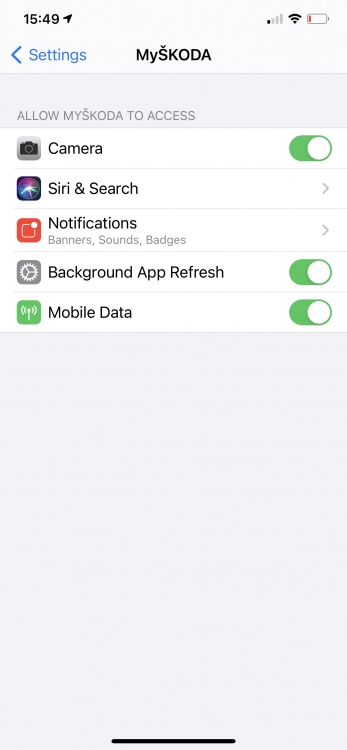
Phone has the following
-
According to the car yes.
-
I’ve just tried the web site and that appears to be working with no issues, so the problem appears to be app related.
-
It appears to be backend related as I’ve now tried it on my iPhone and a friends android phone and it fails in the same way.
-
It’s the new app that’s broke. It just keeps asking for the cars VIN number then gets stuck with “the operation was unsuccessful. We are working on a solution. If this persists please contact the infoline” I’ve just done that and am awaiting further updates.
-
Tried using the app this morning and I was asked to login again. When I did, all the cars details had gone and it was asking for me to register them again by entering the VIN number. Though when you do, it has a fatal error and dies. You’d think after all the time the Kodiaq has been out they could get the app to work. It must have been written by the same people that did track and trace.
-
Many years ago I used to work as a consultant for a company that provided IT systems to Linn. Marcus Tiefenbrun the then Finance Director was a real character. When he heard that he was getting a new salesperson he asked for a meeting. His introduction was “Do you know I’m a salespersons worse nightmare? Because A I’m Scottish and B I’m Jewish” The poor guy was looking white as a ghost till Marcus burst out laughing 😆
-
I’ve just sent back a Sonus One. The Amazon Alexa integration was poor, it was much worse than standard Amazon Echo’s. The sound from the speaker was great though.
-
I’d have a look at drive the deal and Carwow and see what’s available, there are a lot of good deals going on currently. We renewed one of our Kodiaq’s last year and got nearly £3k off list.
-
Good luck, it’s sounding like a trip to an Apple Store Genius Bar time 😒
-
One option 😱😂
-
I spent ten years looking after this stuff for the international organisation that provides many of the standards used. Typically, the interrogation systems use two frequencies, 1030 MHz for interrogations to aircraft transponder and 1090 MHz for replies from the transponder or spontaneous message transmissions (squitters, e.g. ADS-B), in order to build the air situation picture. Ie what aircraft are doing and where. The 1030/1090 MHz RF frequency are a critical resource for Air Traffic Control (ATC). Aircraft surveillance is based on cooperative surveillance systems, all relying on the operation of the 1030/1090 MHz link. This RF link is used by (see below): Mode A/C radars, Mode S radars (Elementary Surveillance - ELS and Enhanced Surveillance – EHS) Automatic Dependent Surveillance – Broadcast (ADS-B) Multilateration systems for airport surface surveillance (MLAT) or over a wide area (WAM) Military systems (Identification Friend or Foe – IFF, combat ID) The 1030/1090 MHz surveillance infrastructure sees its performance degraded when: transponders are interrogated beyond their designed capability and performance; because there are too many RF interrogations on 1030 MHz triggering too many replies from aircraft transponders on 1090 MHz; there are too many transmissions on the frequencies; there are unexpected transmissions on the frequencies; non-interoperability issues happen. When this happens leakage on to other frequencies occurs. IE car doors can open, satellite and WiFi signals can also be interfered with. I’ve seen this happen on busy aircraft routes and particularly on military fields where intelligence aircraft are based. At one RAF field I was told to park away from the aircraft operational areas as you’ll come back to an open door. Theres also another culprit, Wi-Fi routers typically operate in the 2.4GHz radio band, as opposed to the 315MHz and 433.92MHz bands that car remotes operate in, they can still generate harmonic interference and even unintentional interference due to poor shielding or wiring. And so can a whole host of other wireless devices. While cellular sites can also generate interference, these are pretty tightly regulated by Telecommunications regulators.
-
Have you a Pc or Mac with iTunes that you could plug it in to the USB port of? If you have you can then use iTunes to restore the operating system. You need the iPad to be in recovery mode before you connect it to the PC or Mac.
-
I’m using an USB stick with the wife’s new Kodiaq, so far, no issues.
-
Do you by any chance live near an airport or military airfield? I live near Heathrow and certain jets using their identity transponders can magically make the rear door open.
-
But expected, though that price is a bit shocking!
-
Sounds like there trying to move the Kodiaq into higher profits, by using lower cost components. I see it’s now an £1,400 option!
-
The wife’s Citroen got similar damage from being hit by a truck in 2012, the insurance company wrote it off. It latter appeared on a salvage web site.
-
The battery’s energy capacity will go up and down with temperatures. Colder temperatures will have a lower capacity.
-
-
-
Amazon have it on stock if you’re stuck. Audi Seat SKODA coolant ready Mix https://smile.amazon.co.uk/dp/B01MT61SFZ/ref=cm_sw_r_cp_api_fabc_Z8OSFb4XP6QH9
-
Wouldn’t put it past them, but I’d be surprised to see them taking more things out of the specification as the supposed facelift is coming up.
-
Seems bit odd to be the next reply to an item I posted on this dealer years back. It’s been a case of more of the same, just replaced the Kodiaq mentioned above with them with a new Kodiaq 2.0 tsi SEL. The whole process with Caffyns went well and they gave me a good deal. But Skoda Finance has again mucked up the PCP.
-
Got a call this morning with an update that the car is in Sheerness already! That’s impressive considering it was built last week. Car should be with us within ten days according to dealer.