Tell
Members
-
Joined
-
Last visited
Everything posted by Tell
-
May be missing a trick. Town, street and house number is always more accurate. Now the postcode entry is more idiosyncratic. I would have to fumble with a mib2 to tell you the process. I dont believe its the firmware its just the cars system is designed around European city zones and American zip codes so you have to go into the screens correctly to make it work. Something about the space... I haven't entered postcodes into it for years but you will find discussions on it. I'd stick to house numbers, street and town.
-
Well I suspect you have mib1 high where support was dropped after the 350 release. 370 was the next one where mib1 high got dropped. It had been a combined release for mib1 and mib2 high prior. If you google your image part number for the unit 5e0035020c it seems its supported mib 1 and mib2 however your firmware is 370 which is mib1, so you are stuck. Pretty sure.
-
You will be fine. The software is independent to the map file. Software defines you have a mib2 high and you have 350 maps on it etc. Obviously you got Skoda FeCs. The conversation above was about a bit of software surgery to a Seat since the Seat navigation FeC has been dropped from the 450 map release so we give it a Skoda navigation FeC in addition. Taztoza decided to update the Seat firmware at the same time. The VAG firmware upgrades to mib2 high were only incremental to resolve any bugs identified. As long as you present the map file correctly you wont have an issue. The unit checks the integrity of the file before it does the update. Only files designed for it get in the unit which arent corrupted etc. MartiniBs associated link give hints. 32gb SD in Fat32 is ideal or 64gb in ext3 or you can use an USB but the only thing on it must be the unzipped map file. If it comes off a Mac you use CleanMydrive to remove Mac rubbish 🗑.
-
I worked out what you did. Updated to 1447 AIO but then had to use the Mib tools for the FeC edit but because it wasnt designed for the AIO had to do the rename. I think the tool would have worked with the firmware you were on but you'd taken the 1447 AIO update route by then. Straight 1447 has those issues where it was originally designed for the Cupra copper screen and cant be seen without altering the coding of the display if you arent in "copper" before. The user community sorted that out in 1447 AIO. I got put off by changing the firmware at the time and just did Mib Tools after someone in the community wrote the patch. This is all 5 years ago when one of the mib2 high releases didnt support Seat. It's a repeat of that now but there is that techie solution for those that want to raise to the challenge. As an aside my unit had previously been updated by a rather unreliable retrofitter. The back up file which mib tools generates showed exactly what the retrofitter had previously done with the dates and times. Their handy work didnt impress the people who support mib tools.
-
@BooBoo124 might be able to advice you on Gracenotes you rename a file and import via the Bash project... he told me that the other days. All my music is on Flac in sub directories with the art work 512×512 in each directory called cover.jpg. I get album art that way. I've never been too both bothered with Gracenotes. THe conversation with @BooBoo124 was in the radio logo thread the other day. I'll edit in if I find it. Ah different conversation but BooBoos your man for Gracenotes.
-
Did they go in or not. Perhaps the patch never worked although it should tell you whether it went in. There is a help email address on the github link somewhere. Last para feels as if you are saying it now works... hopefully. I know it needs the long press on the on/off switch to get the re fresh after the edit.
-
Then Mr Bonk project to get the FeC. Was 1409 not listed in the Github project ?. I will quickly eyeball what said at the time. I stuck with my firmware and just did the FeC edit which means add it to the end of the prepared lists in the project. Answer is 1409 is in the project so you dont need to update the firmware. Just use the github project and edit in the FeC against the list. You place it at the bottom in addition with the notepad editor watching any line feeds... if its got one keep it, if it hasn't do the same. You keep the engine running whilst using the github tool. It will reboot the unit a few times. Then after the add FeCs command you reboot the unit, go in the Fec screen and check its taken it. Then you are good to go. https://www.seatcupra.net/forums/threads/sw-update-for-mib2-infotainment-system.427280/page-42#post-4973567
-
The tool kit has a built in clear errors it reboots the unit a few times. So you either use the toolkit or 1447 AIO firmware but you'll need to edit in that FeC or use the toolkit on that. Upgrading old units to 1447 AIO has been relatively easy by those that did it. Documentation at the time suggested you cant but that hasn't been found to be the case. Very early Seat mib2 firmware in the units has been upgraded that way. So one of two routes, your firmware is on the compatibility list for the tool box, if not the update to 1447 AIO, then use the toolbox to do the FeC edit.
-
You might find this useful https://www.seatcupra.net/forums/threads/updating-the-inbuilt-mib2-satnav-mib2-tricks-and-mib1.388586/page-163#post-5097617 There is the github toolbox linked. https://github.com/Mr-MIBonk/M.I.B._More-Incredible-Bash The documentation is the wiki on there. The toolbox works with specific releases of the firmware. You need to check in the github materiel. They may have it working for all now. The toolbox goes in the green or red menu whatever they call it. You edit in the FeC to the list with the notebook editor. These units work across brands so you can have Skoda and Seat navigation FeCs in together. Tries one, then tries the next etc. So from the last time they did this I had the Skoda FeC in as well. The expert said you can remove that now when they put the Seat FeC matching back in the next release. I didnt bother. Kept it in just in case it happened again. It did a few years later. The github software will tell you if your firmware release doesnt match what its designed to use. 1447 was the last release and it definitely was designed for that. Has a module for each matching release. For mine, a kind sole wrote mine and then it became part of the project. The documentation as I said tells you which ones it works with. Manipulation of that red or green menu or whatever colour can be found on YouTube videos. Slightly different on the keys dependent on the style of the mib2 high. Mine is the old style that was found on the Tiguan mk2 units. I say this since I know that someone else with a Seat had put a different infotainment unit in that required different fumbling with the keys. Essentially the github project, incredible bash etc puts the work bench tools into the unit. The SD card goes in and fumbling the keys takes you into the application. The app stays in the unit after but does nothing. Next time you want to do a bit more surgery you put the SD card back in. As said you do need to add the additional navigation FeC to the end of the FeC list, which you'll find. After the installation process, you do a long hold on the start / stop and you are off. Its always a good idea to photograph the before and after FeCs so you know what has changed. Then you forget about it.... and thats all I remember.
-
I doubt it since they have mib3 locked down with encryption on signatures. Radio logo file never needed a signature. Poi import was similar. Both those two not supported and they have slammed the door shut on mib3 toolboxes by taking away the backdoor method they accidentally left open. They didnt want connected cars being changed into bot nets. Some logic in some of the actions.
-
Must be a difference in the mib2 between Audi and the rest. We always had the odd logo import function. Essentially you take the VW file which they have now withdrawn and added your own. The new up start channel need adding. Pencil USB I keep but no new radio stations take my fancy. Mib3 I still reckon Phonostar only support the ones they have in the Internet bouquet of stations. It's too much for mib3 system designers to understand that. I see on the Troc site one of the radio providers had conversations with Phonostar but were disappointed they were still not in 🤭. Like stirring treacle.
-
I did wonder whether there was a new one for that. Wonder if it includes the missing logos... bet it doesn't. As you know for mib2 I do the graphic import you cant do in mib3 to in fill for missing. That radio station logo in fill method I might have mentioned previously. In fill method but not for mib3: https://media.info/radio/stations/times-radio/logo-for-vw That web site has all the logos so for the odd missing few you can in fill what are missing.
-
The question is whether they are on the Phonostar app. Ok I did install the Android at on my Nvidia Shield at the time MartiniB published the file links. Searching under Absolute the station drop down box of suggestions doesnt include Absolute. May be they dont have a carrier deal so it's not on their Internet radio platform of which the Vag logos ride off the back. My theory. You'd have to test with other known missing ones.... The Troc people also say Greatest Hits Radio https://www.trocforums.co.uk/threads/radio-station-logos.4632/ That isnt in the Internet radio station list so I reckon that is the key. A Vag design error of only supporting logos in the Phonostar operation.
-
This one is sprinkled with SE in the manifest so I'm hoping it will be of use to Seat / Cupra people. I dont have mib3. Think the manifest has to link in with the model of infotainment unit fitted so a bit like those VW user POI import programs for mib2 if they dont update that list of infotainment units then it wont work. Await to hear anything. May work for some Seat / Cupra people but not for others. I see Troc people were saying it still excluded some station logos.
-
& these are the two key posts that I found in the end... When PCBBC cracked it on the mib2 high connected unit: https://www.briskoda.net/forums/topic/512443-tmc-traffic-events-no-longer-being-receivedfirmware-update-required/page/20/#findComment-5762685 Key post when he explained how it works: https://www.briskoda.net/forums/topic/512443-tmc-traffic-events-no-longer-being-receivedfirmware-update-required/page/20/#findComment-5762765 the 14 # for non connected units. You can trace those opening up the ISO file.
- 24 replies
-
- amudsen
- discover media
- mib2
- maps
-
Tagged with:
-
The post below this tells you how to do it in VCDS (TMC only on mib2 highs) https://www.briskoda.net/forums/topic/512443-tmc-traffic-events-no-longer-being-receivedfirmware-update-required/page/26/#findComment-5766350 and this one https://www.briskoda.net/forums/topic/512443-tmc-traffic-events-no-longer-being-receivedfirmware-update-required/page/20/#findComment-5762685 PCBBC replying to someone.... was searching for the explenation of the code groups that @pcbbc gave me if you are interested. Basically the providers are banded then grouped. The TMC groups is indeed the band. An ISO file from memory you unzip to peak a boo. It will be before that link. That thread covered the total conversation but I distilled it down into that Seat post for the mib2 high and one for standard. The nuts and bolts of how and why it works are somewhere above that post. It's in an ISO file since I managed to get my unzip software stuck to unzipping ISO's, no good on the next Windows update on unsupported hardware ☹️. I click always... no not always. Subsequently corrected it. We may have wondered of mib2 standard 🤔. But two bits of info on TMC for the Columbus. Pass on finding where @pcbbc told me his method he used to track it but it was opening up the ISO files and looking at the contents. That last bit is only for education purposes you don't need to know it to do it. I just asked.
- 24 replies
-
- amudsen
- discover media
- mib2
- maps
-
Tagged with:
-
Yes @pcbbc did the running on that. I reproduced here: https://www.seatcupra.net/forums/threads/updating-the-inbuilt-mib2-satnav-mib2-tricks-and-mib1.388586/page-136#post-5035425 The online solution had been found on the TT board so the mib2 high RDS one washed out of this. The codes if you have that. Online mib2 high connect services never got to Seat. 32783 is online traffic permitted + Trafficmaster RDS TMC 32782 is online traffic permitted + ITIS/INRIX RDS TMC 15 is NO online traffic, Trafficmaster RDS TMC 14 is NO online traffic, ITIS/INRIX RDS TMC So 14 for Seat mib2 high (Seat Plus units), same code for Mib1. Here Maps accommodate the graphics on the maps... designed for it.? This swaps the TMC provider for the UK, all international TMC providers remain as set, except Finland and Hungary which are dropped. Thus the change is good for the UK and abroad, except Finland and Hungary. Basically when you go into VCDS and look for that code in the infotainment system if it 15 make it 14. Skodas will have the long 5 digit code, make it the other code 32782 . Save. Reboot the system with the long press on the on/off to get it to take it and you are off. If you cant see 32783 but another 5 digit code in that field make it 32782. They are @pcbbc instructions. Some units show a different 5 digit code apparently if so make ot 32782. If two digit make it 14. That one is good for mib1 as well. All Columbus mib2 highs will have the 5 digit code. Pcbbc worked it out by looking at the internal files of the map file. The NDS file you could open up or the OVR one of them. He told me how he did it on the Skoda board here when I asked... I had a look. The file featured the old name before it was called Inrix. Armed with that you could find the code that nudged it over and it works. Just a very easy 5f coding change.
- 24 replies
-
- amudsen
- discover media
- mib2
- maps
-
Tagged with:
-
No TMC wont be fixed by Vag for the mib2 standard but if you got a Columbus a small VCDS coding change brings Inrix in, instead of Trafficmaster. That works well. As was said at the time brings in more traffic reports than before. That's patched into road agency traffic information and works a bit like those old service station boards. Mib2 standard, which is Amundsen in Skodas uses TomTom maps. The implementation doesnt have the flexibility to change the TMC provider unlike the mib2 high (Columbus) using current maps whilst you can use the old maps as the great and the good worked out on here. The problem with the old map card which used Here Maps is with 20mph limits coming in widely, new roads etc you trade old cartography against traffic information. In our mib2 standard car we settled on current maps mainly for the speed limit information changes. The Arona does not have traffic sign recognition and the current maps in my Ateca with the mib2 high and the Inrix coding mod (also has TSR). Both mods are on the Skoda thread. It turned out to be DIY as predicted to sort this stuff out yourself. Those fortunate with mib2 Škoda connect services capability could take out a subscription to get it that way plus a bit of hardware as I recall. The other thread, but in the long term on mib3s you only get traffic information via connect services. Mib3 doesnt support TMC. Paying up is really the way forward for mib3 in a new car to keep your systems uptodate. At some point I will be forking when I do change cars so as to get the extras like turning your EV heating on before you get in it etc. Those doing their own firmware updates on mib3 are tripping over on what they can and can't do, like mib2 standard. Better to let the car handle that and the dealer. The mib3 update to maps you can do as per MartiniBs threads but ofcourse without connect services on those cars no traffic information. Do they throw in Spotify in for free on connect services ? (an aside). I think so looking at YouTube Skoda videos another plus, that Scottish bloke. Seat site was saying how good it was now, they have moved to lossless Spotify. On your Android TV box you have to tell it via another Spotify mobile device to put your TV Android box in into lossless Spotify (controlled by Spotify servers). I wondered whether this was true on your cars system. The TV system on Spotify it puts up a banner saying "lossless". Was a slow (8 year) and silent birth on Spotify to get lossless - it quitely arrived for paying customers (no adverts). I toss that out for anyone that knows whether Spotify is free on connect services and lossless 😉. Reckon you need to read lossless to know unless they toss it in for free. Audiophiles.
- 24 replies
-
- amudsen
- discover media
- mib2
- maps
-
Tagged with:
-
Yes that will be from their documentation. Mib wiki and all of that. It was the Audi FeCs that I worked out how the Seat ones worked. Users were in the dark. Retrofitters were selling firmware updates with just one year of mapcare on it, not the lifetime one. It ran out and stopped working - good for repeat business. Effected two of us. The retrofitter looked at the FeC screen, tapped it and said its your navigation FeC. I'd photographed them before and after, so comparing notes worked out the year sequencing of them. Different from the Audi table I'd found. So the long life FeC we had been sold wasnt long life. It's just off the end of the table which makes it a long life FeC. Kick it to the end and it's a long life FeC. Hex table. Seat were shipping cars without life long FeCs unlike Skoda and VW. They ran out after a year. Mapcare was never sold to UK customers of Seat so you were stuffed. You had to sort it out yourself for the mib2 high. Seats love / hate relationship with built in navigation, all rather daft. Now they love it and you need it for predictive braking in EVs. See if I can find that Audi table that I decoded... was this fragment which had been worked out for Audi Audi added +2 ( 20 > 2019 map, 22 > 2019/2020 map) 24 > 2020 26 > 2020/2021 Hex characters. Did the same for Seat and worked out the sequence. So the Audi ee is way off the end. The Retrofitter's mumble gave the game away of their business model and photographing of their before and after screens. They were not selling life time FeCs. They fixed. The guy returned to Poland after Brexit. (will be a hermit crab)
-
Yes 330 supported all the brands navigation FeCs but by 350 they reduced it to just the two 08300008 and 023000EE . I did have a moment where I thought it had been changed in 330 but no 350. The wonder of how the navigation FeCs work you can throw them all in and it runs through them till it finds one that works. I was told by the person that helped me set it up previously in 2022. "You can remove it now" once they reverted. Decided no, I'd keep it how it was just in case it happened again. It did, three or so years later. Nice English day gecko in the picture. Did accidentally import the real thing from PNG once. Given two conch shells by a local. Un beknow, one had two eggs inside. One morning a gecko was spotted running across the carpet. Where did that come from. Found the broken egg inside the shell. Few weeks later the second one hatched out. It had travelled half way across the world in the luggage. Papa New Guinea day geckos. Just as well it wasnt a gekko gecko (tokay gecko) they are considerably larger and noisy. Had those Indonesia living behind a picture frame at a orangutan rehabilitation centre. Let you do the Google. Partners got a degree in zoology. Comes in handy.
-
It isn't for the inexperienced.
-
Thats a train change. You arent suppose to do them. People use mib2 tool for standard unit. Experts on the Skoda site here. Major software hack. There are other people that hack the software and that doesnt work. Basically the software fixes were on each train so Vag didnt envisage the user jumping trains. 2*, 3*, 4* etc. They are the trains, changing trains isnt suppose to be what you can do and also doing firmware updates as DIY isnt another one. Come mib3 you are definitely shafted although people dig little holes for themselves. You are suppose to stay on the 2* train.
-
There are commercial ones. There are also knock off ones but the issue with those you dont know how timely they are. Pocket GPS World is a subscription service which gives you the coordinates POIs from user reports. Fixed and mobile. You then have to import those into your unit. I did a Seat resource on that which requires a bit of work using Poinspector. The developer of that has had that program developed for a number of years now from RNS, to mib1 and mib2. You might find a pre processed file ready to upload in the Pocket GPS World database. The old days VW provided an online service to import user POIs. That got scrubbed so standalone programs are the order of the day now. There is also an Excel one about. Poinspector gives you the map. Will edit links in. https://poinspect0r.blogspot.com/?m=1 https://www.seatcupra.net/forums/resources/uploading-speed-camera-safety-camera-user-pois.12/ https://pocketgpsworld.com/subscription.php The last link contains the source POIs. Alternative as I said you will find commercial European POIs published.
-
-
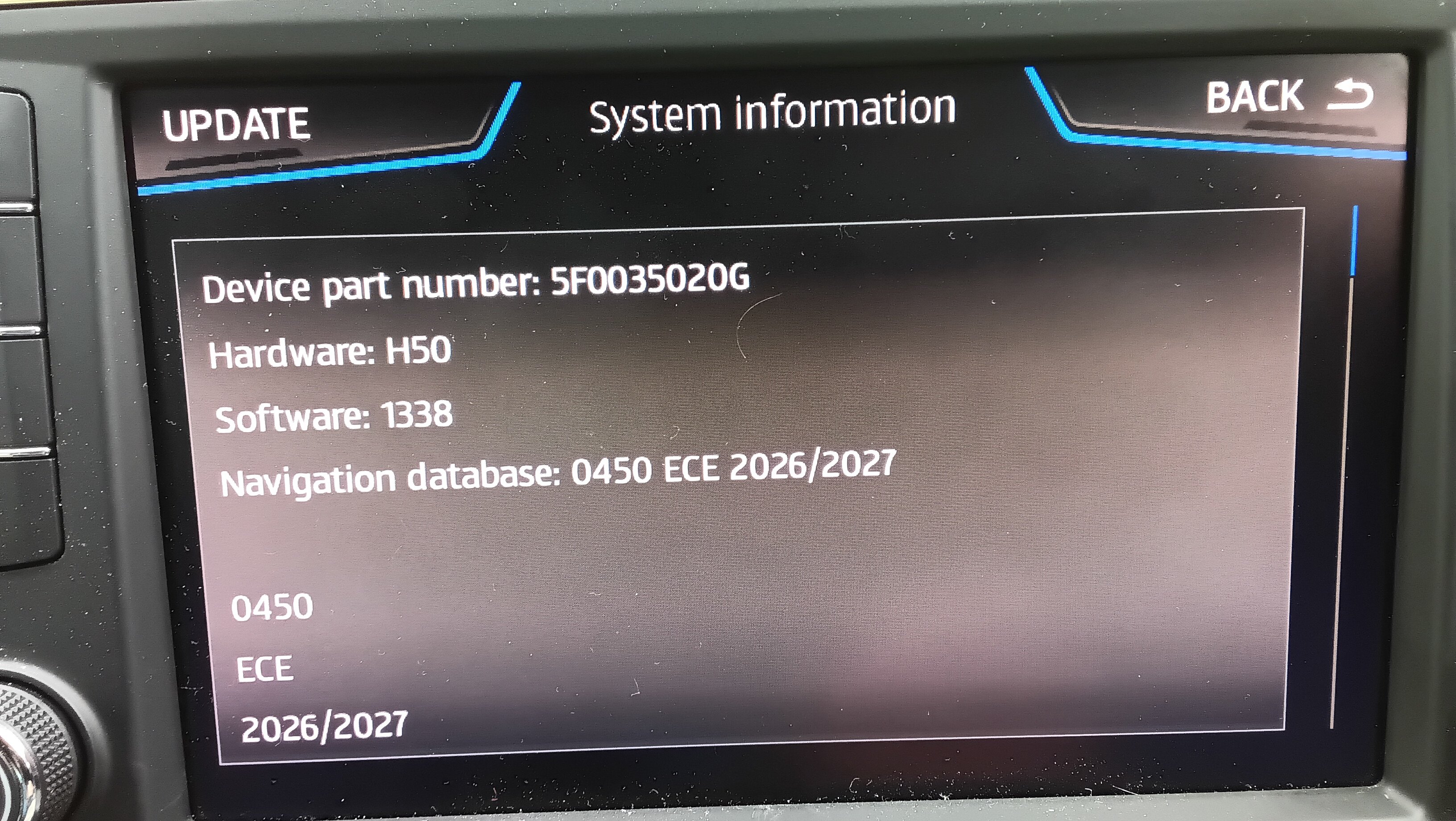
Subject to my final check https://www.briskoda.net/forums/topic/537850-columbus-map-update-2026-2027-mib2-high/#findComment-5996602 It's not identified by the txt files I looked. The key it's missing the part numbered which might be on the screen and definitely on another information screen when I check later. So I'm back to driving the car as a Skoda again.❣️ Skoda Lifetime Navigation FeC for the Mib2 High (Europe 08300008) That code goes into the Addfec list. 5 years ago when this all happened before if it's happened again.