Tell
Members
-
Joined
-
Last visited
Everything posted by Tell
-
Not connected to the 20 minute time out cycle of the infotainment units by any chance. Try 18 minutes and 22 minutes. The infotainment units will power down after 20 minutes. Its a Vag thing. Let's you use the unit to listen to stuff but if no physical contact to change anything will power down. Test it with the door open obviously not a solution, but if it behaves itself its that 20 minute cycle.
-
-
-
You do use that usb indeed. There is a pdf of how to do it. Attached is the VW... same as the Skoda. You have jumped threads thou this is mib2 high but you are asking instructions on mib3. I have answered that here but on the wrong thread mind you. Assume you don't have the connected service contract hence you are taking the file update approach. Discover_Media_Gen.3_November_2020_EN.pdf
-
Think it's this FeC that is required based on the more incredible bash documentation 023100EE There is a catch that you have to check that the firmware is applicable for the patch. The project tells you if it isnt. Some Audi drivers in the past have updated the firmware so it gets to a point where the patch has been written. A kind soul wrote the patch for my Seat so I didn't have to update the firmware that was 5 years ago. So there will be a table in the github project that shows which firmware release it works with, failing that it tells you when you come to the back up phase. Anyhow you can see why I don't experiment with this once it's working. ... all about your friends car.
-
I belive Audi were shipped like Seats so the FeC installed in the unit always tallies with the one in the map file. Their cunning plan was for you to buy mapcare which gives you the ability to update for a 3 years or whatever they sell. VW and Skoda came with unlimited mapcare with a lifelong navigation FeC. There is a combination of buttons you can press on an Audi where you can read off the cars in built FeCs. You look at that list and read it off. That is a hex number. The map file hex as @viper42 quoted / use his method shown but don't save the file after is compared with the units current FeC So the navigation fec on the file has to be less than or equal to the units navigation FeC shown on the unit in Hex terms. The more incredible bash project on github which also goes under the name Mr Bonk or thats what I can it can be installed in the unit and that will write the Audi life long FeC into the unit.... then that <= formula is satisfied and the maps can be updated. All the Audi drivers round here including @BooBoo124 will have used the github project. For RoW there is a catch unless they have fixed it you need to add the RoW life long FeC into the file, the code included in the project is the European one. This came up a few years back on the RoW with someone from your part of the world. The project comes with extensive documentation so you can find the code you need or trace back the conversation. So essentially you photograph the cars current FeC screen. Install the project. Mr Fixit youtube video on that. Make sure the cars battery is charged, or keep it running etc. Make sure you got the RoW life long fec in the file of the project not the European one. Then you run the project. Use to be backup and then update the fecs. If you update with the European fec it wont work. Think the process is install the project in the car which is on the SD card. Then take out the SD card use notepad in text mode to edit the file and add that RoW lifelong fec if its not in it. See notes on their materiel. SD card back in. Use addfec command of the project. Reboot the unit. Go to the audi fec display screen. Photograph it. If it has worked then you will see the updated life long fec shown which should be the audi RoW. Now you are free to update the maps. The project also unlocks assorted screens for off road, performance etc - you can ignore then. Just an added bonus. Was in the middle of typing this when Viper got in with the short answer.... bells and whistles in this. The main thing is to make sure the unit doesn't power down whilst running the github project. It will reboot the unit a few times but loss of power is likely to corrupt the firmware. A charger can be connected or do it with the engine running. It's a one off procedure which you can then forget. Last time I did was 5 years ago. You just leave the project installed but it's there if you need it again. The SD card for the project you fiie away. All clear as mud 👌. Footnote Audi conversation going here: Bit more more time and I may find the Ozzie conversation I had on the Audi RoW fec.
-
The question came up about RoW so we went back to 453 RoW.... we just need 473 😉. Why 450 series started to be talked about since 453 had been found but not 473 and @viper42 told me how to read off the navigation FeCs in the file. That had been a ten year quest of mine to fine where they were stored in the file, not that you can change them in the file but in the unit.
-
-
-
If the A5 has mib2 high then he needs this project: GitHubGitHub - Mr-MIBonk/M.I.B._More-Incredible-Bash: M.I.B. -...M.I.B. - More Incredible Bash - The Army knife for Harman MIB 2.x aka MHI2(Q) units - Mr-MIBonk/M.I.B._More-Incredible-Bash There are videos. Booboo here came that way. Audi folk have the same deal as Seat folk. Have to shift to life time navigation FeCs. Mib1 no new updates. Mib3 tricky as DIY you have to find a retrofitter although it may have the same deal as Seat now life long FeCs but being an import needs to switch to RoW FeCs from European. That link gives a pdf with RoW mib2 FeCs. I did come across a table that's shows everything. Ah Mib3 someone had put this together. https://www.scribd.com/document/814367576/FEC-All-Available-SWaP
-
As long as it's a Skoda.... Quite a few second hand Vag European cars get shipped to the Middle East where after changing the FeCs to the car brand they would come unstuck, but using the list above you'd get it working. Some Australians have actually imported European mib2 highs from retrofitters. I've advised them to use that Github patch software to get the RoW FeCs in. North Africa isn't served by mib2 high maps, mib2 standard it is, mib3 it is. That one comes up quite a bit as European secondhand Vag cars find their way to Africa. Think your slow download will be since you haven't got fibre to the home. Infrastructure problem 😟. It will arrive in NZ pretty fast at fibre speeds. I have had it all here from 300MBs in London to crawling rural wireless broadband of 30. Networked out from church roofs etc (for runner of wireless 4g) to full fibre to property at 900 MBs. Surprising knock on the door asking whether they could take some branches down at the bottom of the garden. Ours comes underground apart from collapsed ducting, camera down, washing up liquid and digging out to push it further along. Didn't help that the existing cable showed no entry point into the house. The house was built on it. Broken some installation rules. Chiseling on the foot of the house wall by the installation guys found a piece of BT plastic, then the phone cable and tube. Damp and radon gas can come why termination is suppose to outside the house... pass on whether radon gas getting into houses is an issue in NZ. Basically rural Wales has useless 4g in the main so I don't expect if I had a connected car it would not get updates. Some connected car users use Internet radio.... another dead end for us rural folk. What would we do without full fibre to the property 😍 Do you want to photograph your success screen so MartiniB can use it.
-
-
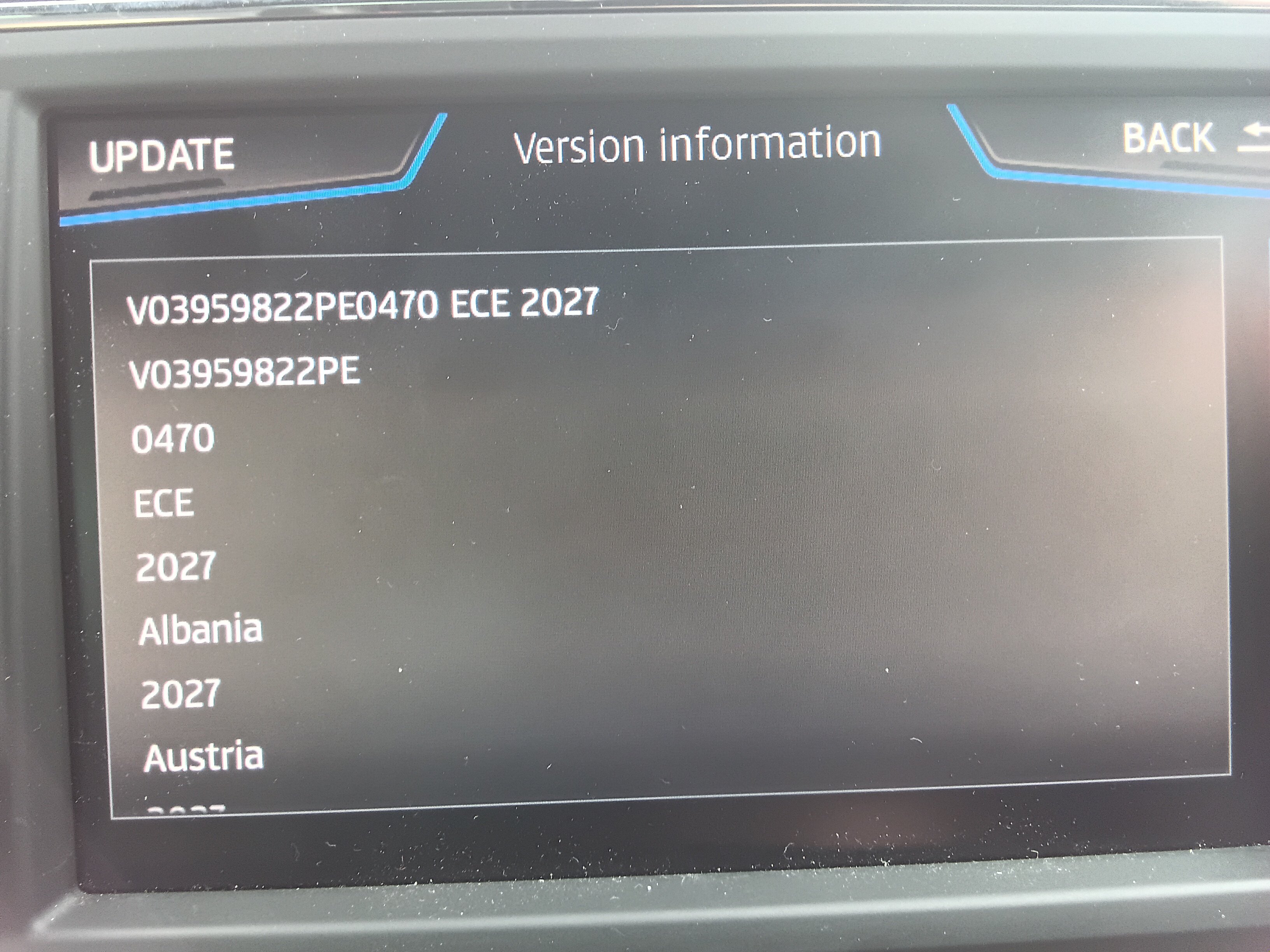
Do we know whether these need the Skoda / Audi navigation FeCs added. Ie. Like 450 where it was targeted at specific brands for whatever reason. Europe we can't check this by installation easily. @viper42 may know. I never found the package file that gave the game away in 470 that it was universal. There are a few first lines in the metafile which do say which brands... Will look when up. Could be extra work for some RoW Seat / Cupra folk to get it working otherwise in RoW same as we did for 450. Think I can see what you mean by the file name... started to download. Will have a look. Is it really 2026-27 or 2027... two digits missing off. Have a look at the title inside to throw lights on that and the meta file on target. Await Vipers examination of the package for the FeCs that which I did not find for looking before. (English expression... for cant find it)
-
Think that one is Microsoft getting up to its old tricks. Edge is supposed to seamlessly open them up or save the file but leaves it with that funny file name. That has been rambling on and off for atleast three years on a web search. You just put that .7z extension on it after it appears to finish. I hadn't come across it before until the muttering began. Chrome and Firefox not an issue.
-
-
Yes the only issue that bogged down a couple of Seat poster was that Edge hung after the download you altered the extension to 7z after with Edge then proceed. Windows 10 and 11 have the built in unzip so it will bounce out into the unzip directory if using the Edge rename. Firefox and Chrome you just use 7zip and right click on that drag and drop to a directory you have made. Or open with the built in unzip of Windows 10 and 11. Think its open with file manager from memory. The right click on the downloaded file.
-
Isn't it this post by Viper above ?... in old language it would be the November 2026 release but brought forwards due to streamlined processing. The November release was always coded to the following year hence this has 2027 on it. Then the June release Id expect to say 2027-2028 and hopefully that will turn up in February 2027. Everything is brought forward by 4 months now thanks to connected cars and the streamlining that was put in.
-
A note on browsers an VW 7z compressed file. A few Seat people have been having problems with Edge. The workaround is to do the download and when it's finished... it never appears as finished just waiting to open, you then rename the extension to 7z than you can open it. Muttering had appeared with the mib2 standard files. Then again with this file. Got to the bottom it now. On browsers: Firefox - no issue Chrome - no issue Edge - you need to edit the extention to 7z when it stops downloading and just sits there
-
-
-
Great. I was wondering this morning where the "June" release was which we had February in that more targeted release. So this in the November release.... connected cars processing with streamlined production of the map files means the turnround is much quicker. Even the mib2 standard TomTom cartography gets that as well. These are Here Maps ofcourse. Will load it up later today on my Seat with those dual navigation FeCs.
-
It wasn't in Seats they never got connected services till 2020. Mib2 connected services passed them by. 2020 with mib3 / 4 no TMC possible, was factored out. That was one of the Skoda solutions a Skoda dongle for mib2s. On these threads it hasn't been a success on those mib2s. The author of this thread went that way.
-
Because its been replaced with connected services. TMC you had to wait for the slot for the data to be sent out, connected services you just get it. No waiting. None of the mib3 / 4 cars since 2020 support TMC so that 5 year rules got the transmission of the data 🫣.
-
I did build a teletext decoder in the middle 1970s. It was an electronic magazine project. Had a turning wheel to produce 100, 101 etc. TTL or something integrated circuits to get your N gates or whatever they were called. A lot of soldering. I did get a trip to the Ceefax HQ in Whitecity. The person who use to sit opposite me was the wife of an esteemed in BBC circles an editor, lead guy. The job was to take the long form text of BBC News and convert it into those pages. Think because I'd built that decoder I was privileged enough to go up one Saturday morning, pass security, suspect not so much in those days to be picked up at the door and be taken upstairs to Ceefax HQ. Old Television Centre, Whitecity. I still got it, in the garage racking. The chap you see on searches as the cherished lead of Ceefax at the time. Not so sure of the wife. She was a statistician. Prior job was as a research officer at a university evaluationing BTs telecoms long range forecasting department in Cambridge. That was their hub of planning investment in new telecoms. I gave the chatter to the BT inspection people when they came here after we got full fibre in. In those days they had an experimental fibre link to Martlesham. Prestel was BTs dial up answer to Ceefax but two way. Digital exchanges were coming in. System X. The long range people had put out assorted evaluations of face to face verses teleconferencing.... Now everybody is at it. Ah the good old days. The research department also had their two pennies worth on investment in the British integrated chip industry. Processors were a glint on people's eyes. Pass on what was recommended. Academia had government's ear in those days, so interested parties in business talked the the academics, they talked to government and things were lubricated. Anyhow to answer your question Vag operates with a 5 year planning horizon so after they stop making that model / unit things start to drop off support. Web pages are deleted pretty fast. POI import for mib2 via Vag pages went exactly at 5 years give or take. We dont say this too loudly incase they do the numbers. So best not to highlight this stuff.
-
You need a co-driver.... well Cornwall you'd get sent down some silly roads where you co-driver navigator comes with devices on the lap switching between them. Google has farm tracks on their maps which is ridiculous and you can't get them to remove them either. If their car passes a potholed route that's good enough for them, even if its shown as not a through road and the tarmac finishes. Their concept of off road. UK we dont show off road... we hope. I see fantasy Waze maps on production live maps. User input you get fantasy maps. A proper mapping company validates user input. In Googles case their own staff enter rubbish.