Skip to content

Tell

Members
  • Joined

  • Last visited

Everything posted by Tell

  1. Tell replied to RodDuggan's topic in Skoda Karoq
    I got the Turbo Manager with Firefox installed but have got that 900Mbs connection so not a lot of buffering between here and wherever their servers are. That manager I got recommend by the youngsters at the time I had terrible rural broadband on an aerial system. The providers had the aeriels mounted on church roofs bounced around between houses... and down valleys by line of sight🤫. Taking government grant for a system held together by sticky plaster, all that changed when fibre to the property arrived. It was 2Mbs or patchy rural broadband. Had the latter first of all. Country living. Generally then these downloads were better when Europe had gone to bed. Doesn't make any difference now. Ofcourse the quicker you get it over the less chance of a wobble on their servers.
  2. It might not like NVME drive. I've seen people trying to do it with SSDs. I'd stick to a standard pen usb stick with a LED. I got this link when I googled. Somebody was asking on there. Others may be available. 64gb is the size you require. Amazon may turn up others. https://hardwarerecs.stackexchange.com/questions/18397/are-there-any-modern-usb-3-0-3-1-usb-flash-drives-with-indicator-activity-ligh It should be formated to exFat. NTFS is slower. I haven't said anything about issues using Macs recently. If you do you must run CleanMyDrive once the maps are copied over to the stick. Don't mix different things on the stick. Only the map files. There are reports that some Skoda firmware in the past needs updating if the map update doesn't work. Something to consider if it's not on the most recent firmware update. You might need a dealer for that.
  3. You are not in the Middle East, Africa etc. Vag cars were shipped there without the navigation FeCs enabled. You find a retrofitter if so to enable it. Other than that its going to be an unzipping error or file presentation. If it's a second hand car shipped into the Middle East or Africa needs the FeCs altered. That comes up a lot.
  4. Tell replied to RodDuggan's topic in Skoda Karoq
    Indeed you frig it to download all the fragments on route with connected services by putting a destination in to that far off place... like Russia or somewhere. That starts the connected services updating all the fragments on route. For usb without connect services it was Skoda people on this board as I recall that pointed out with LED it still had activity going on after it displayed it had done it as far the update showing on the screen. Thus they said they leave it in till all fashing stops. You practical Skoda drivers with flashing LED USBs in the know. I reckon it just updates your location first then if you pull it out you dont get the rest. Why when you read the pdfs its ambiguous. Anyhow youd just leave it in for a couple of hours driving if you had a LED less one. You only update the maps offline twice a year. Given the low cost of USBs you might as well just buy one with a LED and be done with it. Some hubs with USB C also have those LEDs on them which you could try if you had a spare one. Second alternative if you had such a device. Skoda make do approach. Anyhow that's why the LED activity ones are preferred. Footnote. With a LED USB you'd do the frig and watch to see what the LED did. Was it downloading all the zones to Russia?. Task for someone with a LED USB. That answers the question of whether it mimics connect services with the USB in or whether eventually it downloads the whole lot.
  5. Tell replied to RodDuggan's topic in Skoda Karoq
    Probably. Reckon this is the ambiguity. Leave it in for a few more days of driving about. The LED USB people have the edge on this one.
  6. Tell replied to RodDuggan's topic in Skoda Karoq
    The point is, those that use a USB stick with a LED activity light see data activity on the stick after the map version has changed on the screen. Thus they dont pull the stick out till that's finished. You live in Australia with relatively small map. It probably isnt segmented. Europe is. The map file structure is designed for connect services and will update as required as you change the segmentation. Thus what I reckon people are seeing with LED USBs is the rest of the map outside their local zone still being read in. No LED on the USB leave it in a bit longer. Say a couple of hours for Europe. For Australia / NZ you probably dont need to be so careful. You can eyeball the files and count the zones. I did once. Compare.
  7. Tell replied to RodDuggan's topic in Skoda Karoq
    The point is, those that use a USB stick with a LED activity light see data activity on the stick after the map version has changed on the screen. Thus they dont pull the stick out till that's finished. You live in Australia with relatively small map. It probably isnt segmented. Europe is. The map file structure is designed for connect services and will update as required as you change the segmentation. Thus what I reckon people are seeing with LED USBs is the rest of the map outside their local zone still being read in. No LED on the USB leave it in a bit longer. Say a couple of hours for Europe. For Australia / NZ you probably dont need to be so careful. You can eyeball the files and count the zones. I did once. Compare.
  8. Tell replied to RodDuggan's topic in Skoda Karoq
    But the main page is here for latest mib3 navigation file release: https://www.briskoda.net/forums/topic/513799-mib3-map-updates-202406/ Poor old @MartiniB does all the work but people try and reinvent the wheel. So this one is off topic 😉. You get this on the SeatCupra board. There is an area but think the files are specific to the model. Then you get duplication. The main index of the files is here: https://www.briskoda.net/forums/forum/7-audio-electronics-and-security/ The question I seem to recall is why the maps wont update if on connected services. The importance of the yyyy.dd and not the file name. The offline maps can't better the connected services maps if they have been distributed on time. 2025.05 on file did come out before the connected services got it on some units. If you give up connected services then it may take 6-12 months before the offline maps catch up. You look at @MartiniB files since he's the resident Guru on sniffing them out. Board members pass any onto him where his sniffing out algorithms miss them out. As said Vag brands can get tardi at distributing these files. Sometimes Skoda is a head, VW or Seat. Sometimes one of the brands misses out a release as Skoda did in the past and became six months behind VW on the mib2 standard for three years or so. Skoda at the minute is ahead in general on all the files. On that very first question the YYYY.MM may change but those with LED usbs say it continues to flash which means it hasn't completed. My deduction is dont pull the USB straight out if you dont have a LED one. The maps are segmented into areas for online update. Its likely that when the YYYY.MM changes its updated just your local zone, like South England etc. The structure of the file is designed for connect services where it pulls back what it requires. Leave the USB in longer and it actually completes in total. Why people like the USBs which have a LED on them.
  9. Tell replied to RodDuggan's topic in Skoda Karoq
    You are only suppose to be a member if you know what you are doing to test out new builds. One of the complaints is that Microsoft has cut its testing staff and relies on the Insider programme as a cheap alternative. The issues 24h2 were identified by people on the Insider programme and ignored. Not making the best use of the programme. I didnt bother. I could not risk loosing the PC I used for business, so whilst I joined the programme I never installed any builds.
  10. The last person who was having issues. Track backwards from this: https://www.seatcupra.net/forums/threads/updating-the-inbuilt-mib2-satnav-mib2-tricks-and-mib1.388586/page-160#post-5082309 A little test :). Facing the same issues as you.
  11. Tell replied to RodDuggan's topic in Skoda Karoq
    They are probably on unsupported hardware which could be 32bit or the processor not having that security chip. Later the solution I use on the old office computer is this https://www.seatcupra.net/forums/threads/windows-11-22h2-23h2-24h2-upgrade-on-unsupported-64bit-hardware-link.470723/ Use the server command, a wrinkle Microsoft left in for "server" machines. Looks like it will work with Windows 11 25h2, did with 24h2. Then they might have a fully specified Windows 11 machine with pesky drivers. Had to use this to find the offending one. https://www.seatcupra.net/forums/threads/windows-11-24h2-sorting-out-those-pesky-drivers-that-stop-it-doing-the-second-boot-on-the-upgrade.477634/ 24h2 had many upgrade issues from 23h2 on Windows 11. Some users may stick with Windows 10, paying that fee / offer for one year of updates. Others may go to the Internet of things release with a long life of updates. A token can be bought for the license. Only gives you three years. We are alright on Windows 11 24h2 on a compliant machine that should go into Windows 12 at some point. The unsupported ones probably wont get to Windows 12. Time will tell. Then its out it or the Internet of things release for 11 to buy time. With crafty editing the implementation you should be able to retain the existing data and programs. Examples on the YouTube. Think I'll buy new hardware myself when my old office computer from 2012 isnt up to it - 3 years is a short period. The newer 2 in 1 laptop is fine.
  12. The secret source is in here but you got to read the thread. Daz3d is the guy with it. https://www.seatcupra.net/forums/threads/updating-the-inbuilt-mib2-satnav-mib2-tricks-and-mib1.388586/page-144#post-5056706 You will see people asking with the pointer. Also in some cases you have to try an old mib trick of going back releases. Which you'll see on the thread. I recommend buying a mib2 card as your development card. The CID is recognised by mib1. Don't do the hack of the regions to get 106 map on it buy the bigger card and keep the current mib1 card as is... people get in a mess deleting what they have working. It does work on Skoda units. One person had it working here. Best of luck. All the ingredients are there you just got to find it 🥰.
  13. Tell replied to RodDuggan's topic in Skoda Karoq
    Yes that's your tool to add corrections that go into the moderation cycle. Element of AI in there. They can get ignored at times and the underlying maps aren't always the most recent but if you do GPS track mapping for hiking those tools you can lay a track and reflect back onto Map Creator based on newer aeriel images. The Here Maps staff have the latest aerial images but due to licencing Map Creator shows more the public domain ones. Cheaper for them.
  14. Tell replied to RodDuggan's topic in Skoda Karoq
    I do send people of to look at Here Maps Mapcreator at times where the cars maps and road dont tally. You will see in their development database the road speeds given. If you see 40mph you know its been done. You have the max speed and the average speed box. I kind of hope the routing algorithm uses the average speed but moderated by traffic reports.
  15. Tell replied to RodDuggan's topic in Skoda Karoq
    Well the youngsters like to reject the built in maps and use Google Maps etc but neglect to understand the relationship between ACC and the built in maps. Those with EVs and the predictive regeneration.... still you can't tell some people. Google maps aren't produced by a proper cartography company. If they can get a camera car down it, its a road although its a private un made farm track ticks the boxes. Ditto builders roads on estates. They are put in by the estate builder. They get digitised by Google maps and it becomes a fact. Now if you were driving a bull dozer it would be fine. The roads are grubbed up, houses built on them but still they remain in Google maps. Then the mapping companies digitally analyse each other maps and say, hey there is a road here and put it in, when there isnt. The blind leading the blind if good validation isnt carried out. The OS Planning maps are the defacto statutory official maps of the UK. Crown copyright. If it's not on them, it doesn't exist as a passed development. The house numbers are allocated by the LA on these maps with their road names added. They dont have road speeds, those have to be extracted by the cartography companies if they are doing it correctly by writing to the LAs. This they do. Others dont. Road positioning, mapping car or aeriel images. Some cartography companies use synthetic house numbering where they stretch the house numbers equal distance between the start of the road and end of the road. No good if a park is in the middle. Lazy way of doing it. For my sins I did work in health service planning where we used gravity modelling, travel time modelingl for service planning plus all the other management science techniques. At the time when the NHS has planned and had capital to build things. We started to get into GIS as NHS planning just at time when it was abandoned in favour of market management, so I shifted to that but kept an interest in spatial stuff. Well us mathematician dont trust geographers 😀. I'm a management scientist by profession. I did built a microcomputer from chips once... many solder joints. It was an evaluation I was given by someone advising the BBC home computer project. Here you go try building this, my old Senior Research Fellow manager. Had a minor in computer science. Dry solder joint in the power supply stopped it working. Built a teletext decoder once... misspent youth. Anyhow. Zip files. The built in unzip in Windows these days can be used rather 7zip. 7zip can be used but use the most uptodate copy. It seems in anycase the most recent reports of it moaning seems to load fine in the car. Skoda seems to have an ability of not being able to zip their files too well. I say loading up the most recent maps in the car is like hot cakes, get them whilst hot in case they go.
  16. Tell replied to RodDuggan's topic in Skoda Karoq
    I keep three versions back. The complication with the connected services is whether in contract or not. If in contract for map updates then then off line thread isnt for you. If shifting from contract services to a six monthly off line MartiniBs threads are and you need to know your yyyy.mm which is really the map seriel release in the unit. If @MartiniB link as posted above has a latter yyyy.mm then you are in business for a USB map update. It is the same as mib2 its the seriel number of the map release which is the key. Offline maps tend to be released June / November but appear on the file servers earlier discovered by those people that look for them. Also Vag sub brands get lazy at publishing them and drag their heels. Hence you take the first Vag brand one released and dont wait for your tardy brand to publish it. Its all the same. At the minute all releases for June are out and we seem to have the mib2 standard November release as well.
  17. Tell replied to RodDuggan's topic in Skoda Karoq
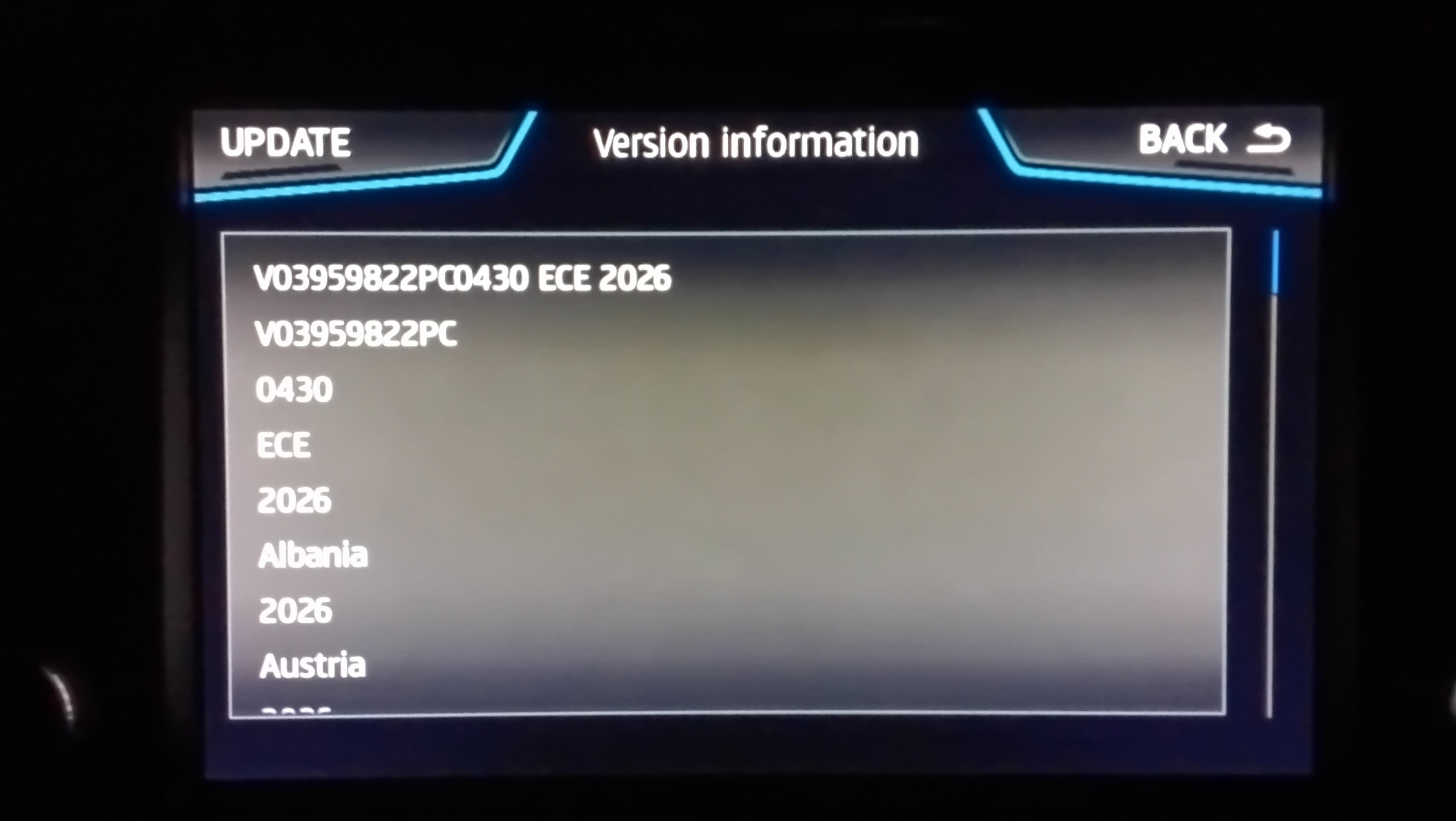
    Yes the maps have seriel codes known to the unit the yyyy.dd is the code for mib3. Mib2 they are just numbers. One set for mib2 standard, one set for the mib2 high. Those codes are the same across all Vag brands and the map files are interchangeable as long as they are for the same release. Mib3 has I recall three types of infotainment. Youd have to eyeball @MartiniB files. I've seen three for mib3. Two for ICE, one for EVs. When you could freely look at the VW site you could place what worked with what. I believe the third less common file is for large screen models. When you enter your VIN into say the Skoda site it only tells you yours. The logo files that MartiniB publishes you try out each mib3 if uncertain. It only works with the one it's designed to work with. I got a suspicion that the third one is only seen on Audi. When downloading from the portal on the browser you can read, button left on Firefox, the name of the file or when it downloads. Thats the file type and place against @MartiniB navigation links. Then those are the future files you want, bracketed by his posts into VAG navigation unit. As for forward releases. That yyyy.mm is like the mib2 standard release an upgrade will only be actioned if yyyy.mm (new) > yyyy.mm (old ) for mib3. In mib2 there is the developers menu (back end menu). SWDL is the software download command in that. Any file, firmware, maps, pois, logos etc. Can be uploaded to the unit irrespective of whether they are "new" or "old". You can go back versions or write onto itself. Mib1 you could get into this via a very long hold on the menu button. Mib2 they locked that down but with VCDS, Obdeleven etc you can unlock access to the developers menu and the long hold will give you the second screen with the SWDL command on it. You can also update each entity, region etc of the maps. I pass on what some of the map entities are. For example you can update just Iceland in a Europe in a mib2 high. This is one of my tests in playing about with the maps - lot faster than the 40 minute for all of Europe. The heady days of backend menus for mib3 is over, you are locked out as far as I know. Thus you can't reinstall an old map or a map onto itself using the backend developers menu. Its not available. It could be a case of never say never. Vag want to keep wondering hands out of the backend of mib3. You can look at the SWAP / FeC codes, the first screen on the long hold, but not the second screen of the longer hold on the menu button. Edit You'll be pleased to know looking at MartiniB's last mib3 post of file links to the map servers for navigation for Skoda cars, currently only deal with one file type... the other two haven't arrived yet to Skoda 🫡. They are on other Vag cars. https://www.briskoda.net/forums/topic/513799-mib3-map-updates-202406/ Anyhow that check above is the one to get you into the ball park. Then you read off your yyyy.mm from the infotainment unit and compare with the published link of whether its an update. If ofcourse you have subscribed to connect services for map files and its correctly configured, you as primary user, not hiding your identity since you want to murder someone etc... then you should get it automatically. Not good to go incognito in the car with connected services you dont get updates and youd still get nobbled for crimes.
  18. Tell replied to RodDuggan's topic in Skoda Karoq
    Well if you got an active connect services contract for navigation you have no real requirement to update the maps via the download. Its all automatic. The infotainment screen shows you the current release. Under contract map services you should get one monthly. If not under contract then they are made available twice a year. @MartiniB publishes the serial number. Obviously if you get them via the portal the webpage author may not edit that into the front web page. A helpful soul told us where to find that in the files after I'd been asking. The issue at that time was across Vag old mib3 maps were shown, with different file names by brand although all the same update. So now we know how to read the yyyy.mm and they can be placed by their update, date, not filename. Currently only Skoda files are the most update mib3 files which are interchangeable. That may change. Thus its best to look at @MartiniB links if you want the best updated ones rather than the portal of the Vag brands. If you have brand loyalty with offline maps you may be running with old navigation files that you can better. If you use connect services and pay for navigation map file updates and have the connect services set up correctly, then it automatic. MartiniB posts the threads here which cover all Skoda navigation models. https://www.briskoda.net/forums/forum/7-audio-electronics-and-security/ Clear as a bell.
  19. Tell replied to RodDuggan's topic in Skoda Karoq
    Probably use roapy old servers. The faster you can get it off the less likely you'll be exposed to server issues. VW servers tended to be faster but then Skoda has the goodies on them of recent. Doesn't hurt using the Turbo Manager or similar if you experience issues.
  20. Tell replied to RodDuggan's topic in Skoda Karoq
    Yes but if the server has a wobble the download manager can handle it. Where the download managers come in. Mega people are hot on them prior to them offering their own. This is the one that mibsolutions recommend https://www.a5oc.com/attachments/mibsolution-one-fix-download-speed-vag-mib2-1-pdf.184875/ Its all the same stuff, parallel connections. We assume that Skoda has that facility on the server. They probably all do. The Turbo Manager is the one I use. Firefox addon.
  21. Tell replied to RodDuggan's topic in Skoda Karoq
    Reckon download manager is the answer then you also see the incomplete files that you can scrub. I'm probably too use to using the Turbo Manager. Good point making sure you got the space. I might also have a ridiculous 900 Mb connection as well 🫠. Started on rural wireless broadband moving from fibre in London to wobbly roof aerial rural broadband. Two years of getting up in the night to cokes these big downloads. Turbo Manager comes into it with that. Then on full fibre to the property and installed Asus mesh, outing the OpenReach router. Like living in a hotel in London now... mesh and fibre. 4g is rubbish thou in these parts.
  22. Tell replied to RodDuggan's topic in Skoda Karoq
    You may need a different browser / download manager. If it's a problematic connection using a download manager addon to Firefox can solve it. This is the fix I recommend to one person and it did it. https://www.briskoda.net/forums/topic/532458-columbus-map-update-2025-2026-mib2-high/page/2/#findComment-5958751 That was on the mib2 high file thread but may help with you. Dodgie servers create problems and connections. Download managers iron things out. The mibsolutions people swear by them since their servers are pretty bad. You'll see the addon talks about multi threading. You just install it. I just leave it sitting there once installed. Didn't configure it. There it's sat for several years. Different browsers may also work better. That was a GitHub project which works across browser. I reckon it could be built into some now.
  23. Tell replied to RodDuggan's topic in Skoda Karoq
    If in Europa you can do better than that with @MartiniB files. The thread labelled 25.02 has Europe in it more recent. Its the old trick. Vag websites dont show the most recent files at times. Currently its across all sites more or less you can better what a Vag site is saying. Its like libraries of old where new books come in but are waiting for the plastic film, the stamp page etc. The Vag file server has the file but the web site designer hasn't edited the page yet. This page for the latest mib3 navigation files that the vin lookup may not have (that has 2025.05 for Europa):
  24. That's not going to be mib3 friendly though. The taxing one for new owners of Vag cars since 2020 kitted out with mib3 putting logo management onto their own locked down import files or OTA where missing logos exist since Phonostar their contractor doesn't have them in their database. Mib2 you can top up via assorted methods. The issue with mib2 is where people delete them on mass and have to get them back. VAG no longer offering the database as the first step. In the UK stations come and go, logos change so without a user solid way of doing it, the tail is wagging the dog, the case with mib3. Where that web site will come in handy for anything other than mib3... plus the Phonostar extraction of their logos or using that radio net website. The manual method going back to the horses mouth is the media.info website as in this example. I've only had to do that on 2 or 3 stations, the rest were in the car's system. If there is a new station you just look it up on the media info website logo for VW cars and add it to your USB. As VAG stopped publishing the logos their saved one on a stick, I augment with the ones I got off the media info site. If you use the Kodi radio de app logos are sometimes useful for where the database doesn't have it in and you enter by IP and need the logo... a thousand and one uses of logos. Rasberry Pi apps as well. All of which is no good for mib3. Eg. Mib1 / 2 method. Boot and braces: https://media.info/radio/stations/times-radio/logo-for-vw

Important Information

Welcome to BRISKODA. Please note the following important links Terms of Use. We have a comprehensive Privacy Policy. We have placed cookies on your device to help make this website better. You can adjust your cookie settings, otherwise we'll assume you're okay to continue.

Account

Navigation

Configure browser push notifications

Chrome (Android)
  1. Tap the lock icon next to the address bar.
  2. Tap Permissions → Notifications.
  3. Adjust your preference.
Chrome (Desktop)
  1. Click the padlock icon in the address bar.
  2. Select Site settings.
  3. Find Notifications and adjust your preference.