
PoloPaul
Members
-
Joined
-
Last visited
Everything posted by PoloPaul
-
Yes I get exactly the same
-
Ok - other than checking in ‘System’ to see if versions are updated dated to a higher number - how do you confirm that OTU updates are complete. Only time I seem to get updates is through main dealer.
-
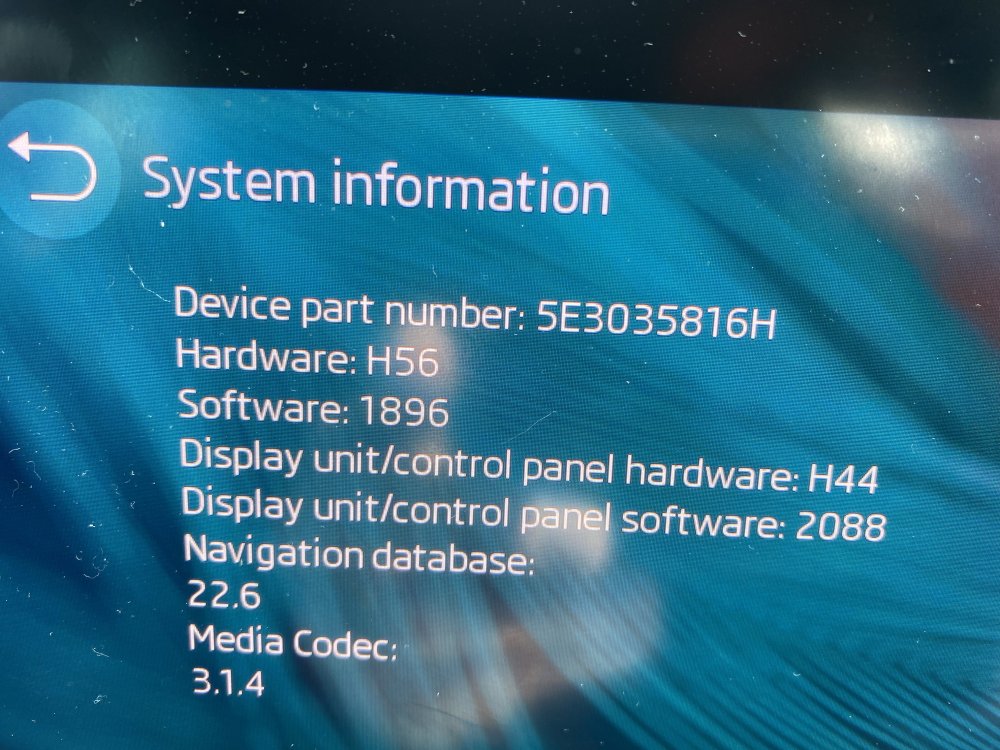
Beginning to wonder about Over The Air updates. I assume my 2020 Octavia 4 receives OTA except for major fixes (they are main dealer) However as you can see my Navigation is on 22.6 whereas others in this thread are showing 22.8. I went into Menu-System-Updates on Colombus an hour ago and pressed ‘Update’. It tells me not to use vehicle whilst updating. I’ve done this before but have never seen confirmation of success or otherwise. The Colombus built-in Navigation is poor and I rarely use it preferring Google or Apple Maps through Airplay. However 22.6 navigation when others have posted photos above showing 22.8 makes me wonder about OTUs and whether they are happening for my car. Any insights from users of this thread gratefully received.
-
Same here and same car and infotainment. 4 times in one hour yesterday and about 6 times across the whole day. Happens now and again - sometimes over several days then then nothing more for a week or so. Hopefully it is not in-car hardware (OCU replaced in mine last year) and is down to The Skoda network-carrier. When it does happen to me it is generally, though not always, in my own locality
-
Your Skoda dealer has to get authorisation from Skoda Uk. They will ask if you have had your dealer investigate. So yes go to your dealer. After that if matters do not improve you can escalate to Skoda UK by phone or Skoda Executive by email.
-
My own issue precisely! I have had OCU replaced in November and everything has been working brilliantly until…. recent daily now several times daily reboots preceded by PDC (but I associate that with the reboot) And….my warranty runs out sooner than yours….in September. I have zero expectation of post warranty Skoda support…free of charge.
-
Thanks Bial
-
Hi How often is your Infotainment restarting? I my OCU replaced in last autumn and two years of frustrating non-connectivity and malfunction was solved. I am on SW 1896 and am assuming I am receiving automatic online SW updates(?). However for the last two weeks I have been experiencing at least daily (and now more than once daily) Infotainment reboots/starts whilst driving. It always behaves well once re-booted As my warranty expires in September I need to know whether I am aline in these recent reboots or if others are experiencing these daily+ reboots before I report another fault. Please let me know. Thank you
-
Looking very positive 👍
-
A fortnight’s absence from ‘Pop Pop’ following an update is very positive 🤞
-
I would expect that this update ‘would’ solve that issue. It is apparently a very large update with many minor constituents. In my case other problems (not Kmh) resulted in the garage performing another scan which revealed that several components “had not taken”! These were then applied. So it seems that in my case although the SW read 1886, this did not, on further analysis, mean that all aspects of the large1896 update had taken.
-
Check your Software Update Number - my latest is 1896.
-
I had the OCU (Onboard Communications Unit) replaced - this is what connects the Car to the Skoda servers to provide the data for licensed features every time the car is switched on. It thereby give's functionality to SOS, Navigation, Users profiles etc. I may be wrong but I believe the ‘Head’ unit is the 10” display screen under the driver’s mirror. I did not have this replaced. My car retained all updates up to and including 1896 but still had all the start up server issues including Pop Pop SOS. Once the OCU was replaced my system became stable and has remained so. So the issue for my car was not the Head Unit but the OCU which sits behind the drivers display in front of the steering wheel.
-
-
-
-
-
-
-
As there is no Pop Pop SOS syndrome following SW 1896…….is it possible that the cause of those irritating issues may lie other than with the OCU? When my car had issues that my Service Partner was unable to replicate/solve I raised complaints with SkodaExecutive. If they felt I had had tried but could make no further progress myself with my Service Partner they would talk to to them directly. My Service Partner then on one occasion discovered a fault code where they could find none before and on another applied a SW update that had been “missed” alongside the SW 1896 upgrade.
-
4 weeks since I was dogged by problems to do with connection to the Server. These faults included the ‘Pop Pop SOS’ issue only arose following on upgrading to SW 1896 six months ago. Since having the OCU (Onboard Communications Unit) replaced 4 weeks ago I have had no further problems.
-
Today, for the first time in 2 years 2 months and 3 weeks since I bought my brand new 1.5 SEL FE all systems in the car are working as they should have done from day one.
-
I called Skoda Service. They spoke to their technical people who confirmed that any quality CR2032 should work. They then spoke to my Dealer who stressed that both batteries in both key fobs must be changed when the ‘battery weak’ warning comes up. Having only replaced one battery in one key fob I duly put a new Panasonic CR2032 in the other key fob and took them both to open the car. I am pleased to say that the ‘warning replace battery’ did not come up for the first time in weeks. 🤞 The dealer also helpfully clarified the ‘Skoda Own Packaged’ battery issue. Oddly there is logic in this! In order to verify if the keyfobs are faulty the dealer must install the Skoda Part with an official Skoda part number hence the Skoda Packaged battery (My factory installed batteries were Panasonic but apparently Skoda now fit Varta) . If the system continues to show the ‘warning change battery’ message then the dealer can organise a warranty replacement of both keys. However this can only be done if the key fobs have had an official Skoda Part (battery) installed. Owners will then also be reimbursed for the cost of the ‘test’ batteries. That does seem fair. So from year to year you can change batteries. The Dealer explained that all CR2032 are 3v but that only certain brands (Panasonic/Varta) deliver sufficient current. The vital point is to change BOTH keyfob batteries at the same time and then bring both into the car for the system to register the strength of both batteries. If your DIY change still brings up the warning, you can get the dealer to change the batteries and test them with the car at the garage. If the ‘Replace Battery’ warning comes up after that, the keys will be replaced under warranty and the cost of the ‘trial’ batteries will be reimbursed.
-
-
After 1 week with the new OCU I have experienced no further instance of ‘Pop Pop SOS’ with loss of function. I will update further in a few weeks.