
classic
FREEDOM
-
Joined
-
Last visited
-
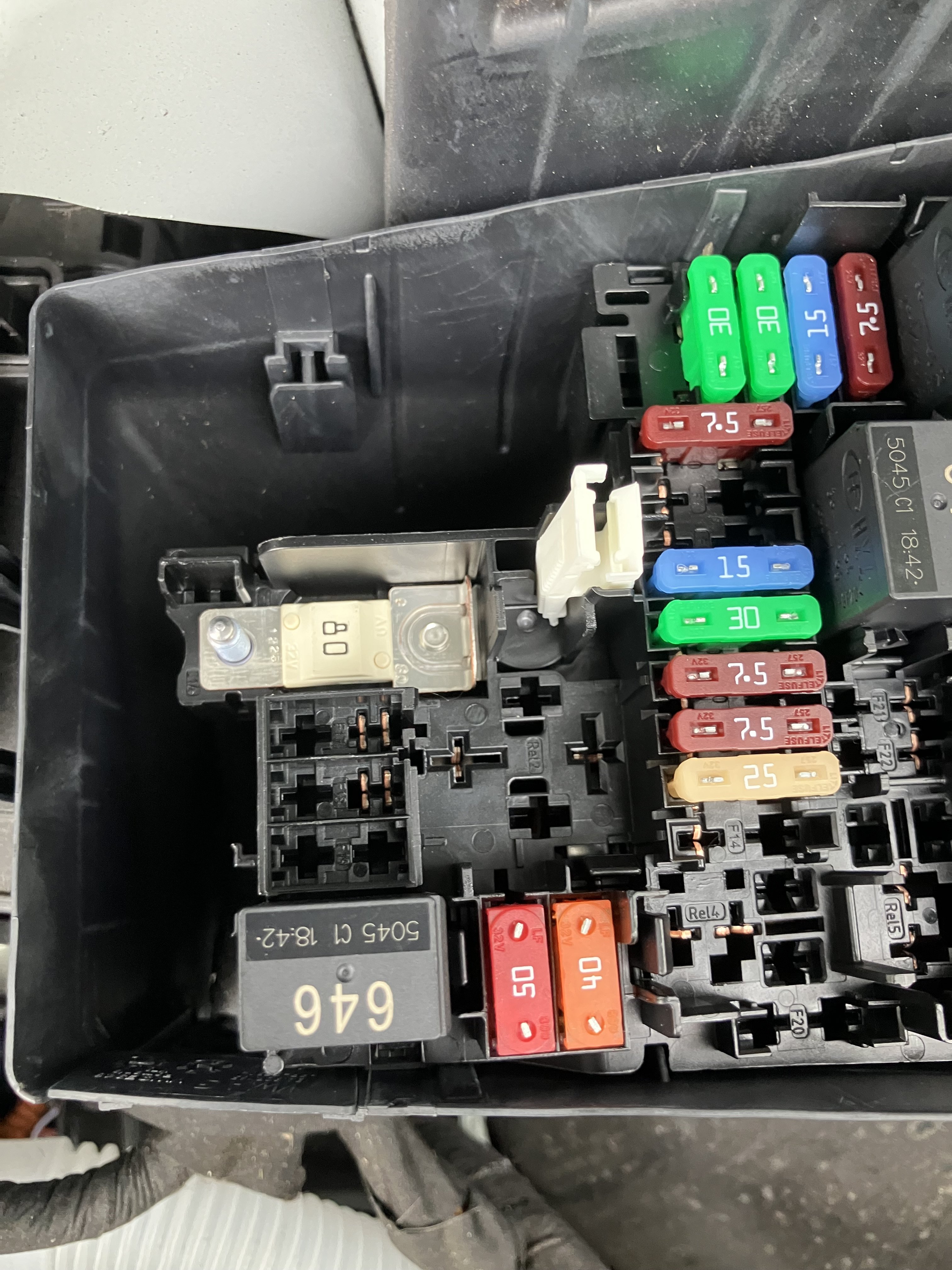
Yes, just looked that 50a is for heated windscreen which mine hasn’t got. Thinking about it, that spare 80a might be for connecting high load 12v stuff for converting them to emergency vehicles for example, or maybe it is a common fuse box for all VW group stuff including Porsche, Audi etc and it is easier for the robots to just make it with that 80a fuse. @AGFalco the stud doesn’t look connected, it doesn’t touch the fuse strip and looks like it needs the nut to make a connection.
-
Just updated my post above that apparently it is unassigned fuse 1.
-
My guess (and it is a guess 😬) is that it would be for some option like Heat Pump. Mine is a 60 sel and I can see there is an extra relay and 50a fuse in your fuse box compared to mine. Edit : Apparently it is fuse 1 and shown not assigned. I googled it at and it came up fuse 1 in the under bonnet fuse box is not used empty/spare.
-
Hi, just looked at mine, it is the same - no nut.
-
Just to add, the OVO app is linked to the car in my case. It can control either the car or your charger depending on what is compatible. In my case my charger, which is a podpoint from 2021 is not compatible, but the car is. I’ve removed all schedules from the podpoint app and set it in “dumb, always on” mode. When I plug in, the car will usually immediately charge for a couple of minutes in which time the OVO app is working out how best (for them I presume) to do the rest of the charging to be ready for my requested time. It then pauses the charge and will charge as required to be ready in time. I work shifts with times that vary every day so I often alter the “ready by” time and it has always worked as expected. The only thing to ever check is that the max charge setting of the car is the same as the maximum setting in the OVO app. Good luck.
-
I’m using OVO charge anytime and it works absolutely seamlessly with my Elroq. I believe it’s maybe more expensive than octopus iog but it actually works and there was a 3 year offer of 10,000 miles per annum of free charging with VW group vehicles when I got the car last year. The OVO system is not tied to 0001 to 0700 or anything either, you set the app for the time you want and the level of charge and plug in.
-
-
-
-
-
I’m not convinced there is any advantage getting a heat pump over the normal system in the UK. It isn’t cold enough for the added cost and complexity to really pay off in my opinion. Winter weather will hit the range by about 25% in my experience, if you are able to get home charging you can mitigate this by preheating before you set off, likewise in the summer you can precool it with the aircon. Not sure on the packs, mine is out of the box SE L spec and I’m not missing anything. Apparently the matrix headlights are good.
-
Excellent work doing that job. I’ll start planning for my Elroq in 4 years time.
-
BBC NewsPeak District National Park partnership with Skoda critic...Skoda installs adverts for one of their new cars on Peak District National Park signs. Any publicity is good publicity !
-
It wouldn’t be the first Skoda to have the transport blocks left in place on the springs. Does it look like it is sitting too high ?
-
Personally, I wouldn’t worry about an occasional trip or journey where you might have to leave it in a low state of charge. In the example you’ve given above I would charge to 100% at the IONITY and remove the following day issue.