




GarySN
Members
-
Joined
-
Last visited
Everything posted by GarySN
-
Hi @JR RS I know this is an old post, but looking at your photos, the power cable for your Blackvue looks like it goes through the A5 camera housing (as opposed to being routing round it). If that's the case did you have to make any modifications?
-
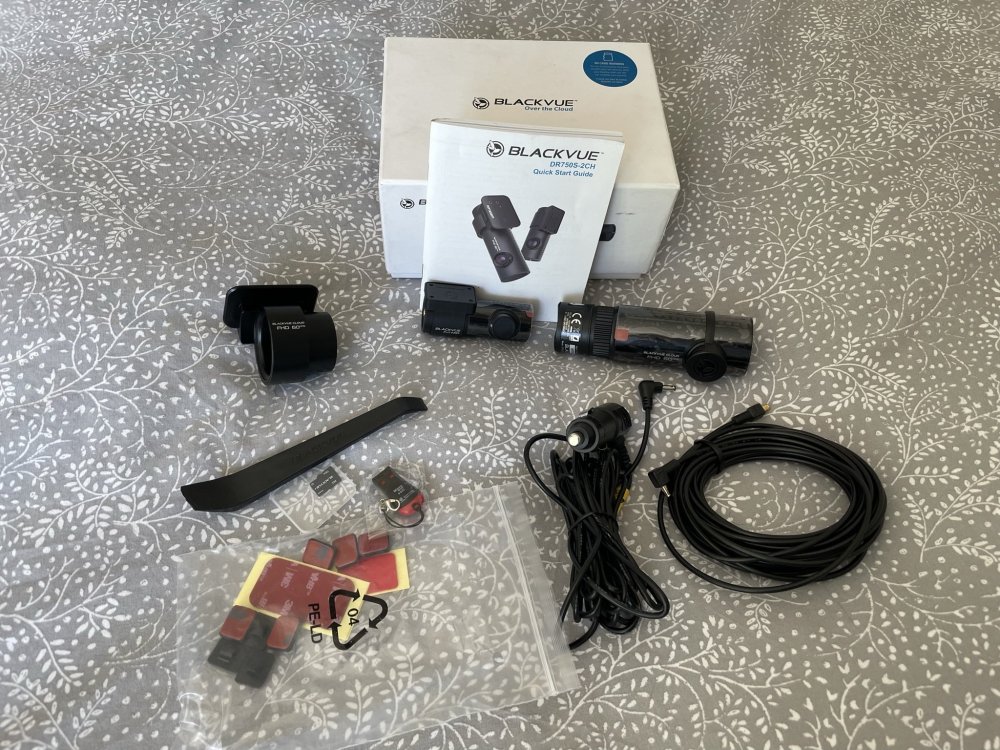
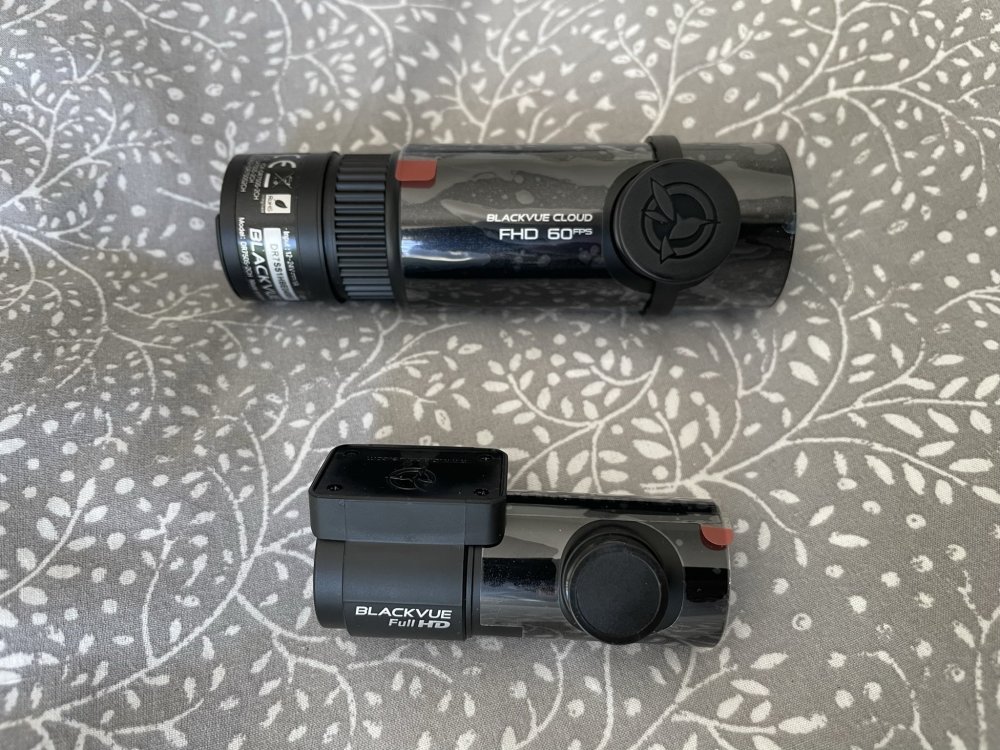
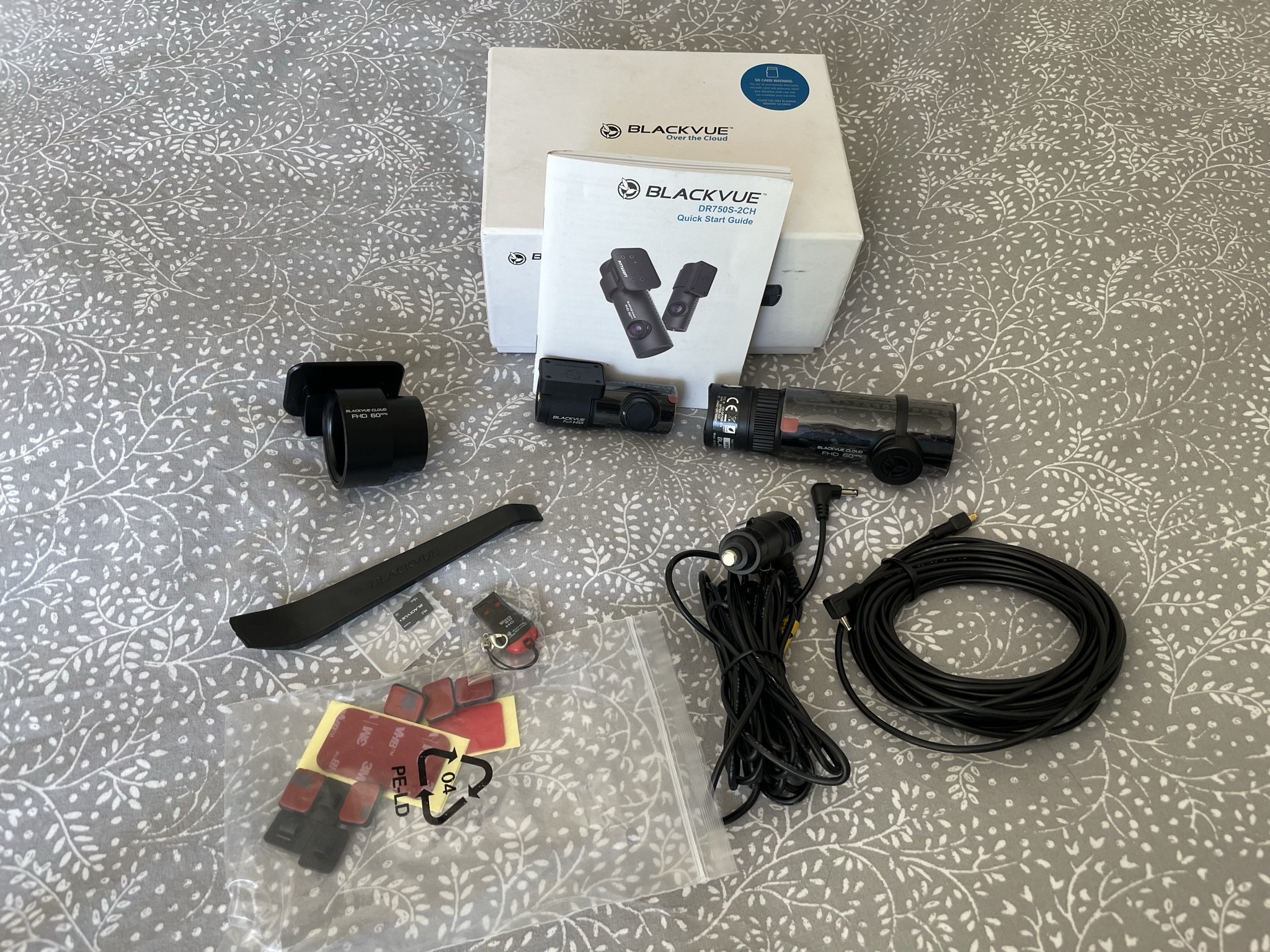
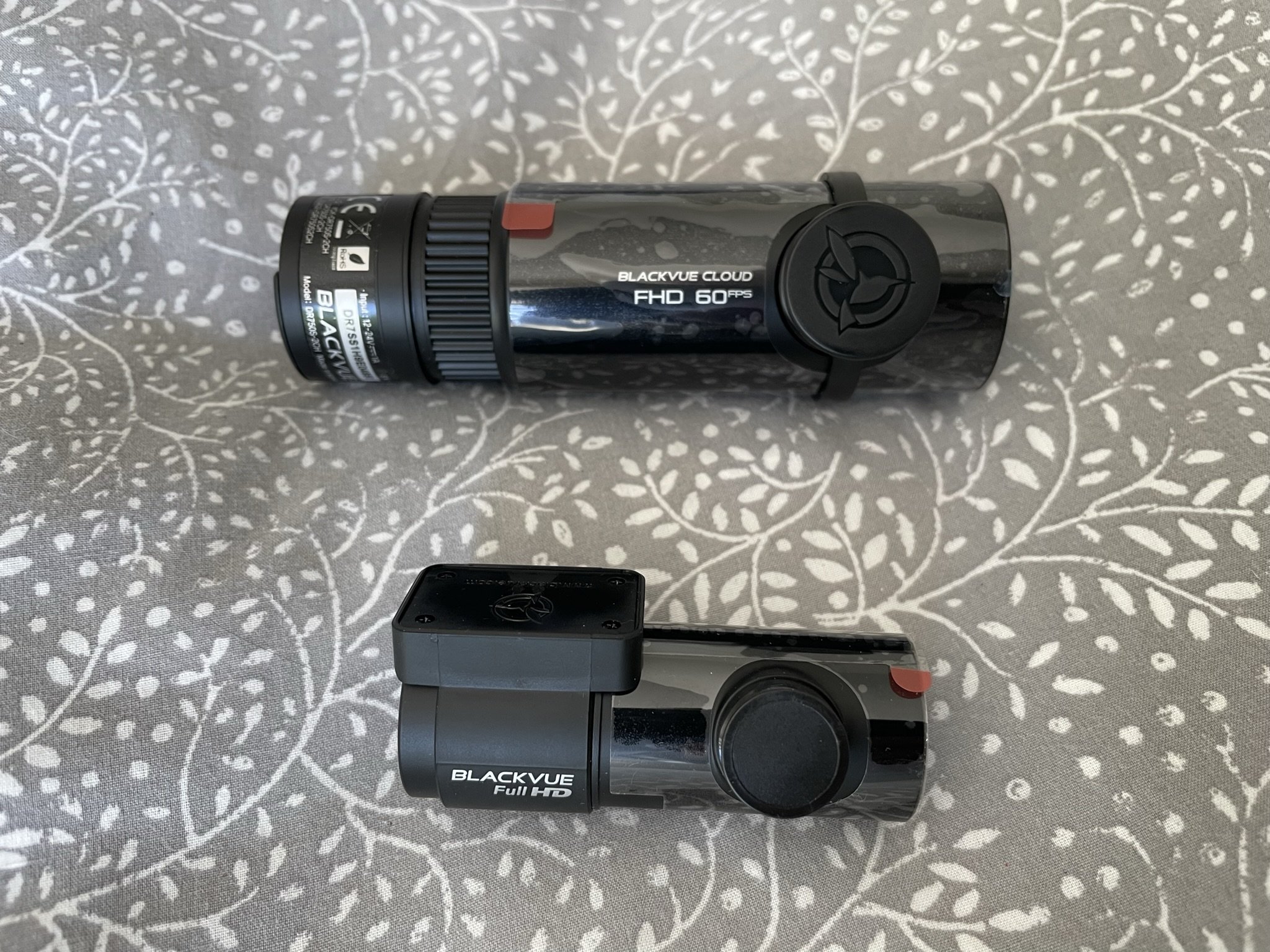
Had another OTA update on Saturday. Volume function seems OK now.Also same for me. Will hope for another update imminently.Yep, same for meNever used this lot, but concept seems sound... https://motorway.co.uk/FWIW, the iV with DSG has a dedicated sport button, as the backward pull on the gear lever switches between coast and brake mode.I didn’t have the charger in the car when I bought it. I removed the rubber lining from the tray and put in a Mous MagSafe Charger, which is plugged into the USB-C port in the same compartment. The phone gets pulled into the optimum charging position by the magnet when I drop it into the tray and I get a great charging rate, regardless of whether I’m using GPS, streaming music or a combination of the two. The phone gets warm, but never to the point it causes a problem.Nope, there are two volume settings - one for audio and one for announcements. Sounds like the latter has been reduced to zero. Danoid's suggestion above should sort it.Looks identical to my 2020 modelWent to unplug the charging cable this morning, but it remained firmly locked. Tried locking and unlocking several times before discovering in the manual that there's a manual release mechanism under the hood. Tried it again after I returned from my journey and it seemed to be working OK, so I'm hoping it was down to the extreme temperature. Anybody else experienced this?My charging flap only unlocks with the remote. it does not unlock when I use KESSY to unlock the doors.Thanks very much. Will contact my dealer and get it booked in.I get this happening regularly (roughly once a week) and have not found a root cause or a solution. Would love to hear from anybody who can shed more light.When I first set up the Area Notification, I would get one whenever I left home, so I switched it off.I also took a punt and, while I'm not as blown away as Richmix, there is a definite improvement in the overall sound quality. The sound is richer and warmer, with more detail across the sound spectrum. Thanks to @spacelord for the discovery and advice.GenuineThis is not my experience. I never have to reactivate any systems after using my towbar-mounted bike rack (which plugs in)Yep. Mine does this. From memory, I think it even does it if I use Carplay for navigation.I bought this with the intention of fitting it myself, but didn't get round to it. Only selling now due to rise in cost of living. Both cameras are in excellent, fully working condition and all original cables, accessories and sticky pads for both cameras are included. The original Blackvue memory card has a capacity of 16Gb. I'll throw in an extra 128Gb Integral memory card. Lowest new price I can find online is £350. Offering this at £250 delivered. Blackvue Blurb... The Cloud Dashcam Standard A dual-channel dashcam without compromise. Both front and rear cameras feature Full HD Sony STARVIS™ image sensors for best image quality under any light. Also included are GPS logger, Wi-Fi, Cloud connectivity, impact and motion detection. All this in a stealthy design that never gets in the way of your driving. No need for a screen: with the free BlackVue app, connect to your dashcam whenever you want. Refined design. Reinvented performance. Successor to the DR650S Series, BlackVue DR750S Series sets a new standard for connected dashcams. Not only does it offer BlackVue Over the Cloud capability, but it also brings you image quality rarely seen in a dashcam. See what the DR750S Series does better. Dual-full Hd Cloud Dashcam Dashcam Without Compromise Dual STARVIS™ sensors in Full HD 1080p (front 60 / rear 30 frames per second) Seeking a dual-camera system that does not compromise on fidelity? Look no further. Record fluid videos of the front and back of your car at a wide 139° view angle. STARVIS imaging sensors are a reference in video clarity under low light, and they equip both the front and rear cameras of the DR750S-2CH. You can rest assured that your dashcam will capture critical details whether you are driving or letting your BlackVue monitor your parked vehicle. With the free Over the Cloud add-on service, check on your car from anywhere, anytime. Built-In Impact & Motion Detection Mark Important Files And Enable Parking Mode While Driving, Your BlackVue Detects Impacts And Sudden Changes In Speed. While Parked, It Also Detects Movements*. Videos Files Are Marked Accordingly So That You Can Easily Find The Relevant Ones In The BlackVue Viewer For Windows And Mac OS Or The BlackVue App For Android And IOS. For Parking Mode Recording, An External Battery Pack (Power Magic Battery Pack) Or A Hardwiring Kit (Power Magic Pro) Is Required. Learn More About Parking Mode. Blackvue App (Ios, Android) And Viewer (Windows/Mac) Easily Manage Your Video Files Both The BlackVue App And Viewer Are Free To Download And Use. They Let You Easily Change Your BlackVue Configuration Settings And Browse Through Your Videos In An Intuitive Way. With The BlackVue App, Connect To Your BlackVue In Wi-Fi To Access Files And Check Realtime Live View For Easy Setup And Positioning Of Your Dashcam. Sleek Design And Controls Multifunction Button And Customizable Proximity Sensor BlackVue DR750’S Stealthy Design Incorporates Easy Access To Useful Functions. Proximity Sensor: Toggle Audio Recording ON And OFF By Simply Waving Your Hand In Front Of It. The Sensor Can Also Be Configured To Trigger Manual Event Videos In The Settings. Wi-Fi Button: Turn Wi-Fi ON/OFF (Short Press), Reset Your Wi-Fi Password (Hold Until Voice Prompt, Then Short Press) Or Format The MicroSD Card (Hold Until Voice Prompt, And Then Hold Again). All Actions Are Confirmed By A Voice Prompt. Built-In Wi-Fi And GPS The GPS Adds Location And Speed Data To Your Videos. Speed: Speed Data Will Be Overlaid In The Video (Can Be Turned Off In The Settings). You Can Choose To Display The Speed In Kilometers Per Hour (Km/H) Or Miles Per Hour (Mph). Location: You Can Visualize The Location Of Your Vehicle In The BlackVue Viewer’s Map During Video Playback. Wi-Fi Lets You Connect To Your BlackVue With A Smartphone Or Tablet. Wi-Fi Also Lets Your BlackVue Connect To BlackVue Over The Cloud Via Any Home Or Mobile Wi-Fi Hotspot (Router). Optimized File Management Event Files Overwrite Protection: Dashcams record in a loop, overwriting older files when the memory is full. BlackVue DR750S-2CH can prevent Event files (triggered manually or by impacts) overwriting. Up to fifty (50) files can be protected this way. You can choose to allow new Event files to overwrite past Event files, thus keeping the latest fifty. Adaptive Format-Free File Management Developed by BlackVue, this file system improves recording stability and reduces the need for microSD card formatting, while giving you the flexibility to change recording time unit (1/2/3 minutes) and quality settings. Still, the videos saved are playable on most viewers. High Frame Rate For Extra Fluidity The Advantage Of 60fps Video Capture The front-facing camera records extra fluid videos at 60 frames per second, keeping all details sharp even in fast action. With 60fps, motion blur is much reduced compared to 30fps. That means your BlackVue can better capture details–like license plates–even in fast-moving objects. Note 1: the higher the image quality setting, the higher the bitrate and the bigger the file size. A bigger size will increase the time necessary to transfer a video file over Wi-Fi. Note 2: Remote Live View using BlackVue Over the Cloud is not affected by the image quality and framerate settings. Blackvue Over The Cloud Me And My Car. Connected. Connect to your BlackVue anytime, from anywhere in the world with BlackVue Over the Cloud. Enjoy remote Live View and Push Notifications to your phone. Back up important videos to the free Cloud storage. Play and download videos from your dashcam’s memory or the Cloud from anywhere. Enjoy Two-way Voice Communication with the driver from the app through the BlackVue’s integrated speaker and mic. Check the BlackVue Over the Cloud page for more information. Tamper-proof Case (Optional) The BlackVue Tamper-Proof Case is a security accessory for BlackVue DR650S Series dashcams. It blocks physical access to the microSD card slot, and prevents unplugging the power and coaxial cables, thus highly reducing risks of data tampering. THE SONY STARVIS DIFFERENCE The Sony STARVIS™ image sensors that equip both the front and rear cameras of the DR750S-2CH deliver outstanding low-light performance. For those who want even more brightness in dark environments, the DR750S-2CH features Enhanced Night Vision. When activated, it boosts the ISO sensitivity in low light without blowing up the highlights in bright surroundings. Even with Night Vision OFF, the STARVIS sensor outperforms regular CMOS sensors as you can see in the comparison shots below: Intelligent Parking Mode Monitoring Rest easy, knowing that your car is being monitored while you are away. BlackVue automatically switches to Parking Mode to monitor you parked vehicle, but only writes to the memory card when something happens (motion or impact detected). Thanks to the video buffer, the few seconds leading to the triggering event are also recorded. Scheduled Reboot: Electronic recording devices can benefit from restarting between long recording sessions. When hardwiring a dashcam for Parking Mode, it may stay on for days. In some extreme cases, unexpected errors can occur. To avoid this, the DR750S Series features the option to schedule a daily automatic reboot (by default in the middle of night) to minimize potential errors. Reboots can happen only when the dashcam is in Parking Mode and not writing any data to the microSD card. This means no Normal driving, Event, or Parking Mode recording will be interrupted by a scheduled reboot. Super stealthy: BlackVue DR750S Series allows you to completely turn off all LED indicators in Parking Mode. Only the recording LED indicator facing the interior of the vehicle will blink when motion or impact is detected. Specification: Channel 2 Channels Color/Size/Weight Front: Black / Width 118.5 mm x Height 36 mm / 90 g Rear: Black / Width 67.4 mm x Height 25 mm / 25 g Memory microSD Card (16 GB/32 GB/64 GB/128 GB) Recording Mode Normal recording, Event recording (when impact is detected in normal and parking mode), Manual recording and Parking recording (when motion is detected) *For Parking mode recording, a Parking Mode Battery Pack (Power Magic Battery Pack) or a Parking Mode Hardwiring Kit (Power Magic Pro) is required. Camera Front: STARVIS™ CMOS Sensor (Approx. 2.1 M Pixel) Rear: STARVIS™ CMOS Sensor (Approx. 2.1 M Pixel) Viewing Angle Front: Diagonal 139°, Horizontal 116°, Vertical 61° Rear: Diagonal 139°, Horizontal 116°, Vertical 61° Resolution/Frame Rate <Front – Rear> Full HD (1920×1080) @60fps – Full HD (1920×1080) @30fps (Sports) Full HD (1920×1080) @30fps – Full HD (1920×1080) @30fps Full HD (1920×1080) @30fps – HD (1280×720) @30fps HD (1280×720) @30fps – HD (1280×720) @30fps *Frame rate may vary during Wi-Fi streaming. Image Quality Highest High Normal Compression Codec MP4 Wi-Fi Built-in (802.11n (2.4 ? 2.4835 GHz) GPS Built-in Microphone Built-in Speaker Built-in LED Front: Recording LED, GPS LED, Wi-Fi LED, Front Security LED Rear: Rear Security LED Sensor 3-axis acceleration sensor Backup Battery Built-in super capacitor Button Wi-Fi / Format button: *Press once to turn on/off Wi-Fi. *Press and hold for 5 seconds and once voice commands start, release the button. Then press once again to reset the Wi-Fi SSID and password or press and hold for 5 seconds to format the microSD card. Proximity sensor: Touching the proximity sensor toggles audio recording ON/OFF or triggers manual recording depending on the firmware settings. Input Power DC 12V – 24V (DC Plug:(-)—C—(+) (Ø3.5 x Ø1.35), MAX 1A/12V) Current Consumption Avg. 350mA (4.2W at 12V, when GPS and Wi-Fi are ON) Avg. 300mA (3.6W at 12V, when GPS and Wi-Fi are OFF) * Actual power consumption may vary depending on use conditions and environment. Operating Temperature. -20? – 70? (-4°F – 158°F ) Storage Temperature -20? – 70? (-4°F – 158°F ) High Temperature Cut-off Approx. 80 °C (176 °F) Certifications Front: FCC, CE, RoHS, Telec, WEEE Rear: FCC, CE, RoHS, WEEE Software BlackVue Viewer for Windows / Mac OS * Windows XP or higher / Mac OS X 10.10 (Yosemite) or higher – BlackVue App (Android 4.2 or higher, iOS 9.0 or higher) Others Adaptive Format-Free File Management System
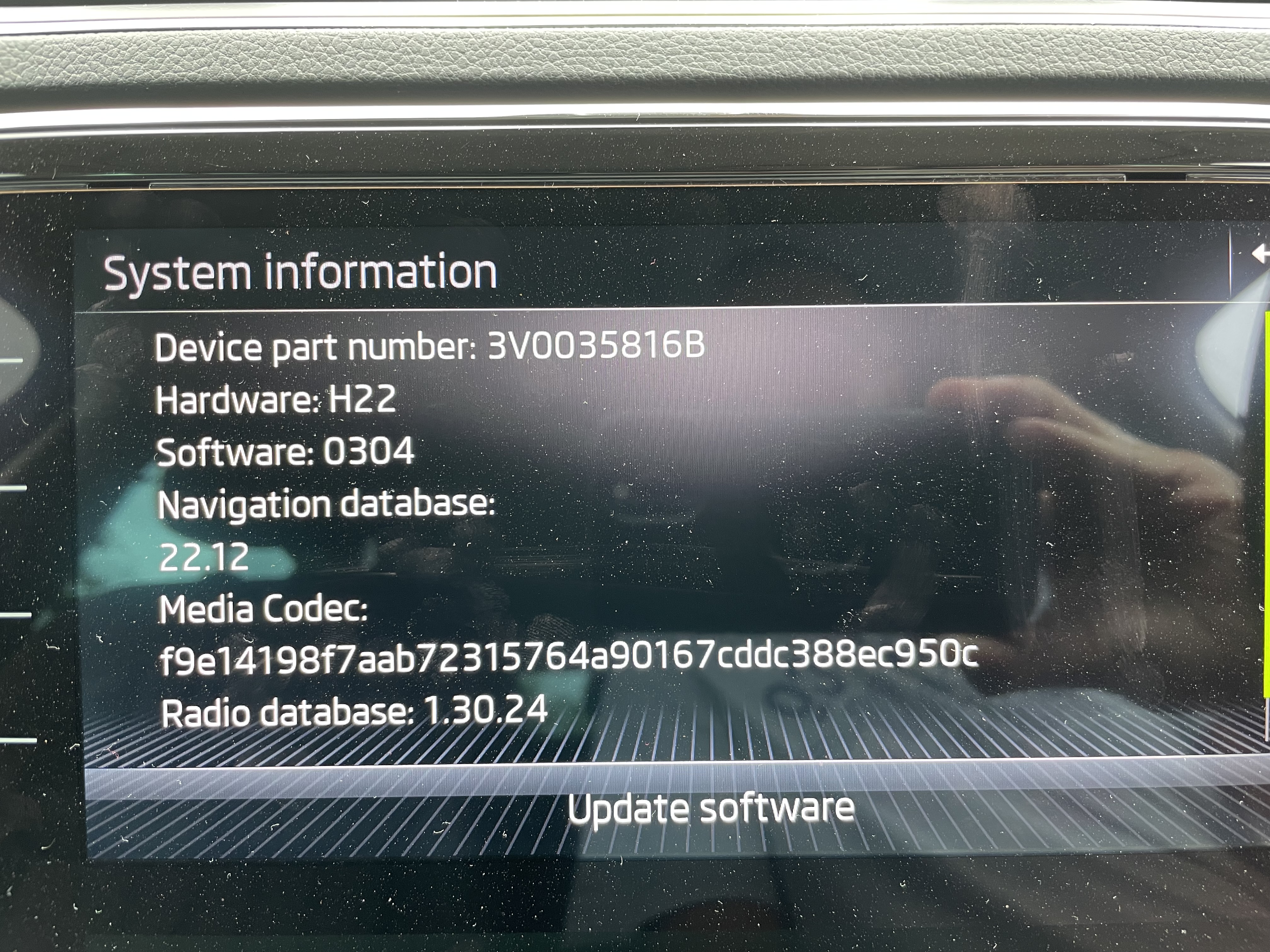
 Pretty sure that’s how it’s supposed to work. My previous car, an Audi, did the same.Cool. Thanks for the replies.The Driving Data display offers three sets of figures - Since start, Long-term and Since Refuel. According to the manual, "The driving data of all trips up to a total of 99 hours and 59 minutes driving time or 9999 km driving distance is stored in the memory. If one of the listed values is exceeded, the memory is reset." This appears to have happened in my car. How do I view its mileage from new?



Important Information
Welcome to BRISKODA. Please note the following important links Terms of Use. We have a comprehensive Privacy Policy. We have placed cookies on your device to help make this website better. You can adjust your cookie settings, otherwise we'll assume you're okay to continue.
Account
Navigation
Configure browser push notifications
Chrome (Android)
- Tap the lock icon next to the address bar.
- Tap Permissions → Notifications.
- Adjust your preference.
Chrome (Desktop)
- Click the padlock icon in the address bar.
- Select Site settings.
- Find Notifications and adjust your preference.
Safari (iOS 16.4+)
- Ensure the site is installed via Add to Home Screen.
- Open Settings App → Notifications.
- Find your app name and adjust your preference.
Safari (macOS)
- Go to Safari → Preferences.
- Click the Websites tab.
- Select Notifications in the sidebar.
- Find this website and adjust your preference.
Edge (Android)
- Tap the lock icon next to the address bar.
- Tap Permissions.
- Find Notifications and adjust your preference.
Edge (Desktop)
- Click the padlock icon in the address bar.
- Click Permissions for this site.
- Find Notifications and adjust your preference.
Firefox (Android)
- Go to Settings → Site permissions.
- Tap Notifications.
- Find this site in the list and adjust your preference.
Firefox (Desktop)
- Open Firefox Settings.
- Search for Notifications.
- Find this site in the list and adjust your preference.