




Stonekeeper
Resident Member
-
Joined
-
Last visited
Everything posted by Stonekeeper
-
If it was over £40,000 in 2023 it will carry the evt until 2028 (years 2 to 6)
-
No, factory fitted options aren't classed as changes to manufacturer's standard specification. A change to manufacturer's standard specification is anything made after the car leaves the factory. https://www.lv.com/car-insurance/are-factory-fitted-options-classed-as-changes-to-my-car
-
In 2023, the United Kingdom became the world’s first major economy to halve its emissions relative to 1990 levels. UK cars on the road 1995 21,394,103 2023 there were 41.2 million licensed vehicles in the UK
-
The majority of the fuel efficiency development was in the 70s -80s due to the fuel crisis, the last thirty years has seen most of research and development being focused on emissions which has been significantly improved.
-
For Diesel engines efficiency went down as more and more exhaust mitigations were added.
-
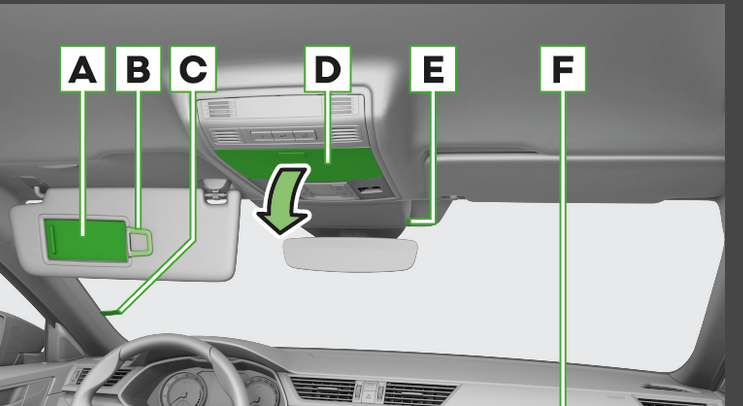
Is it not D?
-
No faff involved if you have the phone, just push a button a few minutes before you go to the car. Or for regular work mornings, set the car to be ready to leave at your usual time. If plugged into house it has no effect on the battery. If it's not the wattage use is not huge. Or use de-icer like ICE drivers do.
-
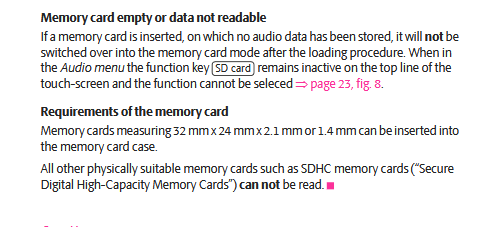
They could share a common earthing point which would explain the loss of signal when hrw is turned on.You could fit a dab windscreen aerial to solve the radio issue https://kenwoodshop.co.uk/products/cxdab1?srsltid=AfmBOooPZommXdYUdO9WLKugFe_yKkR_gnEt8_pvGiOGRjzQNWJHvJg0Long time since I played with a distributor. But turning the distributor body (hence adjusting the rotor position) is how the dynamic timing is set once you have it started. Strobe light on the crankshaft timing marks for the right setting.Sorry if my post gave the implication that leaving switched on would be "catastrophic" that was not the intent. Even in the on position I doubt the mirrors are heated all the time, there will no doubt be a timer involved. The point was they would be activated everytime the vehicle was started which may not be necessary and wasteful, especially in an ev. When they are connected to HRW you know when they are likely to be on because the hrw does have an indication that it is on. The switch on the door panel is less visible whilst driving.I would try position one which on older cars would have been intermittent, what used to vary the time becomes sensitivity of sensor.Possibly a 32gb limit on a 2010. I will have a dig about in the manuals. Manuals for that year state Amundsen and Bolero can accept Sd and sdhc cards up to 32gb But the Columbus manual says https://www.skoda.co.uk/apps/manuals/Detail?model=Octavia_1Z&edition=05-2009&market=&manualLang=en
 "Roughly 37% of methane emissions come from highly concentrated sources at relatively few sites. Therefore, methane capture devices installed on a small number of sites could have a huge impact. Implementing existing technology to capture and use or burn methane at 3000-6000 sites worldwide could have the equivalent greenhouse gas impact of taking 100 million cars off the road" https://overshoot.footprintnetwork.org/portfolio/burning-methane/ "Methane is a potent greenhouse gas — 28 times more potent than CO2 over 100 years. It can be turned into CO2 by simply burning it, reducing its global warming potential by 96.4%."My car was built in 2022 but has P (MY23) as it's model year in the vin number at position 10 So I believe a MY2025 will be an S in that position.If the car has no aerial and uses the rear screen it is a possibility. Have you noticed if parts of the rear window don't demist? It could also just be the quality of the earthing points of the hrw and aerial amp.The steering wheel changes in the superb owners manual in November
 E
E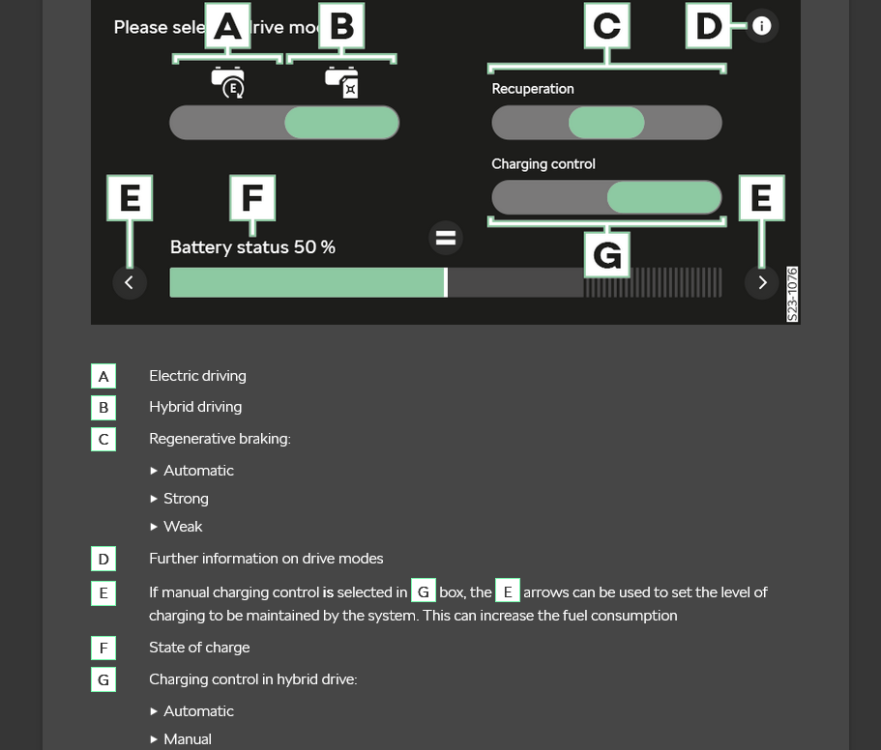 Why would he want rid of it. Yesterdays video has had over 148,000 views in less than 24hrs.https://www.insurewithporsche.co.uk/car-insurance/ Maybe he should contact them?



Important Information
Welcome to BRISKODA. Please note the following important links Terms of Use. We have a comprehensive Privacy Policy. We have placed cookies on your device to help make this website better. You can adjust your cookie settings, otherwise we'll assume you're okay to continue.
Account
Navigation
Configure browser push notifications
Chrome (Android)
- Tap the lock icon next to the address bar.
- Tap Permissions → Notifications.
- Adjust your preference.
Chrome (Desktop)
- Click the padlock icon in the address bar.
- Select Site settings.
- Find Notifications and adjust your preference.
Safari (iOS 16.4+)
- Ensure the site is installed via Add to Home Screen.
- Open Settings App → Notifications.
- Find your app name and adjust your preference.
Safari (macOS)
- Go to Safari → Preferences.
- Click the Websites tab.
- Select Notifications in the sidebar.
- Find this website and adjust your preference.
Edge (Android)
- Tap the lock icon next to the address bar.
- Tap Permissions.
- Find Notifications and adjust your preference.
Edge (Desktop)
- Click the padlock icon in the address bar.
- Click Permissions for this site.
- Find Notifications and adjust your preference.
Firefox (Android)
- Go to Settings → Site permissions.
- Tap Notifications.
- Find this site in the list and adjust your preference.
Firefox (Desktop)
- Open Firefox Settings.
- Search for Notifications.
- Find this site in the list and adjust your preference.