



Skip to content

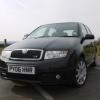
Finally got my first Fabia VRS!!!
Featured Replies

Hi there!

My name is Maia and i've been a member of the forum for a little while now looking for a Fabia VRS. Well i've finally got one so i thought i'd say hello. :wave23d:

I picked it up on Friday - 06 in black magic - and i have loved every minute of driving it since.

I'm not sure if i'll go down the mod route, but if the fella has anything to do with i'm sure we'll do a little.

Will get some pics up shortly.

Welcome to Briskoda, I said that about my Fabia vRS when I bought it and I've given into temptation and modded it.

  • Author

I can see it going that way, but it wont be heavily modded.:)

Welcome, mine's staying as standard as the day it was born

Welcome :)

Radiant is my PC online-gaming tag :rofl:

  • Author

Radiant is my PC online-gaming tag :rofl:

Lol.. good name. I use it for my Archery stuff mainly as it was the name of the first bow i had.

Welcome along! :D

My VRS lasted 5 days before it was remapped and that was only cos Jabba couldn't fit me in :rofl:

Welcome :)

Welcome on board Radiant :thumbup:

Maybe paint the wheels in anthracite, but other than that leave it as standard

and enjoy :D

Hello and welcome :wavey:

  • Author

Oooo... after looking around the forum i'm definately tempted to buy a few toys.

Oooo... after looking around the forum i'm definately tempted to buy a few toys.

Remap?

Seat Sport strut brace?

312mm brakes?

Rear ARB?

PD160 intake?

:)

remap! remap! remap!

  • Author

PD160 and remap i think.. :)

PD160 and remap i think.. :)

Drop a panel filter in as well to get the best out of your remap :thumbup:

Oh, and welcome to Briskoda :wavey:

  • Author

thanks.. and will do. Just need to get the bits now.

Create an account or sign in to comment

Recently Browsing 0

  • No registered users viewing this page.

Important Information

Welcome to BRISKODA. Please note the following important links Terms of Use. We have a comprehensive Privacy Policy. We have placed cookies on your device to help make this website better. You can adjust your cookie settings, otherwise we'll assume you're okay to continue.

Account

Navigation

Configure browser push notifications

Chrome (Android)
  1. Tap the lock icon next to the address bar.
  2. Tap Permissions → Notifications.
  3. Adjust your preference.
Chrome (Desktop)
  1. Click the padlock icon in the address bar.
  2. Select Site settings.
  3. Find Notifications and adjust your preference.
