



Skip to content

Pictures of my Fabia VRS
Featured Replies

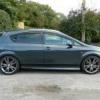
Thought after owning it for 5 years I'd put up some pictures. Only changes are the refurbed wheels, ITG panel filter, VRS wheel badges and LED sidelights/number plate lights. Might do some carbon wrapping later, and some 2010 VRS badges.

SANY0624.jpg

SANY0623.jpg

SANY0625.jpg

SANY0626.jpg

SANY0627.jpg

Nice and very 'straight' looking.

Have you been stopped for having blue number plate lights yet?!

nice clean example B):thumbup: :thumbup: :thumbup: :thumbup:

  • Author

Not been stopped no. I admit they are very bright but also more white then some I have seen out there.

Where did you get the numberplate lights?

  • Author

eBay mate. Got the SMD LED version of the festoon bulbs. SMD ones are much brighter.

Edited by rik_t

nice clean example. Looks good :thumbup:

looks good, are the b post decals oe skoda? just ordered a set myself emoticon-0148-yes.gif

lol just spotted your post on my thread! where they the 1's listed for the hatchback or est? as the h/back set has been obsolete since 2007 emoticon-0148-yes.gif

cheers mark

  • Author

lol just spotted your post on my thread! where they the 1's listed for the hatchback or est? as the h/back set has been obsolete since 2007 emoticon-0148-yes.gif

cheers mark

Hatch I think. Had them on for years so can't remember. Personally I would use some carbon film or go for the very nice glossy carbon ones from superskoda shop.

Create an account or sign in to comment

Recently Browsing 0

  • No registered users viewing this page.

Important Information

Welcome to BRISKODA. Please note the following important links Terms of Use. We have a comprehensive Privacy Policy. We have placed cookies on your device to help make this website better. You can adjust your cookie settings, otherwise we'll assume you're okay to continue.

Account

Navigation

Configure browser push notifications

Chrome (Android)
  1. Tap the lock icon next to the address bar.
  2. Tap Permissions → Notifications.
  3. Adjust your preference.
Chrome (Desktop)
  1. Click the padlock icon in the address bar.
  2. Select Site settings.
  3. Find Notifications and adjust your preference.
