



Skip to content

Hello from Norwich

Featured Replies

Hello,


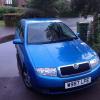
My first post here on these forums to learn more about my first car, a Skoda Fabia.


I got the car at an absolute steal and saying that, there are a few kinks that need to be ironed out so I'm sure I'll be hunting these forums a lot and posting to help me get the car in a good condition.


Thanks


Joe


post-117278-0-35919300-1400052340_thumb.jpg

Welcome to Briskoda, Joe. Your new car looks very tidy. :)

Hi Joe - Welcome to the forum.

Welcome Joe,  So who did you steal that Fabia from?

Welcome,


Tidy looking little Fabia, although they do say never judge a car in the rain (yet I've bought three in the rain!)


Much better and nicer than my first car was!

  • Author

Welcome Joe,  So who did you steal that Fabia from?


Bought the car privately from someone for £500, couple of things to sort out though, tracking/balancing, gentle knocking in the rear suspension and the engine coolant temp gauge doesn't work. I may replace the sensor myself, but then again, I am noob to all this, so I'll post or search on another thread for the details. Taking it to a respected garage next week for them to have a look though. Still, lovely to drive, although I don't have much frame of reference apart from the cars I learnt in and the horrible 1.0L Saxo and Polo, both with no power steering that I test drove earlier that day. Good history and MOT till Jan.


Welcome,


Tidy looking little Fabia, although they do say never judge a car in the rain (yet I've bought three in the rain!)


Much better and nicer than my first car was!


Yes, as soon as it stopped raining I took a look outside and it looked very photogenic. The main panels don't have a scratch on it though, I've been lucky to find the car in this condition! :)


Edit: And thanks for the welcome! Looking forward to getting stuck in and learning about my car, and doing as much sorting I can before the next MOT.

Edited by JoeChamberlain

Create an account or sign in to comment

Recently Browsing 0

  • No registered users viewing this page.

Important Information

Welcome to BRISKODA. Please note the following important links Terms of Use. We have a comprehensive Privacy Policy. We have placed cookies on your device to help make this website better. You can adjust your cookie settings, otherwise we'll assume you're okay to continue.

Account

Navigation

Configure browser push notifications

Chrome (Android)
  1. Tap the lock icon next to the address bar.
  2. Tap Permissions → Notifications.
  3. Adjust your preference.
Chrome (Desktop)
  1. Click the padlock icon in the address bar.
  2. Select Site settings.
  3. Find Notifications and adjust your preference.
