



Skip to content

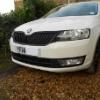
Black Grill Surround on my Rapid Sport Pic
Featured Replies

DSCN1850_zpse82d5802.jpg


Delighted with this..supplied and fitted by my dealer.I ordered it on Monday and had arrived on Tuesday!


Surprising how such a small detail change makes so much difference.

It really brings out the lower black grill a lot more.

That looks so much better now [emoji106]

How much if you don't mind did the dealer charge to fit this?

  • Author

 they didn't charge me for fitting it,  They did a 10K service on the car at the same time so that might be why.

That's a bonus too [emoji16]

Looks great. That's how they should look.

How much is it for the surround from SUK? I quite fancy the grill that Superskoda are doing so could do both at the same time.


I'm just waiting for a "how to" with lots of pictures before I attempt it :happy:

Edited by Delberthot

Looks good. But you know what would look even better, some chrome on it :)

But seriously, the black grill on a white car looks really good. Should also work well on the green one and maybe the red.

  • Author

How much is it for the surround from SUK? I quite fancy the grill that Superskoda are doing so could do both at the same time.


I'm just waiting for a "how to" with lots of pictures before I attempt it :happy:


£75+vat from my dealer.  not cheap but probably less cost than having it professionally painted or wrapped. 

and yes a Honeycombe style grill would look great and match in with the already Honeycombe lower grill.

Edited by charles

Create an account or sign in to comment

Recently Browsing 0

  • No registered users viewing this page.

Important Information

Welcome to BRISKODA. Please note the following important links Terms of Use. We have a comprehensive Privacy Policy. We have placed cookies on your device to help make this website better. You can adjust your cookie settings, otherwise we'll assume you're okay to continue.

Account

Navigation

Configure browser push notifications

Chrome (Android)
  1. Tap the lock icon next to the address bar.
  2. Tap Permissions → Notifications.
  3. Adjust your preference.
Chrome (Desktop)
  1. Click the padlock icon in the address bar.
  2. Select Site settings.
  3. Find Notifications and adjust your preference.
