



Skip to content

Head units

Featured Replies

Good evening

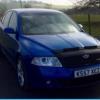
I'm in the market for buying a octavia vrs, looked at a few high specked ones but all the cars have been c**p, I'm due to look at an older 56 plate one, which is meant to be very good condition, but the heat unit looks very standard, is there an easy way to change(what units) to be able to plug iPod/phone to it, cable or blue tooth, sat nav would be a bonus etc. So how hard and what units are available for a plug in and play, car has climate control, no dot matrix display just green, in pictures, hope this all makes sense thanx

Fairly simple in theory to change the head unit. There's a few options (depending of course on what it has at the moment) and it'll be a fairly straight forward plug & play with some coding needed with VCDS maybe. However, means of connection are not dependant on the head unit really. Bluetooth is a seperate module fitted to the car, and for cable type connection there's either an AUX socket which will need fitting to the car, or an MDI (Media Device Interface) unit which again needs fitting to the car. If you go for a later generation head unit then your car will also need the CANBUS gateway updating to prevent a known problem of the battery going flat overnight.

Edited by Rustynuts

You can go for an aftermarket unit or a skoda/vw unit. Depends what you want really.


If you go aftermarket you will need to buy iso adaptor (about £40), possibly trim pannel and fitting kit. Both available from skoda.


If you go oem make sure you look into what unit you get before hand due to the reasons mentioned above

Create an account or sign in to comment

Recently Browsing 0

  • No registered users viewing this page.

Important Information

Welcome to BRISKODA. Please note the following important links Terms of Use. We have a comprehensive Privacy Policy. We have placed cookies on your device to help make this website better. You can adjust your cookie settings, otherwise we'll assume you're okay to continue.

Account

Navigation

Configure browser push notifications

Chrome (Android)
  1. Tap the lock icon next to the address bar.
  2. Tap Permissions → Notifications.
  3. Adjust your preference.
Chrome (Desktop)
  1. Click the padlock icon in the address bar.
  2. Select Site settings.
  3. Find Notifications and adjust your preference.
