



Skip to content

Rear bumper foil?

Featured Replies

Has anyone fitted the rear bumper foil to the hatch/saloon/limousine? This stuff:

1444137506_3V5061197_w450_h400.jpg

Just rooting around under the boot and found that there was an unused pack there ready to go. I can only imagine the garage thought better of it or forgot about fitting it...

Looking at the place it goes, on mine (7000 mile old ex dealer principal car) there are a few tiny scratches from loading stuff into the boot so I could imagine it's worth doing if it doesn't look daft.

Interested in views on this.


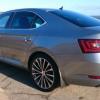
I think I've ballsed up an order from Superskoda - I ordered a steel bumper protector - I went for brushed effect. I've still to get delivery of the car, but from photos it looks like there's some polished metal just inside and so a polished finish would have been a better match.

I've started to look at options for this, as I don't like chrome or plastic ones.

There is a place round the corner from mg work which does 3M kits so I'm going to take a look

I have one on my car that was fitted by the dealer when it was new. Seems to work well and avoids the dog making too many marks on the rear bumper when getting in and out. You hardly notice it is there.

Edited by Simon-R

Two questions,

1) is it possible to get the rear bumper protectors in stainless steel ?

2) Are the rear bumper protectors the same across the S3 range ? ( we have a combo on order )

Two questions,

1) is it possible to get the rear bumper protectors in stainless steel ?

2) Are the rear bumper protectors the same across the S3 range ? ( we have a combo on order )


http://www.superskoda.com/Skoda/SUPERB-III/Rear-bumper-panels/


I have a question - what is the finish on the visible metal already present around the rear of the car? Polished or brushed?

Create an account or sign in to comment

Recently Browsing 0

  • No registered users viewing this page.

Important Information

Welcome to BRISKODA. Please note the following important links Terms of Use. We have a comprehensive Privacy Policy. We have placed cookies on your device to help make this website better. You can adjust your cookie settings, otherwise we'll assume you're okay to continue.

Account

Navigation

Configure browser push notifications

Chrome (Android)
  1. Tap the lock icon next to the address bar.
  2. Tap Permissions → Notifications.
  3. Adjust your preference.
Chrome (Desktop)
  1. Click the padlock icon in the address bar.
  2. Select Site settings.
  3. Find Notifications and adjust your preference.
