



Skip to content

Just picked up....

Featured Replies

Hi Guys,

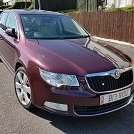
That's me finally picked up the 2008 (58) Mark II from the dealers.  I've only had a short 30-40 minute drive but I must say it's some piece of kit.


I am sorry to say that I may well be asking some questions over the next month or so from the experts until I get used to the car - here's the first couple: -


1. I cannot get a SD card loaded, I have tried 3 and they all come up with an error message?


2. The mirror is set to 'Down@ and I believe that means the nearside mirror should lower when the car is put into reverse, it does not?


Many thanks.

The Columbus will only work with cards formatted with the FAT32 filesystem and IIRC it only supports SD cards up to 32 GB in size. Early units like yours may have additional limitations - user rustynuts here will know more.


The passenger side mirror can dip when reversing but it needs to be told what position to dip to. With the ignition on but the engine not running, put the gearbox in reverse and then adjust the mirror to your preferred position for reversing. Leave the mirror position control in 'L' for it to work. Since it's stored as part of the seat memory function, you'll need to run that too: press set then the number of your choice until you hear the 'ding' from the dash.

  • Author

Chimaera,


You're a star and the mirror now works!!


I have umpteen SD cards: - 128mb, 1 GB, 12 GB, 4 GB  and 2 x 32 GB.  All are formatted to Fat32 bar one, which I will look to amend.  None work?

  • Author

Right, follow up on the SD card saga........


It appears that the larger SD cards will not be recognised on the head unit.  I did manage to save some albums from smaller SD cards to the HDD, but I have no idea how to access them and the instructions are very difficult to understand - and I'm usually pretty good with technology !!  Every time I press HDD I get the same bloomin' Diana Ross song playing (managed to delete the others) and I can find no way to access the other music stored on it.  I also made up an audio CD using a DVD and shoved several 'best of' albums on it.  The head unit will play the first album no problem, but I have no idea of how to access the other albums on this disc.


Please help as I listen to all my music in the car.........do you think if i visited a main Skoda dealer they would help?

I think your door mirror switch also needs to be set to L for drop down to work too.

From memory the earlier firmware on the Columbus units couldn't read larger SD cards; but once updated they could read up to 32GB cards.


The firmware can be updated (along with the maps); a search on the forum should turn up a how to guide.


Once you've found what firmware you currently have, you'll  know what version you can go up to without bricking the unit.

32gb of MP3 files is plenty


about 40 albums

with regard accesing the rest of the music...I recall reading that a single mp3 needed to be stored on the root of the drive and it would then access all the files on the drive.. very vague memory but search the forum... the answers are all there....somewhere!

om my 2013 Mk2 pre-FL with Amundsen unit I just formatted iy and it was fine

Create an account or sign in to comment

Recently Browsing 0

  • No registered users viewing this page.

Important Information

Welcome to BRISKODA. Please note the following important links Terms of Use. We have a comprehensive Privacy Policy. We have placed cookies on your device to help make this website better. You can adjust your cookie settings, otherwise we'll assume you're okay to continue.

Account

Navigation

Configure browser push notifications

Chrome (Android)
  1. Tap the lock icon next to the address bar.
  2. Tap Permissions → Notifications.
  3. Adjust your preference.
Chrome (Desktop)
  1. Click the padlock icon in the address bar.
  2. Select Site settings.
  3. Find Notifications and adjust your preference.
