



Skip to content

Trippy paint

Featured Replies

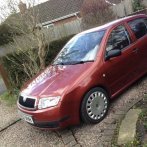
Sorry about the rather boring location but I thought id see if I could capture the mental colour change on the Primera in the dusk light.

prim1.jpg

prim2.jpg

prim3.jpg

prim4.jpg

prim5.jpg

Gotta love mystic green :)

What colour do they list it on the log book as..................Chameleon?

Looks really good - -must be a right pain to try and do any repairs with it tho!!

  • Author

Log book says Green.

Colour is Nissan Mystic Green, aka Chromaflair.

And repairs are generally a respray.

It looks spiffing, but I wouldn't take it to the supermarket!

That looks really cool

That looks like Pearlescent paint.

I have been painting cars for 13 years and i have only done 1 nissan in this colour and it was a primera too (they also used it on the micras)

Contrary to popular belief it is really easy to paint, one coat of black primer, three coats of blue/green croma and two laquer and it matches panel to panel due to it being a 3 stage pearl.:thumbup:

It is however ferociously expensive though! :rolleyes:

Saw a twin to this car in Walsall the other day.

Photos don't actually show how interesting the paint job is.Very nice.

Looking very nice Ross!

I've seen a mirca in this sort of paint but it was gold/pink/red looked very tasty!

  • Author
I have been painting cars for 13 years and i have only done 1 nissan in this colour and it was a primera too (they also used it on the micras)

Contrary to popular belief it is really easy to paint' date=' one coat of black primer, three coats of blue/green croma and two laquer and it matches panel to panel due to it being a 3 stage pearl.:thumbup:

It is however ferociously expensive though! :rolleyes:[/quote']

Right name and number noted should i need you ;)

Lummox you have PM

  • Author

Thank you ;)

It looks spiffing, but I wouldn't take it to the supermarket!

hehehe! 'spiffing'! not heard that in aaaggees! lol! what an ace word! :D

I like flip paint, tis pretty! :thumbup:

Create an account or sign in to comment

Recently Browsing 0

  • No registered users viewing this page.

Account

Navigation

Configure browser push notifications

Chrome (Android)
  1. Tap the lock icon next to the address bar.
  2. Tap Permissions → Notifications.
  3. Adjust your preference.
Chrome (Desktop)
  1. Click the padlock icon in the address bar.
  2. Select Site settings.
  3. Find Notifications and adjust your preference.
