



Skip to content

octy II tunnel shot

Featured Replies

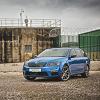
took this for a comp in another forum the other week so i thought id post it up here. I got the idea from a few people on Flickr taking shots from their back seats. I changed mine slightly and mounted the tripod in/on the passenger seat so i could see more through the window and take advantage of the lines through the tunnel.

Taken with a Canon 10-22mm at 10mm through the Conwy tunnel on a timed remote release

455933456_4781543db5_o.jpg

That's a very nice picture :thumbup: Shame that the tax disc spoils it a bit (imho)

  • Author

thanks quinten, yeah it does a bit and only realised after taking. I need to get a decent one off ebay or wait for the briskoda ones to appear!

PS, are you the same quinten off ukha? ive not been active on there for a long while now though

i like that!

PS, are you the same quinten off ukha? ive not been active on there for a long while now though

:eek: Yup, one and the same :) Now I reckognise your nickname/name too :D

Cracking picture that. Having the map on the MFD would have looked cool as well.

  • Author
:eek: Yup, one and the same :) Now I reckognise your nickname/name too :D

lol, thought it was you

Cracking picture that. Having the map on the MFD would have looked cool as well.

i had thought about that stu but with me not knowing what exposure the camera would be picking in the tunnel i didnt want it to get blurred as the screen moved. It turned out that this one was 1 seconds so it may have been ok but some of the others were up to 3 seconds. Ill try it again on map display when ive got a new tax disk holder

that looks awesome! v.good work fella!

Looks good :thumbup: but wondered if there was any reason why the vents are shut?.

Looks good :thumbup: but wondered if there was any reason why the vents are shut?.

if they are anything like the fabia ones they're probably broke:O

  • Author
Looks good :thumbup: but wondered if there was any reason why the vents are shut?.
ive never had them open since i got it last year as i find the climatronic works ok for me as is. having said that i did have the centre open the other day when the car was really hot after it had been standing.

You should be able to photoshop the tax disc out of the picture. Apart from that it's top quality. very professional pic.

You should be able to photoshop the tax disc out of the picture. Apart from that it's top quality. very professional pic.

Yeah very nice piccy...... Sort of thing i'd put on my desktop.......... You got a high res version??? :)

That tax disc should photoshop out easy enough as the background around it is plain enough etc.....

Cheers

Dave.

  • Author

i did have a quick go with the clone stamp but was in a rush to get it in for the comp it was in. ill give it another go with the original

what size is your desktop waveydavey?

i did have a quick go with the clone stamp but was in a rush to get it in for the comp it was in. ill give it another go with the original

what size is your desktop waveydavey?

1440x900 :thumbup::thumbup::thumbup:

Cheers

Dave.

Clever shot. I like it:thumbup: :)

:thumbup:

Good stuff :) I can finally try some long exposure shots now :D

Ill have to have a bash at this and the running round with a torch on my willie shots :D

Ill have to have a bash at this and the running round with a torch on my willie shots :D

Ooooookaaaaaaaaay

Taxi for PEMBO!!!!! :D:D:D

Cheers

Dave.

I like it :) Some of your other pictures are amazing too :thumbup:

Create an account or sign in to comment

Recently Browsing 0

  • No registered users viewing this page.

Important Information

Welcome to BRISKODA. Please note the following important links Terms of Use. We have a comprehensive Privacy Policy. We have placed cookies on your device to help make this website better. You can adjust your cookie settings, otherwise we'll assume you're okay to continue.

Account

Navigation

Configure browser push notifications

Chrome (Android)
  1. Tap the lock icon next to the address bar.
  2. Tap Permissions → Notifications.
  3. Adjust your preference.
Chrome (Desktop)
  1. Click the padlock icon in the address bar.
  2. Select Site settings.
  3. Find Notifications and adjust your preference.
