Stratton
Members
-
Joined
-
Last visited
Everything posted by Stratton
-
I have always been able to send a WhatsApp message from my car whilst driving but recently my requests are falling on "deaf" ears. When asked who I want to send to when I say it just asks again. I can ask for a text message to be sent to any of my contacts without any problems. Is this likely to be the car or my phone settings having been changed?
-
We must have just been reading the same piece. There is adjustment available via the infotainment for cars with Adaptive Functions. Nothing to be found in "settings" on my car so I'm guessing the following applies to me from the Manual:- Applies to headlights without adaptive functions. The headlights meet the requirements for driving in countries with opposite traffic direction. No headlight adjustment is necessary. So yes, no sticky tape required. Thanks
-
I was thinking on the same lines as you but I will check out the options via the Infotainment menu. Thanks
-
I'm planning a trip to France soon. Is my 2025 Karoq cleverer than me and does it realise I'm driving"on the wrong side" and adjust the LED headlamps to dip to the right automatically? I've searched previous content and can't find a discussion - which I find strange, what have others done in this situation? Do I have to resort to sticky tape?
-
Yes, isn't it great to have your whole CD collection on a memory stick and accessible at the touch of a button. Imagine being restricted to about six in the old style CD players. You also have "Laura" to hand to find the artist or track for you. In my car it's one of the jobs she manages not to mess up!
-
I keep being told it's not possible on more recent cars using the infotainment system to control Lane Assist and turn it off permanently. I would love mine to be "off" all the time and then be in control and turn it on if I wanted it. Did you use another method to "fix" yours?
-
I am able to send maps from the App to my car at present. I did have an occasion when the car decided I wasn't the main driver and when I noticed I had to reset things. Could this be happening to other people? This would stop them from receiving updates to the satnav via the App.
-
My 2025 Karoq does all the same things you report. If they can't get it working correctly why is it forced on us to accept this in our cars. I know we can turn it off but why should we have to do it every time we turn our engines on? The EU rulers state these things are there for safety but is it really safe to have us pressing buttons to turn something off while we drive along. I read an article in a recent Which magazine which stated nearly 50% of drivers are turning these systems off. Don't even get me started on Lane Assist!
-
Is it possible to have the car stay set on a chosen option rather than it defaulting to "Normal" mode each time the engine is switched off? I would like to keep it in "Sport" mode rather than have the inconvenience of resetting it once i start a new journey.
-
Thanks very much I persevered and tried again. I had looked to see if the phone was set to share contacts but hadn't previously selected the specific vehicle that it was linked to. Clicked on the tab and "hey presto" I am now able to make calls connected by the "very useful" Laura! Thanks very much again.
-
My Kodiaq replacement was picked up last week and the technology in my new Karoq is proving just as difficult in the early weeks. My 5 year old Huawei phone which I was able to pair to the Kodiaq and used very successfully refused to work in the Karoq so a new phone was purchased. My new Pixel 8a paired up to the Karoq without any difficulty but I'm not able to access the phones Contacts to make a call within the car. Has anyone else had a similar problem? How was it resolved or has anyone got a more technologically minded brain than mine that might be able to shed some light on the problem. Thanks
-
Mine is the same as Yogi-Bears. I always have the "spiders web" of destinations display when I first turn on the ignition but a press of the Nav button (top right of my Amundsen unit) displays the map of current situation. No route is needed. Also the screen displays the Speed Limit for your location which is very useful at times whilst driving.
-
I had a similar sounding problem last year with my car. It is a software problem that causes the SOS system to fail. You are getting the warning as you're effectively driving without the SOS system functioning. My car was taken in to do a software update which cured the problem. Audi have a similar problem as my son's girlfriends A3 had the same thing with her car.
-
I tried the SkodaApp for my first two years which in principle seems like a very useful addition to the car. I think it only worked correctly for 50% of the time and was a total time waster if it wasn't working. I decided in the end to save my money and not renew the subscription, I seem to be managing OK without the hassle of a very unreliable service from Skoda.
-
A short while ago I checked again and the "Update has Completed" message was showing. Fingers crossed there will be some improvements within the update. Time will tell!
-
Another software update flagged up today. I've left it running for more than 30 minutes and it seems to be still downloading. It's showing "update in progress" but the circle to the left which normally shows a green portion is showing no green at all. Does anyone think this is an update that is destined to fail?
-
I'm hoping that there are problems that they are aware of and work is being carried out to correct it. I had cause to try and use the "Hoot and Flash" on the app to locate my car at Gatwick airport. It took more than 5 minutes to communicate with the car and I'd actually found it when it started sounding the horn as I approached. I'm still getting problems downloading locations for my satnav, it's only works when it wants to! There are times when I agree with BoxerBoy's comment however they can only "fix" what they know about. Email the Customer Service dept regularly if you have a problem, they can pass on the the relevant department. Because of the years worth of problems I had reported they were kind enough to organise my 2nd years subscription free. With the problems I'm still experiencing I'll only continue into the 3rd year if they give it me!
-
My car and the App work together in very much the same way as Doombar's. I have also just done a check after having unlocked the car. If you are aware of the problem it is easy enough to press the update button and be patient whilst the App communicates with your car. I have the App on my Android phone and have all permissions for the app enabled so it must be something Skoda need to correct within the Apps software. I would like to think that there are Skoda management or customer service people who monitor this forum and are aware of the problems we experience. However, I guess that the only real way of making them aware is to email with our problems. I have done this on a number of occasions and when I stated that I most likely wouldn't continue to use the App when my first year subscription ended one of the Customer Service Managers kindly offered my second year free of charge. So fingers crossed the Apps tech guys will be continuing their work to get it right.
-
Billywizzo Do you have Breakdown and SOS in your car? I was told by Skoda customer service that the Esim continues to function so as to provide cover in case of Breakdown or accident, even if you've decided not to pay the annual subscription. I can't see that Skoda can put a term on the sim - it must operate for the life of the vehicle if the service is fitted to the vehicle. I'm presuming that the Esim also looks after updates for the Satnav but I might be wrong, perhaps someone can enlighten us.
-
Our caravan weighs in at 1400kg and is easily pulled by our 1.5TSI though ours is a 5 seater with DSG gearbox. I use the Speed Limiter a lot as the car does tend to get a bit carried away! I don't think you will even notice a trailer weighing in at less than 750kg.
-
Yes, it's the same in my car, I thought it was odd when I first noticed it. Hope you weren't late for your appointment but at least you're now aware of it.
-
Four weeks have passed since my unit had the Software update and I was then able to send destinations and routes using the App from my phone to my car. Since then it has repeated this successfully on a number of occasions but I now find it has stopped working. The Skoda Connect App on my phone still works in it's other functions, showing me my car location, trip fuel consumption and mileage details, etc. so I know the phone and car are talking to each other. Have any other Skoda Connect app users found they are in the same situation?
-
Some people may have already found this but I noticed yesterday that my MIB3 Amundsen was telling me there was a Software Update. This I completed very quickly and I now find I can download a route from the app to my car. I have managed to have one route download and my fingers are crossed that this is not another temporary fix. I now need to find out how I can monitor my downloads and find routs that have previously been downloaded. I understand this is one of the functions of the icon named Skoda Connect that is on the earlier Amundsen and Columbus units. Lets hope they have not stopped on improvements that can be made to the unit in our cars
-
I noticed yesterday that my MIB3 Amundsen was telling me there was a Software Update. This I completed very quickly but disappointingly the missing icon has not yet appeared. The update has though corrected another problem as I now find I can download a route from the app to my car. I have managed to have one route download and my fingers are crossed that this is not another temporary fix. Now all I want is access to Skoda Connect via my unit so I may then check back on previous routes that I may have downloaded amongst other things. Patiently waiting again Skoda!!
-
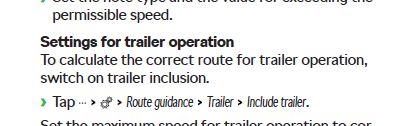
Within the settings options for the Satnav are an option for "Trailer Settings". This gives one option "Include trailer" and another for "Maximum speed for Trailers". I'm guessing the maximum speed setting is to allow the satnav to give me a better estimate of arrival time on a journey. The "Include trailer" option, I'm hoping will allow the satnav to set up a route for a journey and make some allowance for width restrictions. I know that caravaners purchase stand alone satnavs that are probably better at doing this but do you think I'm hoping for to much that our Skoda units might be able to cope with this? What is other people's experience with this?