TheWanderer
Resident Member
-
Joined
-
Last visited
Everything posted by TheWanderer
-
Just now wondering if the A pillar grip and mount that I have on the Mk3 will fit the Mk4, in which case it's going to be a simple transfer. It's just I'm a creature of habit, I like thing's to be at eye level and it's just so easy to give it a cursory glance.
-
So I can get Google Maps or Waze to appear on the infotainment system screen, yes? If that's correct I may have to see I can amend my order to have the wireless charging option.
-
Deleted.
-
About £40 on the bay. I had them on the last RS and I thought that they did a good job allowing me to have the window cracked open for fresh air whilst raining and no rain getting in. OK they're a bit of a pain if you like to have the window open whilst having your arm on the sill upwards but you can't have everything.
-
The question is will it work wirelessly whilst it's on charge? Can I have Waze or Google Maps on the cockpit whilst on the move? I like to have my phone on a mount where I can see it.
-
I do shifts, so one week I can be getting up at 0230, the next I'll be getting into bed at around that time. That can be days a week, although very unlikely to be getting up at 0230 on a Sunday, more likely 0430, but a 0130 back in bed is more likely. I also have arthritis, so I take a couple of painkillers to get me off to sleep..
-
Could anyone recommend a mobile phone holder for the Mk4, that does NOT attach to the windscreen or will be low level centre console as I use Waze or Google Maps for navigation. Would a Brodit mount from a Mk3 fit a Mk4? Thanks
-
Well if I'm struggling to get to sleep I visit this and I soon drift off.
-
Has anyone done a scan of their car with either VCDS or OBD11? They'll probably show up if the car has Wi-Fi system installed, but disabled for some reason.
-
This thread is the ideal one for curing insomnia.
-
I thought that it was meant to work remotely (wirelessly) with this system. 🤔
-
Try a PD cable.
-
When I said about this, I was thinking not about Sat nav, but more along the lines of streaming services such as Notflix, Amazon video as well as ITV hub, BBC Iplayer etc, which can setup to stream content to other devices.
-
This really screwing me up, because I don't know what the output of the car's USB sockets are, are they QC 3.0 compatible? I think that I've worked out a cable routing for the extension lead from the boot, as well as installing a high capacity socket doubler in there so I can use it for the electric tyre pump. But all in all it's a p*$$ poor solution.
-
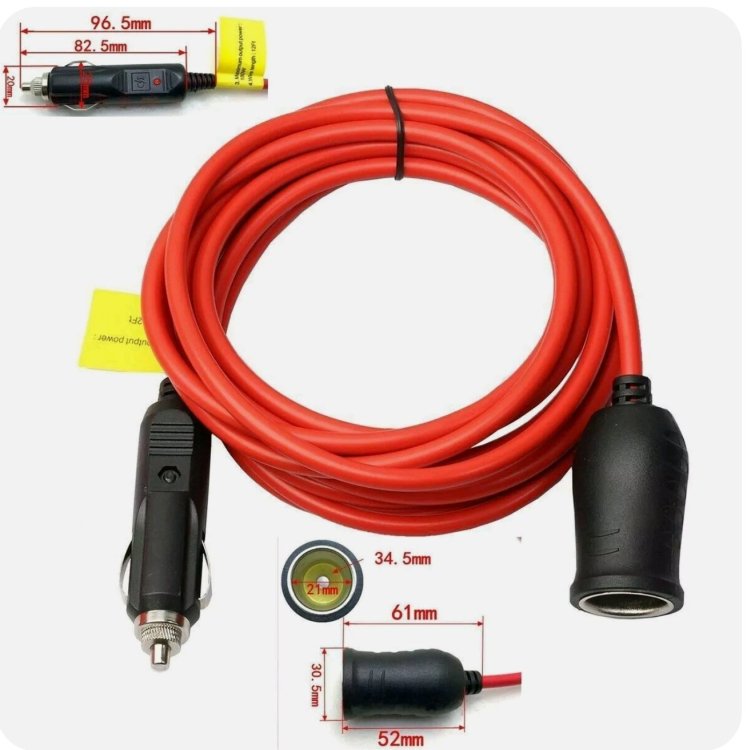
Would one of these solve the issue? Because I'm going to have a power supply issue with my new car as I'm going to need a connection to charge my phone in a holster as I use Waze or Google Maps rather than the built-in system and a laser camera detector, on the dashboard. A splitter will also be put into the socket to allow an electric tyre pump to be used.
-
Just realised that this is in the Mk4 forum. 🙃
-
Really? I'm going to be in deep trouble then with charging my phone and radar detector.
-
Your best bet is NOT to use the usb port but buy a proper charger for what was the cigarette lighter socket. I have a couple of chargers for my car, one is a 60w which has a PD and standard USB and the other is a 40W with 2x standard USB sockets, both will charge my Galaxy S20 quite quickly via direct connection or via wireless charger, although the wireless charger does tend to struggle to keep the charging level up whilst BT and Waze are active, whereas if I use the direct connection it will keep the phone at 100% without any issues.
-
That picture quite clearly shows that isn't the correct one, purely because of the mouldings, which are wrong.
-
Unless you are fortunate enough to have specified a car that maybe a stock one (struck lucky), otherwise then I would say that they have been buttering you up to get a sale and have been told a lot of lies, because if you take the time to go through this thread, I would say you are being extremely optimistic about what the car industry would describe as a rapid delivery. Sorry to rain on your parade, but it's just being truthful.
-
At least It'll be a good start.
-
Well unless the price jumps £3½k, I'll be fine.
-
New car on order and price locked ahead of the price increase in April.
-
I ordered an RS today, I was warned that the delivery schedule is way out and nothing should be expected for at least 8 months and probably nearer 12. I don't mind too much, as the dealer is going to arrange for the pcp to be extended accordingly, the only fly in the ointment is that I'll have to get 2x new tyres, MOT and service in that time. I'm not worried about it, 💩 happens, we are where we are and I'm not going to whinging about it. I knew what I was letting myself in for when I put the deposit down, so I will just live with it. I'm just thinking that by the time it arrives most of (if not all) the glitches should have been sorted out.
-
Right I'm going to be quite candid with you. What you are doing is fine, but do it to your own car, don't encourage others to do it especially when your English isn't great, it makes it more difficult to understand and much easier to make a mistake. The Mk4 has enough software issues without you encouraging those who are inexperienced with the software side of things to tinker with it, causing even more unnecessary issues and misery for them. You say that a lot of it can be done with preprogrammed apps, I'll go with that, but you're also suggesting that owner's use what's known as adaptions and long-coding, something that should only be attempted by those who have the necessary skills, knowledge and expertise. That is importing unnecessary risk and that's unacceptable, as the slightest error could have the potential to affect the safe operation of the car. So I respectfully suggest if you want to post these software tweaks, that you get your English up to scratch or get someone else to do the post so that the instructions are absolutely crystal clear and have been double (if not triple) checked for errors to avoid any further issues and most importantly put a disclaimer stating that whilst they are made in good faith, they are to be used entirely at their own risk. Better still if you insist on doing this thread to show how to do it, try using your phones video capability to showcase your expertise on the matter, especially if English isn't your native language, because a video is far better than fractured English.