
linni
Members
-
Joined
-
Last visited
Everything posted by linni
-
No way. Last was MIB2.
-
MDI connector was an option on MIB2 (my 2014 Superb had it), but not on MIB 2,5 anymore (my 2019 Kodiaq has it).
-
What I meant was that in the beinning MIB3 could have an option in the menu "update software" but later it was replaced with fully automatic procedure.
-
Yeah, bit strange because the instructions are for MIB3. There might be several SW revisions since the MIB3 came to market.
-
Found this in VW forum: https://www.trocforums.co.uk/download/file.php?id=3264
-
Could be hidden file.
-
Here is the answer.
-
Just a random thought - unit says "signature file not found". Means the package is missing the file. Switch off all the antivirus programs you have (including native MS Defnder, if you are using Windows. Sometimes it tends to block files it doesn`t recognise. And download the map files again.
-
Yep, press the P button, as Kenny R pointed out.
-
Are you talking about reversing or just driving with RVC switched on? Doors autolock at certain speed, I think it`s about 15 km/h (10 mph). So does the camera switch off at the same speed, going forward. Never reversed at that speed, cannot comment this.
-
Just to be clear, you still have to activate "Update from USB" in navigation menu, although there will be no update notification or anything else on the screen (from the original post): https://www.drive2.com/l/568779015389709159/
-
https://www.skoda-parts.com/spare-part/3v0905217awhs-start-button-skoda-32037.html
-
I had SS button changed on my Superb 2 and the button cost was somtehing 20 euros plus the same amount for changing.
-
Are you talking about perol (as in ignature) or diesel engine? Actually car`s ECU does everything for you. Including the period when glow plugs warm up. All you have to do is press the button once and wait until the engine starts. No need to hold the button down.
-
Did you extract the files first or copied the whole zip file to the drive?
-
I had similar issue on my Superb II. There was supposed to be a progress bar on the screen but I never had one. I just knew it will take 40 - 45 mnutes to update the maps so I just left the engine running (otherwise it would switch the headunit off after 30 minutes).
-
Mine works just fine. Uninstalled the old one and installed the new version just 2 - 3 week ago.
-
Naah, too freaky for me I will leave it untouched.
-
How do you do that?
-
I found it some times ago from some VW forum. But I do not remember if I tested it so not sure if it works.
-
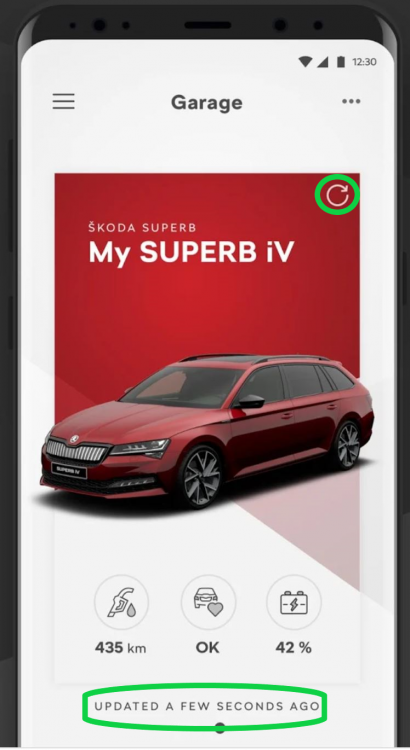
App doesn`t update itself every second. Open the app and check the period since last update (lower green circle). Update app pressing Refresh button (upper green circle) Simple as that.
-
Uninstall the old one and install this: https://apps.apple.com/in/app/myškoda/id1147949033
-
Few weeks ago Skoda Connect and smth else were united into one, MySkoda app. Mine has worked flawlessly since the day one and I am using it sometimes to lock the doors or honk a horn in a parking lot. Suggest to uninstall the app completely and reinstall from app store.
-
I am afraid the 2021 model is pretty much locked for VCDS. But you can try and let us know.
-
locking car while engine remains running Select Control unit 9 (Central Electrics) Authorization: 31347 Adaptation ZV allgemein Select: Funk bei Klemme 15 ein Value: Active permanently disable Start/Stop STG 09 Security access 31347 Adaptation 10 Channel 34 The original total value in channel 34 appears to be just 4 which as we know defaults SS to ON at each start. Altering the total value by these amounts will make these changes.... Subtract 4 = default is OFF at each start. Add 32 = default is last used setting. Add 64 = reverses lights on the switch Note with all choices the On/Off switch still functions. memory of last-selected drive mode on start-up Not possible. SS disable - do not remember if I used he very same method or the voltage method.