nickytheshaft
Members
-
Joined
-
Last visited
Everything posted by nickytheshaft
-
Are you searching the phone from the car or the car from the phone? Also do the 2 ask for a validating code? You can try this https://youtu.be/N-oYyn6S7_I
-
Phone calls still go through Bluetooth. Android auto activates bluetooth each time I plug my phone in
-
On my Amundsen mib1 I pareil galaxy phones from 4 to 21 and on my mib2 upgrade, I paired a s21 so Samsung phones work with these units
-
Have you checked if the unit already has 5 phones paired? There is a limit to the number of phones that can be paired. You have to go to the Bluetooth settings.
-
Hell yeah 😬
-
Phew, you all stressed me with this silicate bag. I just got mine out. 77000km. It was not Burt but a side is all Black. I managed to get it out without removing the overflow bottles but drained it in cases the bag burst.
-
Dab isn't included, you need a USB dab adaptor. If your previous car had dab, you can get the antenna back, otherwise you have to add an antena. This adaptor works good with dab-z or the dab included software € 26,93 25%de réduction | Récepteur d'autoradio Dab, adaptateur numérique DAB +, boîtier tuner, antenne à boucle amplifiée USB audio, réception radio de décodage Android https://a.aliexpress.com/_EucLnHp Which unit did you get? Is.the call quality good or ****ty?
-
For winter and snow, just fit Winter tyres. The rubber compound and grooving of summer tyres are never going to work in the Winter. All you will achieve is ending in a ditch trying different tips on your summer tyres. And no 4x4 will helps, when braking all 4 tyres will drift anyway. Summer tyres just don't grip on snow, period. I personally go to all 4 Winter tyres from november to April in France. There are cheap and very good alternatives like the vredestein wintrax on 17 inch
-
You can't access much. You won't get Tyre pressure or car diagnostic. Basically you will have drive settings, ac control and that's all, you can forget drl and other settings.
-
Hi, this is the unit https://a.aliexpress.com/_EyPYZTt 4gg+64gb The installation is not hard, you have to remove the glove box unit (if you have one) and the head unit. The reste is just plug and play (except for the stock usb cable that need a little modding) To remove the units, you need keys like these ones https://amzn.eu/d/9LaDaDn
-
Hi cheapest option is go android. You have to fiddle a bit and mic is not great but other than that you get lots of apps. Hi 4g 10 inches , there is a topic on the forum € 79,85 22%OFF | EBILAEN 9 Inch 10.1 Inch Car Multimedia Player Head Unit Autoradio GPS Navigation QLED Screen Rear Camera 4G Carplay Andrid Auto https://a.aliexpress.com/_ExHls6t
-
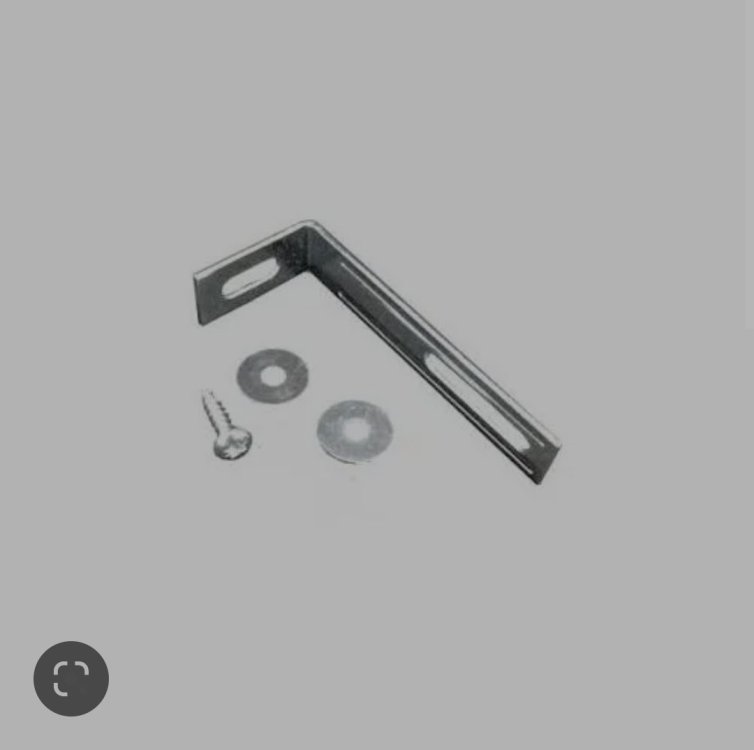
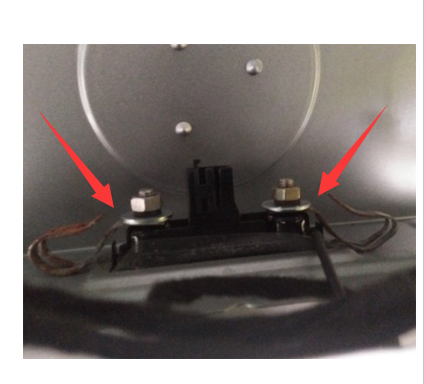
This is what I used. If you picture the bracket like on the picture put the small side on the screw of the camera, then bend the long side to the right for it to sit on the trunk. It will make a clamp that works really well don't forget to put a washer on the screw The second picture is Taken from the net but y you should end up with something looking like it
-
I will send you a picture when I go to my garage
-
yes, same issue for me, I used some IKEA brackets I has lying around and twisted theme to make a clamp on each side. I taped the part touching the trunk to avoid scratching the paint.
-
MQB option E if you want dynamic lines and plug and play https://fr.aliexpress.com/item/4000230897829.html?spm=a2g0o.productlist.0.0.11502b6dG7CRMK&algo_pvid=b5278275-be52-4118-9f2d-bd68c3796b74&algo_exp_id=b5278275-be52-4118-9f2d-bd68c3796b74-8&pdp_ext_f={"sku_id"%3A"12000030861906212"}&pdp_npi=2%40dis!EUR!61.13!51.35!!!!!%400b0a0ac216673052161283037eb1a8!12000030861906212!sea&curPageLogUid=4GGM4ykMWMes others, you will have to find a 12v source
-
Nope sorry, I didn't make any pictures. The cable from the amplifier to the cable is short so what I did was get an extension for the usb, hooked it to the plug providing only power. Ran that to the small glove box on the driver side. It gave me enough mic cable left to put the mic on the sun visor.
-
-
For the option, it really depends in your trunk handle size and plug. Measure the handle to determine the option. For the plug, you have to remove the boot trim to check. I installed mine about 3 or 4 months ago and it is still working fine. The trunk opener feels as good as the stock one. When I had my android head unit, my camera was set to ahd and the picture was juste wonderful. I then installed a mib2 unit and had to set it to cvbs, the picture is not that good. It is ok but compared to the ahd it is like going from a 4k monitor to a CRT screen. If you have the 11cm handle, go with the OEM camera € 88,75 5%OFF | FOR Skoda Octavia MK3 III Superb 3V B8 Rear View Trunk handle Camera with Highline Guidance Line Wiring harness 3V0 827 566 N https://a.aliexpress.com/_EGkhTrF More expensive but good picture. If you have the 9cm like me then you are stuck with after market
-
-
Reverse cameras work on any model, Il have a 2014 and fitted one. The one you are looking at auto codes the infotainement system. If it fails to do so, then you can use a vcds adaptor to code the camera in. I personnaly went with this one https://www.aliexpress.com/item/32570611045.html?spm=a2g0o.order_list.0.0.46f61802I5QRBH and coded it. You have to choose the right handle and plug type. If I had to do it again, I would not go wih an rca connector on the cable but the small purple one as the RCA is a pitta to get trought the rubber gromet on the trunk. I ended utp cutting it and re soldered it when I finissed passing the cable.
-
It is the reverse camera. I can't have genuine camera as my car has the small trunk Switch. Genuine are only in the big switches.
-
Hello, so I went From an Android head unit to a Amundsen mib2. The camera is a 720p On the Android head unit, it was configured in ahd and the picture was perfect. On the mib2 I had to revert to cvbs and the picture quality is horrible. The mib2 being 480p, I was wondering if it was struggling with downsampling. Should I switch the camera for a 480p? Thanks
-
Shure I would happily go for that option but it is only compatible with the big boot handle. Unfortunately I have the small handle. I posted the camera I fitted one or 2 posts earlier. In then changed bit 4 of byte 19 to enable reverse camera low. Greeny has a highline camera that does not auto code. It may be also a solution
-
Ok understood, in thing I will go with a high line Chinese as I have the small handle and the camera I have hase ripples and waves. The power comes from the rear wiper where I also have the transformer for the dash cam. It must be giving dirty power to the camera. Everything is clear now, thanks
-
This is the one I have option D € 22,76 30%OFF | GreenYi 170 Degree 1920x1080P Vehicle Rear View Camera for Skoda Roomster Fabia Octavia Yeti Rapid superb for Audi A1 A4L A3 Car https://a.aliexpress.com/_EwAKHBN