Tell
Members
-
Joined
-
Last visited
Everything posted by Tell
-
Probably another thread for that I don't venture much away from the map ones here. MOST is the optical / coax digital connection (think its Coax so it would be dead if not switched on... may be something else needs to be switched on ?). MOST is what they are blessed with for external amps. More likely the gain is different on the balance... I would have thought. Probably a long string you can find with a Google to examine for the 5f unit compare with what you have in Obdeleven. MOST is also used for something else but slipped my memory 🤔. I'm never changed my firmware but have that module hack for FeCs. Stickler. The "experts" wanted me to upgrade to the fully hacked one. Resisted and somebody wrote me the module to go in the Mib2 high toolbox. Got my module code so it went in as an option for others to follow. They hadn't catered for the firmware I was on. At that stage the last Seat mib2 firmware was problematic. 1447. Now they do home brew. It's all basically the same code between the brands. Some people put Skoda code on their Seats but ofcourse if you have different fancy Skoda external amps then they won't be in the software. Where Seat started to get Beats and Sound on the later year Cupras rather than the Seat Sound system which I'm on. Why I stuck with the firmware I had. I didn't want "carbon" which is the festooned screen effect that Cupra people love thinking it's cool. No just freckles on the background making the screen difficult to read. But I do know how to get the Cupra splash screen at ignition 🤔.
- 142 replies
-
-

- 1
-
-
- columbus
- discover pro
- maps
- mib
-
Tagged with:
-
The only thing I can think of is whether equaliser / balance changed in the update ?. You could down tune bands may be. Afraid I have tinnitus so I'm use to whistling 24/7 irrespective whether I'm in a car or not.
- 142 replies
-
-
- 1
-
-
- columbus
- discover pro
- maps
- mib
-
Tagged with:
-
It's the 370 ones which are the June 2024 ones that have been found that are only mib2. Russian site and mib2 solutions one. Normally if you load the maps in regularly you are protected from anything going wrong, if you load them in via the backend menu then not. So when I said have you a backup that doesn't apply (we hope). 350 with mib1 and mib2 will be circa 32gb. Anything thing smaller like 16gb aren't the two combined. Has been spliced into mib1 and mib2. The Audi files are released in three forms, combined and component. Other brand released Skoda, VW and Seat are combined mib1 / mib2. Gracenotes mib1 high. I might pass on that. I've never found a need to upgrade Gracenotes. I put the album art on each SD album 512x512 via directory. Saved as Cover.jpg. That's the standard DNLA mini server spec of the time that was adopted in mib2 high, any larger and it might pop the program bounds - I've seen that in mib2 standard where it corrupts the unit and it reboots. The dnla mini server spec is used by ASUS in their routers, so does for me to bridge the gap between home and car for music files. I use ASUS at home. Think if playing CDs in the car it might come in or MP3. I've seen it once in the car where I did not get my album art saved correctly, Gracenotes stepped in with some art. There are troops of people digitizing those fields... well not troops. Either via peak a boo in Here Maps to see what's been left off their maps compared with others via digital analysis. Track analysis of GPS signals, they get them back off vehicles using their systems or loyal crowd sourcing watching for developments. Developers publish their plans, postcode directory, LA based planning maps which have house number clues and aerial images reveal the developments as being there. The car coming round also. The fly in the ointment are developers roads that half brained people digitise, those roads become fact as mapping companies copy each other. When an estate is built the developers use their own roads to shift the building material around and store it. They get digitised in. The half brains also put the roads through front gardens since they never look at the planning maps. Those maps also show bollards. Why you find a road across someone's front garden. Google maps are just as bad. They don't practise rigger and fail validation.
- 142 replies
-
-
- 1
-
-
- columbus
- discover pro
- maps
- mib
-
Tagged with:
-
1. Yes 2. Yes but we don't see them too often. On 2. If you are going to do the upgrade then best to locate a copy of your original files so you can revert back. But you will probably be OK.
- 142 replies
-
-
- 1
-
-
- columbus
- discover pro
- maps
- mib
-
Tagged with:
-
64gb USB or SD card to fit into it in situ. If they professioning to be doing it quicker than 45 minutes they will be doing it on a "bench" some how. I'd stick to USB or SD.
- 142 replies
-
- columbus
- discover pro
- maps
- mib
-
Tagged with:
-
Thanks for the interesting stuff. @MartiniB is probably your man to keep an eye open for Gracenotes database. Russian sites seem to trawl Audi servers so something might come up either via those sites then appears on mib solutions website where files get parked. I don't believe connect services are established in some of the East European countries and Middle East so that flag set may be useful to them as well.
-
It's just an artistic thing. They don't want the screen overcrowded with names. That will be one criteria so even if they had the data they may not show it. Counter argument it's how I said on those POIs. Round where I live the local town has area names I'd never heard of so as you zoom in, it turns up with names for areas which few people would recognise. The long standing issue of it calling the local town a Duck.. whether all towns with the name Dock are called Duck I pass. Causing amusement. A typing error in the preparation of the files. The roads on the map and the next turn screen are so you relate the road to where you are. The mib2 high also shows three dimensional graphics to achieve that as well. So as you drive round say a castle, the castle rotates in front of you on the display. Perhaps you need the mib2 high 😉. One of those egg things youngsters talk about. A hidden egg. Well it's amusing when they add another one so a cathedral appears on the map. I've seen it on airport buildings and shopping centre on the continent. It won't look like that on a paper map. They use 3D images to generate the graphics.
- 98 replies
-
- amundsen
- discover media
- maps
- mib
-
Tagged with:
-
& I looked to see whether the delay in releasing V19 was related to switching back to Here Maps cartography in case they had rationalised their map contract. Answer no. Still TomTom maps (I know which bit I drew myself)... so still TomTom and TMC if you want it in the UK V12 maps and the mod contained on the thread.
-
They started talking about it on the German Skoda forum having read it here 😃 Beitrag im Thema 'Navikarten Update Q1 2023 (Release 2024 für MIB1 & MIB2)' https://www.skodacommunity.de/threads/navikarten-update-q1-2023-release-2024-fuer-mib1-mib2.103181/post-2427243
- 98 replies
-
- amundsen
- discover media
- maps
- mib
-
Tagged with:
-
Ah... We dont carry them in the car now but have my tablet to double check and for back up. Bachelor soup free maps was how we did our holidays in Scotland... me, chief navigator aged 10 on the back seat with the soup maps. Book map as well. Remarkable how we did it then. Less traffic. Now you get lane assistance and that can be very handy on the continent swapping from one lane to another on intersections. You'd never do that the old fashioned way - you miss the turns. The downside with sat nav is you never know where you really are since you just follow directions 😂. The roads are much more busy these days for paper navigation.
- 98 replies
-
- amundsen
- discover media
- maps
- mib
-
Tagged with:
-
Think it's just a curiosity of the mapping system how they show geographical entities. I use DMS input or postcode. I can see for church architecture people looking for a village alone could be tricky. You'd have to cross reference it. I always augment with something else. Treat it like a sat nav system built in rather than stuck to the window or dash. It was Skoda people that told me about DMS input (Degrees, minutes and seconds) in these cars rather than traditional decimal place coordinates. Once saved it's there for ever 😏. It was the old work horse to get exact coordinates in. The rest is kids stuff 🤣. I still navigate with grid points here that I put in Co-pilot 14 years ago and exported and imported to the cars navigation 7 years ago. Delivers me exactly to Morrison's 😂... 14 years later 200 miles from where I lived at the time.
- 98 replies
-
- amundsen
- discover media
- maps
- mib
-
Tagged with:
-
Well I reckon they do it via https://www.briskoda.net/forums/topic/512842-amundsen-mib2-map-updates-2024/?do=findComment&comment=5840805 But you'd have to try a few to see whether it made sense. It had come up a few years ago but remained un resolved where those titles come from. Tom-tom kept rejecting what the person was saying so they were slowly pulling their hair out. I suspect it is how I said. Locality name and town POI but if rejected it never gets in. They are like hamlet / suburb markers.
- 98 replies
-
- amundsen
- discover media
- maps
- mib
-
Tagged with:
-
Then try Mapcordinates if you want to stay with mib2 standard maps and just dial in the coordinates. The app is very good at locating things since you can toggle between Google Maps and Openstreet. Has that peak a boo into street view. I find it very good for armchair planning. Save to favourites then dial in when you get to the car. Ordnance Survey walking book, the app and access to Openstreet and you are off.
- 98 replies
-
- amundsen
- discover media
- maps
- mib
-
Tagged with:
-
That is indeed the latest map now. No the sub areas will be / should be the same. As I alluded to the mib firmware could have a bearing on it. Could be the size of the screen... as you zoom in and out using the twiddle knob on the right hand side it may reveal more or less of those names. No telling what intelligence they have built in. I was going to check whether Castlethorpe in Bucks appeared since that one doesn't have a POI as explained. That's when I thought I'd cracked. Probably is how it works. All depends on how they use the files whether just the TomTom ones or dive into additional files or whether it's firmware based.
- 98 replies
-
- amundsen
- discover media
- maps
- mib
-
Tagged with:
-
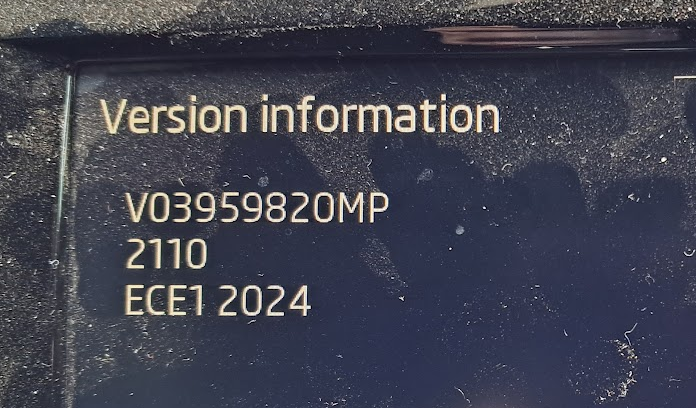
On your image. The actual serial map release is 2110 as MartiniB pointed out there is a newer one now. The code above that V... is the part number for the brand. It's all the same release for 2110, just when put it in the unit it will show the brand part number. Skoda, Seat, VW - that's that line. Traditionally we would define the map by that ECE code but a few years back they slipped a year or six months variation so the mib2 standard and mib2 high ones didn't tally. The ECEX, X being 1 in that map dates back to when they split out the maps by zone so they fitted a 16gb card. You can buy the 32gb to get all of Europe on. Hand in hand with that map release is the V version code not shown but printed on the original card / box. 2110 is version 18. The main quotes for mib2 standard which is the 4 character code and the version code. Eyeballing the 2210 means it's not the most recent. Some people prefer to talk V codes rather than the seriel release xxxx. Those village names appear to be driven by those POIs which give the location although the company that generates the files for Vag may be using a different file outside of TomTom for that.
- 98 replies
-
- amundsen
- discover media
- maps
- mib
-
Tagged with:
-
It shouldn't... if you use Android, this is a good app for generating the DMS that go into the coordinate system of the car: https://play.google.com/store/apps/details?id=sands.mapCoordinates.android&hl=en&gl=US I swear by it. It does give you a streetview as well if you cokes it out of it. Save favourites, linked to Google Maps and Open Street. Basically I find out where walks etc start from the guide books, find them on the overview map, toggle between Google Maps and OpenStreet, get the best of both worlds. Save as a favourite then just dial it into the car. You select the DMS display in the app and new destination in the car, on screen or something and dial it in. People would say use Google Maps in the car but then they are not good at finding car parks for hiking walks etc. Google Maps tends to be commercial, not for outdoor activities. Openstreet tends to be the crowdsourced outdoor activity map. The streetview part of it is being withdrawn by Google, but I've just ported it to a new tablet. You select Free, always or something, then you can walk the map as a streetview. This is where you can find hotel car park entrances exact, whilst Goggle Map POIs can be just be plonked close by. Postcodes are ofcourse the postmans walk so that is the street or business address. I have used it for planning holidays in Japan, although they have a similar app that generate their own coordinates that I've also used. You dial those in as well. An idea for you.
- 98 replies
-
- amundsen
- discover media
- maps
- mib
-
Tagged with:
-
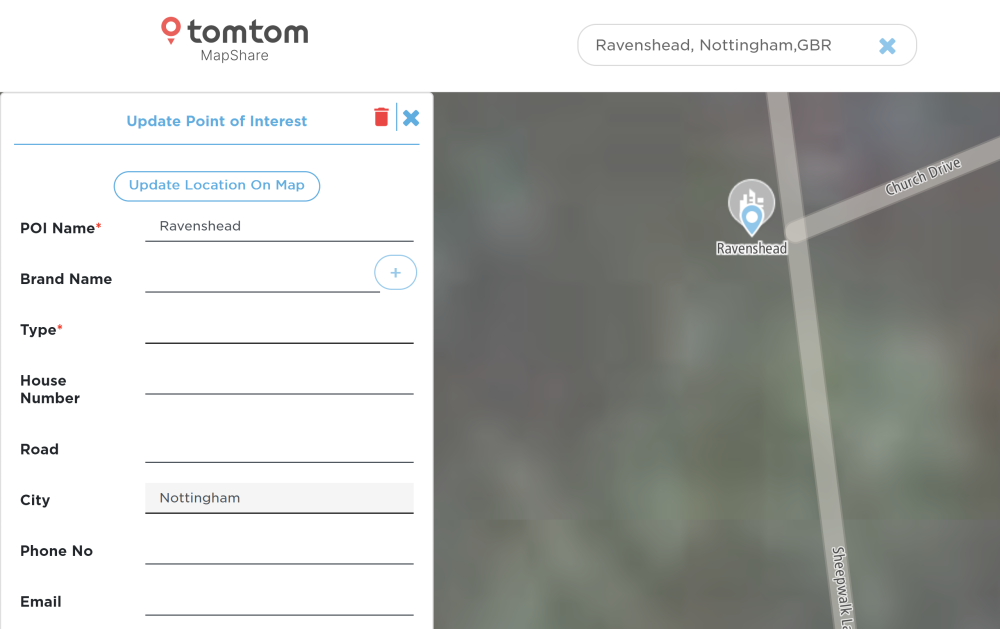
I thinks it's because the those villages aren't marked up as POIs. In TomTom Mapshare you find Ravenshead but not the villages so I'd say it's driven by that. Reckon it's needs a POI name and the City as the big city it is associated with. I was trying out some villages around Milton Keynes, and they are put as the City of Milton Keynes although not in it, but the POI name is the village and the postal address is MK. Everything else has to be blank. Trying out my local village which isn't in MK that is how it works. Users of TomTom may have submitted them in the past or it was some POI file they got their hands on which was incomplete. On the postal address It goes STREET VILLAGE CITY VILLAGE is the POI name CITY is the city name in the TomTom system. If you put those in, in Mapshare, check they get accepted and wait for the files to be processed, about a year, you'd get them. Feel free to check out the rest. It's the same issue that came up before. Think we have got down to the bottom of it, this.
- 98 replies
-
- amundsen
- discover media
- maps
- mib
-
Tagged with:
-
Is that version 2210, v19?. I didn't see a difference myself when I checked between v19 (TomTom) and v12 (Here Maps). The level of zoom will reveal more and less details so may drop the main name for the area and go into village names.
- 98 replies
-
- amundsen
- discover media
- maps
- mib
-
Tagged with:
-
Only really one other person has reported this and that is here: That's where they drew a blank with progressing it.
- 98 replies
-
- amundsen
- discover media
- maps
- mib
-
Tagged with:
-
I'd assumed he'd used them. It will be the cartography differences and how it setup between the old Here Maps and the new TomTom ones after V12 unless it's been fixed. As said it has come up before. I did have a quick check on the latest maps v v12 maps today. I could see a difference on the villages I was looking it. There are some bizarre things you see as you soon in and out you see province names that you aren't familiar with but I did spot the villages. If its still on the latest map then it will be the cartography and as I said a poster got nowhere taking it up with TomTom via Mapshare reporting website. As I said the validation team wherever they are based, didn't seem to have the capability of naming villages. Only streets errors not missing province names. It could be as I hinted at these are not passed into the mib2 standard maps. You have a GIS database and support files being mapped into the mib2 standard form if they mess up not taking attributes then you won't get them. I did do GIS a few years back... in its infancy hence a hobby now 😉. Planning was my background and to use GIS in it, GIS and navigation are related..... It seems on mib3 a number of newbie errors were made on taking the Here Maps data and getting it into mib3. The programmers on that did not understand the relationship of postcodes to roads using the centroids instead, you dont (That's fixed now, sent people off road 😂). There seems to be an on going issue of defining road speeds again geographical zone rather than road. So they proxy that onto the roads that it's not meant for. Basically rubbish programming from staff that don't understand GIS attributes and know how to use the attribute files which will be in the systems of the cartography companies. They get a file dump and have to use it. If you don't know what is in the dump then you miss use it. Audit comes in 🤔. That which isn't being done very well so it seems from reports. They did fix the off road navigation issue but not the speed issue where the brakes get applied for those that like ACC... 🤔 Answer that question no if villages names are missed out you can't put them in yourself.
- 98 replies
-
- amundsen
- discover media
- maps
- mib
-
Tagged with:
-
Probably. Mib2 standard isn't such a good implementation on mib2 high. It will be how they took the TomTom cartography and turned it into the Vag mib2 standard which is the one we are talking about. Revert to v12 and have TMC on Here map. I was going to suggest you look at Amigo which uses TomTom cartography. That has village names in it round here so I reckon they just didn't use all the data. Cross check with Amigo. The equivalent Here maps one is Herewego. Those are online renderings of the cartography of the two. They are useful resources for bang up today look at their databases.
- 98 replies
-
- amundsen
- discover media
- maps
- mib
-
Tagged with:
-
I have come across people moaning about location names on the maps. It remained unresolved. I put them onto the TomTom reporting site and they didn't resolve anything. Reckon the TomTom map screens can change names of roads but not district names if you see what I mean. So they drew a blank. You register for an account, but as I said the validation team get stuck with that type of thing. It's called TomTom Mapshare for feedback. https://www.google.com/url?sa=t&source=web&rct=j&opi=89978449&url=https://www.tomtom.com/mapshare/tools/new/mapshare/&ved=2ahUKEwj_8YGWjpiFAxXnQEEAHe45AvoQFnoECAcQAQ&usg=AOvVaw0qu-5giOB7e63In0V6ug7e Suspect 2017 maps are Here Maps origin and these are definitely TomTom, so it's the cartography and how it's set up.
- 98 replies
-
- amundsen
- discover media
- maps
- mib
-
Tagged with:
-
Yes I've seen a picture with the A55 which was never in the original, with a finger pointing at it, by a satisfied person who got the down load working on Seat. They also went on a hacking session like you to get it to fit. Reckon that's the only difference with Skoda you don't have to do the part number edit. It was never sorted out 5 years by Seat people, with only 50% managing to update, then the world moved on to mib2 and the trail went dead. Nice to give them a boost with the maps more up-to-date.
-
It does say Technisat mib2 standard and how to test on that link. @bigade1 was the mib2 standard technisat champion in the UK to get it working following Ozzie methods to get it to work on Australian TMC, then used those method on Inrix (as I understand it). Via the mib2 standard toolkit. That washes the changes out which @pcbbc took those files and made it modular so you didn't have to use the toolkit. That was ticked off. Mib2 high @pcbbc sorted that out with a TMC group coding change. That leaves mib2 standard Delphi where a champion hasn't stepped forward. You'd probably have to go back to researching what they did in Australia to change provider but perhaps it's a difficult nut to crack. You'd see from a Google and some reading. Probably need to work backwards from this https://www.vwwatercooled.com.au/forums/f78/additional-tmc-provider-mib2-discover-pro-units-heretraffic-134851-5.html Wegas 8/8... Pcbbc is the expert at decrypting those... That's what he did with what came out the mib2 standard toolbox. Public domain code mentioned on the Briskoda by pcbbc thread that decrypts that stuff, probably encrypts it as well. You have to take on the role of Bigade1 with your Delphi 🤔. Pcbbc is a programer... Probably insulted him now 😂. All of that can only be done with V12 maps, not beyond like the mib2 standard Techinsat solution I guess (Here Maps came fully loaded with the hooks in it for different providers whilst TomTom cartography after v12 didn't). Pcbbc has also done one for the French service where he worked with another guy on the thread, where that went similar and vanished to one provider not on the VAG TMC group list. Fun. Mib1 you just do the code change 15 to 14. By mib3 they dropped TMC from the cars. All online now.
- 98 replies
-
- amundsen
- discover media
- maps
- mib
-
Tagged with:
-
Give you the documented one I pulled together from the thread here. Bigade1 and PCBBC work with thanks. https://www.seatcupra.net/forums/threads/updating-the-inbuilt-mib2-satnav-mib2-tricks-and-mib1.388586/page-136#post-5037297 You don't need the steps 1-12 with the overall.nds file in that. That's only for Seats, you got mapcare on Skoda for life. No coding is required thanks to Pcbbc's module copy. Use option b of the text above. Discussion thread is here but gets punctuated with comments and discussion so I pulled it out as above for Seat users:
- 98 replies
-
-
- 1
-
-
- amundsen
- discover media
- maps
- mib
-
Tagged with: