




HappySam
Members
-
Joined
-
Last visited
Everything posted by HappySam
-
You can do it in satnav settings. It speaks as you do it.
-
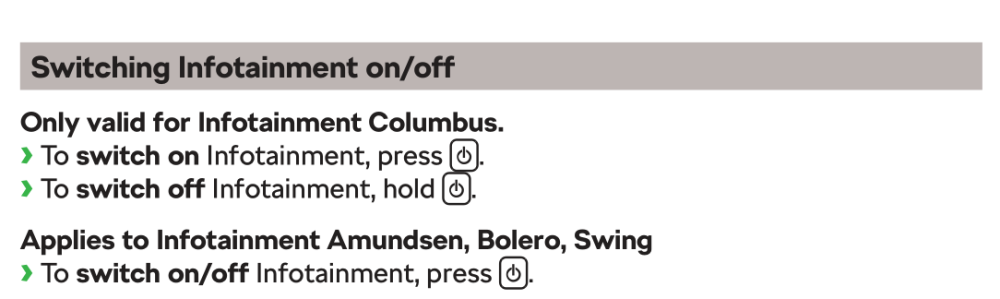
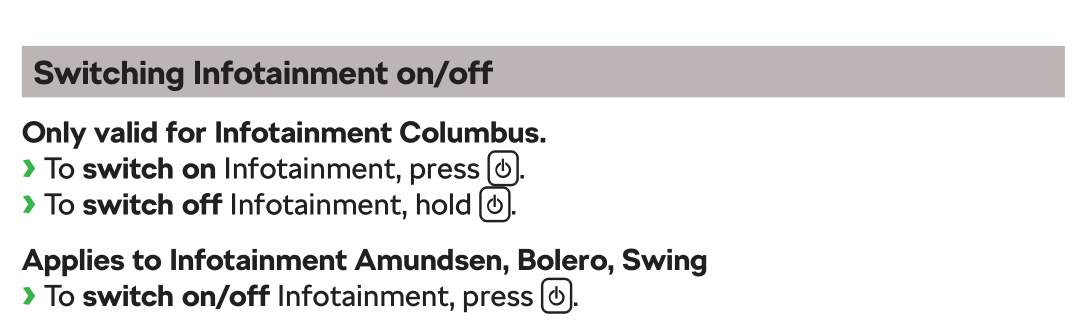
Actually, its not an unreasonable question. I've had my Octavia for 3 years and I've no idea how to get sat nav instructions without having the radio on (probably because I've never used the satnav, Waze for the win). That said I know how to turn the infotainment on and would hazard a guess that if you mute the radio (I know how to do that too 😁) you still get satnav instructions. Anyhow, for the op... ETA; Oh, and I've just read the manual. There is nothing in there about getting satnav instructions when the radio is muted 🤷♂️
-
If its a separate part it'll be listed here; https://www.lllparts.co.uk/catalogs/skoda/CZ/OCT/753/9/945/945000
-
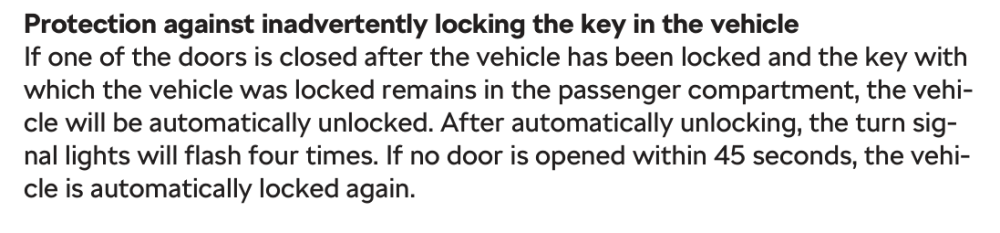
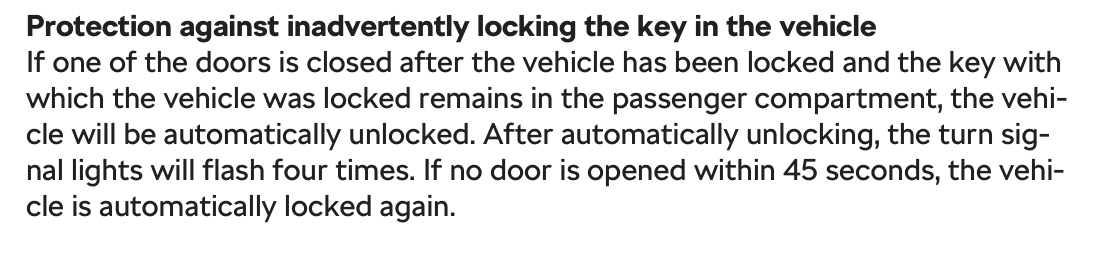
From the owners manual, non-Kessy Kessy

-
Has it unlocked? There's a fair few threads on here about stuck actuators. It seems there is no emergency release so its a case of keep locking / unlocking till it frees (possibly while pushing on the flap) or a bit of brute force. There's more if you search for Fuel Flap Actuator but I expect they all say similar.
-
You realise the OP is from Egypt? English probably isn't their first language and that's probably not what they meant? vw-rz-08-0030-b1 appears to be some sort of Canbus interface and K2501 T5 an Android headunit. I can't help solving the OP's problem but I'm guessing they're trying to get car diagnostic data on the headunit. @Mazen86 You might find more help on the XDA thread I've linked above. It's 121 pages long though...
-
You can get the part number from here; https://www.lllparts.co.uk/catalogs/skoda/CZ/OCT Annoyingly the diagrams are not loading for me at the moment. You'll probably need to replace the entire switch.
-
I just posted the same in their other thread 🤣
-
Looks great. You should keep it 😀 Asym 6's are a brilliant tyre. Get my vote every time. My rears are flaking as well. I need to paint them. What paint did you use and was it a good match for the fronts?
-
I also took a punt on one of these. I must say I'm very impressed with it. Connects quickly and everything works. Only downside is my phone gets a bit warm if I leave it in my pocket 😄
-
I bought some similar to these; https://www.aliexpress.com/item/1005006266995575.html The covers are a bit large but they do the job. They're also sold on eBay and Amazon.
-
Welcome to the forum. There will be a bit of corrosion sticking the alloy wheel to the steel hub. Remove all the wheel bolts, sit on the ground and give one side of the tyre a whack with your foot. That should release it. If not give the other side a whack. Put the other foot in the centre of the wheel to help keep it in place and be ready to catch it as it comes away.
-
Unplug it. You can just about reach the plug if you lift the plastic scuttle cover in the centre. Ignore that. Misread, it. Didn't realise you like the sound. I prefer driving in Sport mode so I've simply got into the habit of tapping the vrs button twice every time I get into the car. Simply tap it thrice 🙂
-
You need something like this; https://www.ebay.co.uk/itm/195381038809 They were typically used to power external hard drives. Only one port provides data which should stop the car getting confused by 2 phones being attached. However, and it's a big HOWEVER, I doubt the port on the car can provide enough power to charge 2 phones. If it was me, I'd look at getting the accessory socket replaced.
-
I upgraded mine. I disconnected it 😁
-
Can you even get a torque wrench that does 1.5Nm? You're overthinking it. Just do them up so they're hand tight with a spanner / short ratchet.
-
You need the build codes for the car. They're either on a sticker somewhere or there's eBay sellers who supply them from the vin. You can then look up the disk sizes in this thread.
-
The dongle isn't worth it. Like you I looked at it when I first got my car and as best I could tell is simply gave me info I already had on my phone for free (like the weather). You can download and install radio icons from any sd card but will need a genuine Skoda card for maps as the sd card CID (Card IDentification) is unique to Skoda (VAG maybe?) o others don't work. Plenty available on eBay and other places for not much money. Changing the CID is nigh on impossible however I've seen videos online describing how to disable the check using MIB Toolbox if you're that way inclined. Personally I wouldn't be too bothered about the built in satnav. I only ever use AA / Waze.
-
Part 5 or 8 here; https://www.lllparts.co.uk/catalogs/skoda/CZ/OCT/753/9/919/919070
-
Plenty of threads on after-market wheels. I'm sure there's more and you'll find similar for tyres if you search. I'm not sure if there's differences between pre and post facelift fitment as post facelift has a wider track. Personally I run summer tyres all year round (Goodyear Eagle Asymmetric) but many people run all seasons tyres such as CrossClimates. I think you'd only change tyres if you live somewhere that gets a lot of snow.
-
-
You might be better off getting the existing one retrimmed. https://royalsteeringwheels.com/ I've not used them but have seen them recommended. Other retrimmers are available.Top of the V is 22mm from the swage line. Top edge of the S is 37mm from the edge of the boot.When you unlock the doors with the key the boot doesn't unlatch. You still need to press the release button on the boot. Are you saying it doesn't open when you press the button? This is by design. If you press the button on the centre console it will unlock the doors and the boot.




Important Information
Welcome to BRISKODA. Please note the following important links Terms of Use. We have a comprehensive Privacy Policy. We have placed cookies on your device to help make this website better. You can adjust your cookie settings, otherwise we'll assume you're okay to continue.