STEV0
Finding my way
-
Joined
-
Last visited
-
Currently
Viewing Topic: Infotainment System Restarting endlessly
Everything posted by STEV0
-
There's a little tab on the left (or right, can't remember exactly which) of the video file name that you have to swipe once it's playing. This displays the video. I had the same question. Only problem is that it's not full screen (at least on the software version I'm on).
-
I just set my VPN to Melbourne, and my Amazon location to Australia. The lead is showing as not available. Switched it all back to UK and it's in stock with next day delivery. I think that is your answer I'm afraid.
-
Your screenshot of the Amazon UK site states 'deliver to Australia'. Pretty sure that's why it's showing not available for you.
-
-
Hi all. My car is a 2020 SE Technology running the 1896 version of the infotainment software. I've read the other posts where people have had problems with their infotainment restarting and other issues so I can understand why they have updated their software. Mine however, is pretty stable and I haven't experienced any issues (except for Android Auto becoming unresponsive on occasion). So my question is, for those that updated to 1941, or now the even newer version, what are the benefits other than improving the stability of the system? As mine is pretty stable, is the new software going to give any new functionality, or should I just stick where I am? Just trying to weigh up whether it's worth going through the hassle of upgrading. Cheers!
-
I've only just got it last week so haven't done night driving yet. But at dusk I was surprised how well it brightened everything up. There are a few reviews on YouTube that have examples of night driving.
-
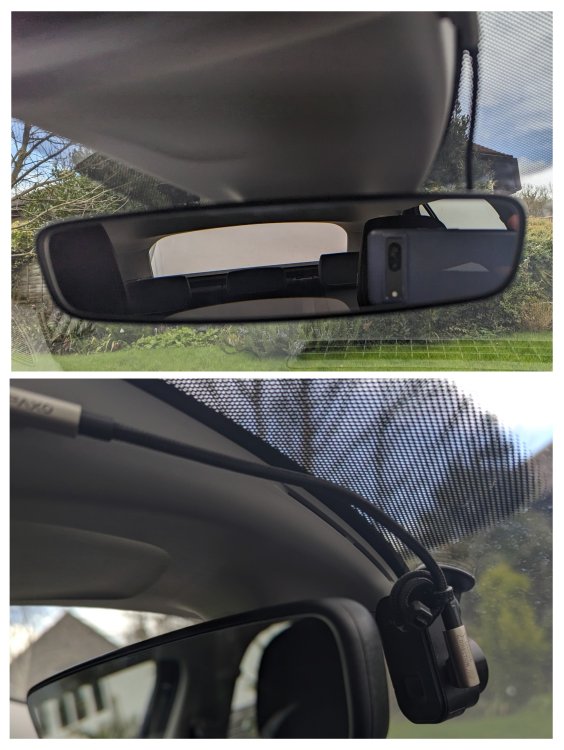
I spent way too long trying to find a lead I liked more than the one recommended by @RobL50, but couldn't find one... Initially I tried the left handed plug version hoping it would reach all the way around to my Garmin mini 2 mounted on the passenger side, but it's not long enough for the camera to be concealed behind the mirror unfortunately. So I ended up with the right handed plug version with camera on the driver's side. I used a couple of small cable ties to create a coil to take a little length out of the cable at the camera end. Nice and neat I think.
-
Same here. Sometimes apps don't load in, but as mentioned above hitting the button to rearrange the apps does the trick, or hitting the icon for the app that isn't displayed a couple of times. Occasionally, AA locks up completely and none of the buttons do anything. Have found the only way to fix that is to restart the infotainment completely using the power button. I am on older software version (1896), so not sure if this is any better in the latest version.
-
Thanks. Seems a shame for all that screen real estate to be wasted. But never mind...
-
Hi there. Realise this is an old thread, but do you know if it's possible to switch to full screen (i.e. without the media menu on the side or the a/c menu etc at the bottom.) I've played with the settings but not worked it out. Cheers!