jimharston23
Finding my way
-
Joined
-
Last visited
Everything posted by jimharston23
-
-
Fair point/question - they are actually Michelin CrossClimate i.e. all season I guess. I have been running at lower pressures than recommended, around 32-34psi, on my recent trip to France I averaged 50-55mpg (much of it 2 adults 2 children plus luggage, 1.5 TSI Estate) mainly motorway driving 65-80mph. Given that good mpg, I'm not inclined to increase the pressure as doubt I'd save much fuel by increasing and prefer less harsh ride and noise. Thanks everyone for the advice
-
-
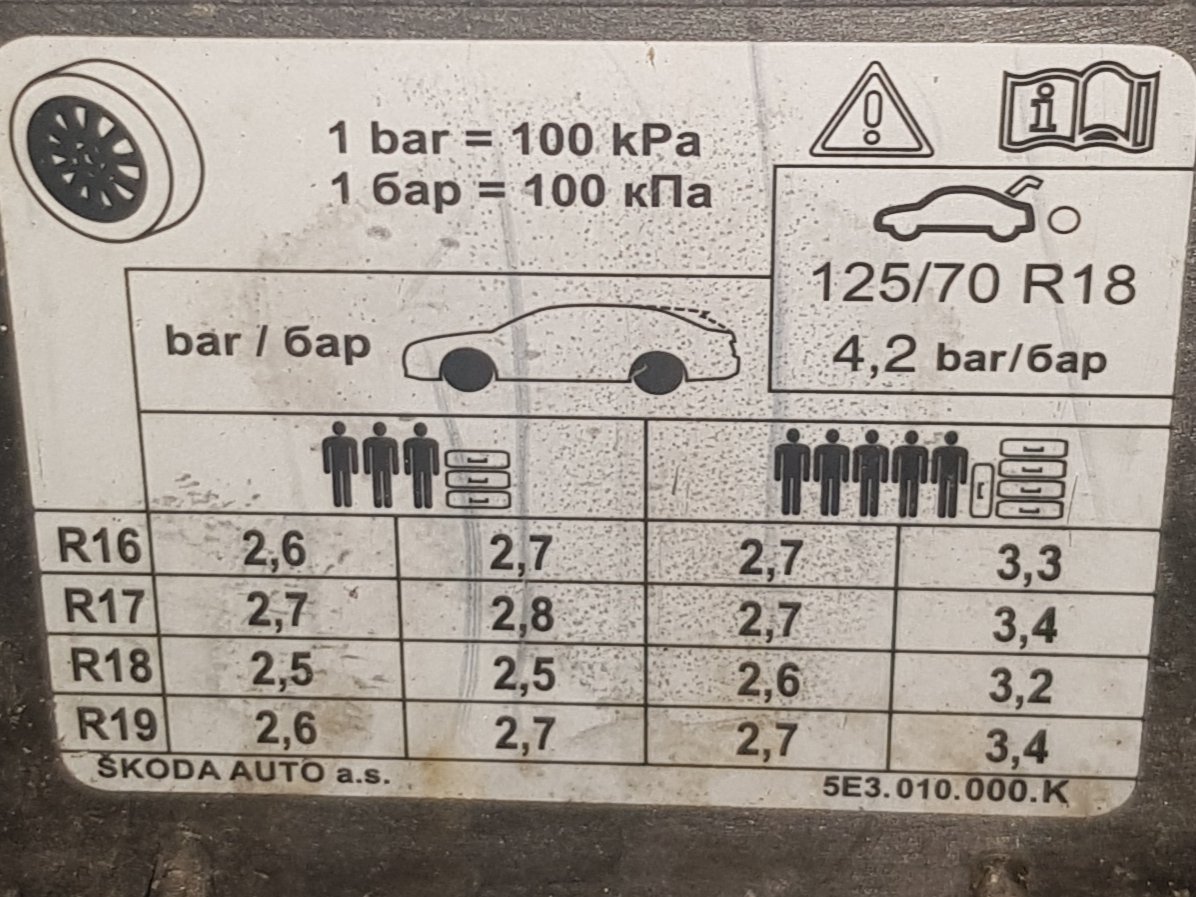
My car is 1.5 TSI Octavia Estate, with R17 tyres, 'normal' (not low) profile The figures shown in filler cap are in photo: Front 2.7 bar rear 2.6 bar, and rear 3.4 bar with full load This equates to 39 psi, 38 psi and 49 psi - these are very high esp 49 psi ?!! I always ran around 32-36 on my old Focus (lower profile than my Octavia) Any thoughts - based on normal/summer tyres? The other thing is mine are winter tyres but from what I've read that shouldn't affect pressure required (at a given temperature)
-
Good morning/afternoon, presumably after the 1h20 mins driving, it had downloaded what it needed from the USB drive. As I wrote above, turning the ignition off and back on for a few seconds didn't show the updated version (maybe it didn't properly shut off in that time). I turned off ignition, locked car, about 30 mins later turned on ignition and was updated. Maybe 5 mins would have done it i.e. long enough for it to properly restart, I wasn't keen enough to check that often 😄
-
Just a brief (hopefully final) update from me, I followed your instructions @Exkiwi (had to get someone else to download file and put on USB stick, I tried fairly late in the evening, it failed at 11.50pm) Once unzipped folders/file on USB drive, plugged into car, drove for 20 mins, brief stop, drove for 1 hour. I turned off ignition briefly and back on, it still showed 19.7. Unplugged USB, turned off ignition, went back approx 30 mins later, and it had updated to 25.6 😊 Thanks for the help
-
Hi @Exkiwi thanks for that, to clarify when you say go to portal do you mean https://updateportal.skoda-auto.com/en-GB/Updates/[my VIN] which is shows ECE 2025/26 and gives link with 29GB OI_P153_EU_202525_Offline-Update .zip - correct? The problem with this is I get repeated 'network issue' error when trying to download, at various points from a few GB to 27GB (of the 29GB) - so I can't download the file, I posted on another thread about this recently. Someone who lives in my street also couldn't download it (has Virgin fast connection). A friend who lives 60 miles away with Sky fibre did download ok but this is rather a long way to pick up the USB stick!
-
Hi all, I'm struggling with this. Firstly I have a problem downloading from the Skoda website, tried the 29GB file it gives me when entering VIN but after multiple attempts every time I get 'network issue' at varying points in the download. I have now managed to downloaded 16GB file from https://infotainment-cdn.skoda-auto.com/base/maps/STD2_2510_EU_AS_202525.zip and within that zip is a top level folder 'maps', below that are two folders '00' and 'EEC' then various folders below these. Which of these should be at the root level in my USB drive? I looked at the screenshot posted by @Exkiwi in this thread which shows many folders at root level starting 'MIB31_xxxxxxx' but I don't see these in this zip (realise those are Australian ones but can't see anything similar). So my question is what should the folder(s) in the top level of my USB drive look like? So that my car recognises them (Octavia Mk4)
-
It might be same issue as I flagged recently here User setting unavailable on infotainment. - Skoda Octavia Mk4 (2020 > ) - BRISKODA the outcome was it needs (chargeable if not under warranty) job done by the dealership, according to them and Skoda central support. I was relying on the eSIM not wifi for connection, but don't think that is the problem.
-
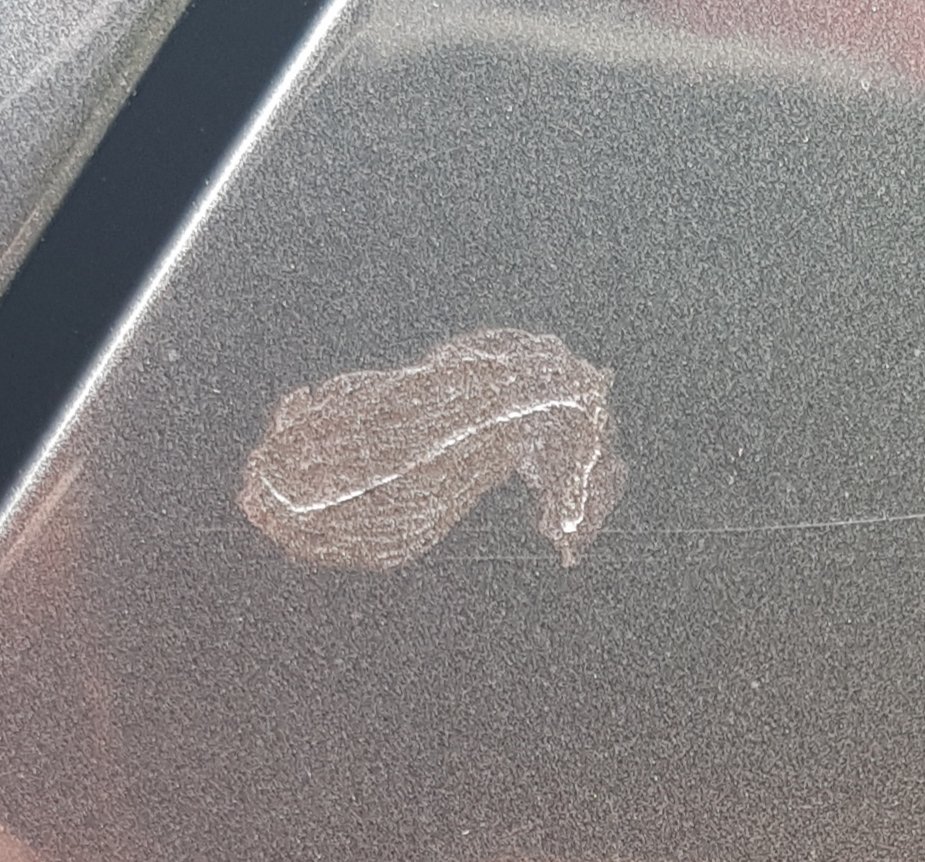
I have the 'graphite grey' (I believe) Mk4 2020 Octavia. I recently bought two touch up paints, both via ebay, one from r.s.autoworks (marked as LF7C) and one from ab.touch-ups (F7C), they seem identical to each other, but are lighter than my car, see photo Do I need to shell out nearly £30 for the 'official' Skoda parts e.g. the one in Swindon? Does anyone know if this is a better match or another supplier? @EchoWisky what year is your car and did you get a good paint match?
-
Outcome: Dealership said the fix is not quick and this is a chargeable service for a car outside Skoda warranty. I have decided not to spend the money and will manage without the link to Skoda Connect account. I guess this means no live traffic available - will use google maps instead. Disappointing Skoda aren't willing to fix these kind of problems.
-
@spcdust How much does it cost to get dealer to update the Telematics firmware? I went into a local dealership yesterday because Skoda support said to fix a problem I have (not being able to log in to my Skoda connect account, see separate thread) I would need to book appointment, then Skoda central support would have to provide information to dealership.... it was going to cost something over £100 (out of 3 year warranty) which tbh for me isn't worth it as it works ok and I'll just use my phone with google maps to get live traffic and don't need SOS. No other issues currently (I updated to 1985 as per process detailed in this thread) although have the annoying air con issue (again another thread) but think that's across various software versions and VAG models.
-
@prosist I would send a private message but can't as a new user... Did you find a solution? I have posted recently on two other threads on this site, I have same problem on 2020 Mk4 Octavia, and seems to happen when it is very hot (i.e. when you need air con the most!). Web search shows it happens on other VAG/VW cars e.g. Golf, and older cars. I am fairly sure it's a software/control fault, although possibly a sensor. Someone helpfully posted a workaround where you initially set the temperature high (e.g. 28) then gradually reduce it as the cabin cools down. Annoying esp if you're driving and have to keep touching the screen, but worked yesterday. Other thing I found (and others) it's triggered by putting car into reverse, this could be intentional switch to recirc to avoid exhaust fumes entering but potentially its only closing off the outside vents not opening the recirc vents, and then not switching back to external when driving forward. All very bizarre.
-
The process outlined by @Saracens_fabia does seem to work. But this is madness, why is this necessary? I also found again today the problem seems to start when putting the vehicle into reverse?! Come on Skoda/VW - surely with reports of this across different VAG models you can find the solution and fix your software?? I am wondering if a software version update might help, I recently updated to 1985, but can't say if the problem existed before update.
-
Thank you @faz244 agreed it's over complicated, wondering if I should have bought a mk3 Octavia... I removed the air filter and it seemed ok going down my road and couldn't replicate the problem but filter didnt look very dirty so doubt that was the cause. Still missing my 2009 Focus I swapped for the Octavia 2 weeks ago...
-
@Saracens_fabia can you advise what happened when you tried this? Anyone else had the problem and know the fix? It's infuriating and I need the air con working in this weather!
-
Hi guys. I have put in my VIN and I get ECE 2025/26 showing 29GB, I click download using Edge browser and then after a while it stopped with message (on download drop down on Edge) 'Couldn't download - Network issue'. Fist time didn't notice how far it got. I clicked download again then it got to about 7GB then stopped, same message. Then I tried again, it got tantalisingly close at 27GB but stopped short of the 29GB. I am using windows 11 with lots of disk space (will copy to USB after). Anyone else had this problem downloading from Skoda website? I have never downloaded a file this large before but not had any issues with my service provider (Plusnet), connection speed is about 35MB/s and estimates about 2 hours.
-
I know some people have posted about improvements they've noticed, however having updated my Octavia 2020 model from 1806 to 1985, I cant identify any tangible changes/improvements - am I missing something? I've not used the speech recognition function since upgrading admittedly. I didn't really have any problems before, except I couldn't register my Skoda Connect account and that is still the same.
-
I have now updated to infotainment version 1985 (as per instructions on other thread) but I still same problem when trying to add my Skoda connect account. Tried factory reset after the 1985 update and still 'Sorry, unable to load your settings'
-
So I press start update at bottom of the list of MIxxxxx files(?) then the start update again at bottom of screen with no files listed (same as in video) then I just get screen with Update Progess in red at top of screen and Back Button below, nothing else happens, waited over 5 mins. If i click Back Button i get screen User abort! with Update Interrupted in middle of screen, with options Continue update or Cancel update, if I choose Continue then again same screen nothing happens. Should I try clicking cancel update?! Guess no other option. If you read this more than an hour after I've posted I will have tried it! Edit: after clicking continue update, after waiting a while it started updating...
-
My 2020 Octavia shows Software 1806 Display unit/control panel software: 2088 Navigation database 19.7 When I click show all updates, all types show nothing
-
Thanks for comments. Having read a few other articles about this, think I'm going to just plug my phone into a holder and use google maps, as I did on my old car 🙂 I can foresee hassle and cost (subscription) involved getting up-to-date maps and traffic info, even if I get this user issue fixed. Using my phone for navigation I can use the screen for controlling things like the radio, heating/air con etc (which I'd rather not be using a touchscreen for, probably should have bought a late Mk3 instead).
-
Thanks for the suggestion, I tried this and also a factory reset but still the same. I called Skoda support, they logged a ticket, I replied on email with screenshots, then I got email back saying I need to book an appointment with a Skoda dealer, advise the technical support of the appointment, then they will provide the technician at the dealer with the info they need.... seems a bit excessive? Does anyone know if I will be charged for this? Car is nearly 5 years old, not under Skoda warranty. The main thing I'm trying to fix is getting live traffic updates, does anyone know if becoming the main user is likely to fix it, would I need to pay subscription?
-
I am having the same problem. Have registered account on the app, when I add new user and enter my email and password, it shows 'Loading settings....' for a while then 'Sorry, unable to load your settings'. Have tried several times, I have both keys in the car, and the car has internet connectivity. Anyone got any ideas before I call Skoda support?
-
Hi all, can anyone help on this? I assumed that Skoda would have downloadable versions on their website - this page Škoda Owners Manuals & Car Owners Info | Škoda UK says click here to download manuals but when I find my car (using 07/2020 Octavia) it gives an online interactive version, not a pdf download.