Graham Butcher
FREEDOM
-
Joined
-
Last visited
Everything posted by Graham Butcher
-
Well, consider you may be spending money for no reason here as your OBDeleven you said is now playing up and is displaying "Device is not authorized" so it might be that the device has been lying to you about the misfiring, you did say before that you were getting some odd results with the claimed misfiring apparently jumping around various cylinders. Is the car currently drivable or not? If it is, and appears to be running OK, it might pay to book in at your garage as the 4th Sept is only next Monday so you could maybe drive it till then? Its your call at the end of the day. What you do is a risk either way.
-
I think I'd be inclined to the dealership for checking. They have factory approved tools and should be able to resolve your problems once and for all. I had Halfords autocentre do the headlight alignment for me twice I had to take it back as with their aiming the only safe speed at night was about 20-30mph on country roads as the headlights only shone up the road for about a car length giving me a great pool of light and darkness beyond, very dangerous. They said it was done on their MOT approved head adjustment machine, said that if they were any higher drivers would be dazzled and flash me. I ended up doing it myself in the end using a brick wall and aiming the headlights up until they looked OK. Much better now, can see just as good as I could with my old car and all the others before it. That was nearly 3 months ago and not a single person has even flashed me to say they were being dazzled by them. I won't be going back Halfords autocentre anytime soon.
-
Is there a way to beat them?
-
Your guess is good as mine on those issues, or indeed do they really indeed to do anything at all. Is this all smoke and mirrors?
-
Well in that case, you do really need to get a plug removal tool and clean / check them and if required adjust the gaps. Perhaps even replace plugs with new ones.
-
What diagnose system are you running? Does the car feel / sound / different to normal? Has it been suffering from lack of power? When was it last serviced and by whom, i.e., was it done by a garage / dealer or did you do yourself? Does the car run hot, do you have to keep topping up the oil or water? Do you have any warning lights in the instrument cluster etc? It is common for the start/stop system not to operate, I believe if the engine cooling fan is running or if the aircon is working really hard. It sounds as if it would be a good idea to book the car in with a Skoda service centre for them to cast an eye over it and do their diagnostic checks.
-
Either way, @Breezy_Pete and myself have advised them to get the battery checked by another garage for peace of mind, but currently the dash cam is chief suspect as it appears to be plugged into the 12v power socket which seems to be always live and OP is checking that and will report later.
-
That is from my Skoda service agent. There is a plug that connects to the negative battery terminal but on my old car that was impossible to extract for some reason that disconnects the sensor. Anyway, I think we may have discovered that their dashcam has been left plugged in 24/7 and discharged their battery. Awaiting their reply.
-
Today I came across this in my mailbox. What I'd like to know is why has it taken the government so long to respond to this crime wave, and also why was the equipment to capture the signal from keyless entry cars and then use it to steal the cars even allowed to be on sale? Secondly, following the jump in my renewal policy after the shunt earlier in the year which was through no fault of mine and zero cost to my insurer, has it made such a massive impact on policy. I did a test quote with another company last night, one without declaring the accident and then another declaring it. 1st quote was £888.84 and the second was with the same details but with the no-fault accident declared £1042.37, that is £153.53 uplift for something I did not contribute to. That to me is clear evidence of price gouging and is 100% not justified. Keyless car hacking equipment to be banned as rise in thefts urges Government to act | Regit
-
Dash cams are normally connected in one of 2 ways, the first is via a power lead that is plugged into either a USB socket or 12V power socket, some call them cigarette lighter socket. The other is directly wired to the cars supply via a circuit that is only active when the ignition is switched on. The power lead method is not a given that when the ignition is off, the supply to the socket is off. In lots of cars the USB or 12v socket is always live so if that the case with your car, and you don't pull the plug out of the socket, then that is still connected and drawing power, and will drain your battery down enough to prevent the car starting, especially if the car does move for a few days. It might well only drawing a few milliamps, but they all add up of time. Normally there is an indicator on the dashcam to show that it is active, a LED should be glowing when powered up. So the question is do you always unplug the dashcam and judging by what you have already said that is NO, so I suggest that you do so with immediate effect and see how the car behaves after a few days driving. EDIT: I just looked back your other posts, and you mentioned that the camera was an Azdome one and so I have looked on their website and for a dashcam to be left on 24/7 which is what they call 24 Hour Parking Monitor it will require an external power supply and copy here an extract from their web page. 24-Hour Parking Monitor 24-Hours Parking Monitor only works on an external power source. If someone hits your car and impact reaches the G-Sensor Level, then the camera will turn on and record it. Note: 24-Hours Parking Monitor requires AZDOME 3-lead Micro USB Hardwire Kit(not included in the packaging). Hardwire kit need buy extra, search ASIN: B0BGHQN5RP
-
The reason for saying what I said was that if the car has been jump started using the incorrect method that the resultant current flow risks damaging the current sensor/battery monitor attached to the battery negative terminal cable clamp. This could then result in the battery charging management system not having the correct info being received from the monitor and can do one of the two things I originally mentioned. So it could overcharge and damage the battery plates internally, or it may be undercharging. jump start.pdf
-
Lol, correct it should be NO
-
Since the battery was fitted and the coding done, has the car been jump started? If yes, was it done correctly using the ground point instead of the negative battery terminal? If yes then that may the cause of your problems as the current sensor has been bypassed and confused the charging regulator meaning the battery could have been overcharged and suffered internal damage. Or it might be under charging and may just need charging and recoded again. Get the battery tested again by a garage and see how it fares.
-
@Lee Correct, although the Superb is not a particularly wide car by today's standards, it however far longer than lots of cars and bays. It is very noticeable when backing out of a bay that the back is extremely close to the next row of cars, making the manoeuvre at best a 2 stage and sometimes 3 if the car opposite is long or badly parked.
-
Never ceases to amaze me just many drivers appear to think that their car is both wider and longer than others are. It makes me so mad to see with people small cars like Fiestas etc, swing out to the crown of the road to make a left turn🙄
-
Yeah, the Taycan is a big fat thing for sure, but I thought Tesla's were to bad.
-
@tootNo, its been many years since I was last up in Scotland, lovely scenery you have there. The furthest north I ever got was Aberdeen.
-
No, I did get an apology in the end, they claimed it was a change of shifts that caused the delay. I wasn't aware that I could have claimed, but then, maybe I couldn't because it is a perk offered by my bank, therefore I don't actually subscribe to the RAC.
-
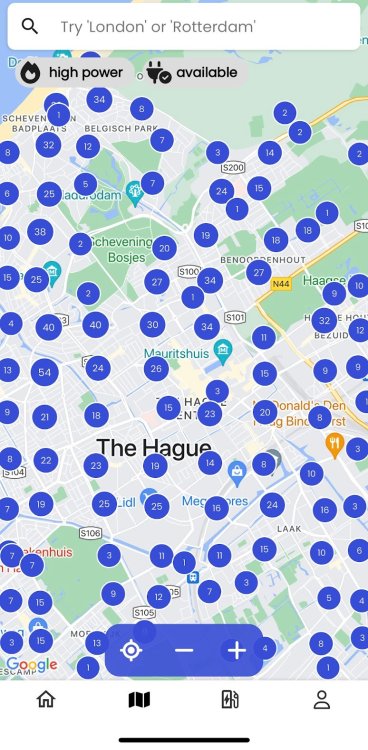
Well, he might well have a point if he had to go to the west of Scotland, there is not that much support for EVs. Take a peek at the attached, which shows some of the charge points in The Hague.
-
I don't have a clue how the recovery Centres & Body Repair centres will get on with it. I expect that they will have to follow the guidelines because can you imagine the carnage and the massive claims being made if a fire was to break out in a crowded yard. My car was taken to Balgores in Witham and like I said there must have been around 100 vehicles stored there and mine was in the middle of the front row and was one of just a handful that was drivable. If an incident did happen, they would never be able to extract many vehicles before they were all engulfed. As to the RAC, well they are at best laughable in my view, on 2 occasions they had to recovery me and I wait over 7 hours once and 4 hours on the other.
-
Further to my original post in response to @Warrior193post where I posted a link to the telegraph about damaged EV cars having to be quarantined at least 15m away from anything else, and I also post the UK Gov document (MOT) confirming this I have got further confirmation of this from research carried by Thatcham who are the advisory body for the UK industry and the insurance companies and their report is also attached, and it not only discusses this but also shows what this graphically means, and it means that in the same space needed to store 100 ICE cars awaiting accident repairs, they can only store just 2 EVs. If the area does not have any other structures or vehicles bordering onto it then the maxim they can store is just 8. When I visited the repairs where my old damaged car was being stored awaiting instructions, their yard was rammed with cars and just about enough space to open a door and squeeze in the car. This rule is going to be very problematical for them and will shove costs up across the board. This shown on pages 38 & 39 of the document if printed out, but if reading it online it is pages 44 & 45 as they do not number the index pages. So it would seem that the Telegraph, at least on this occasion, was just pro ICE and anti EV but were in fact factual after all. recovery-_operators-working-with-electric-vehicles (2).pdf Impact-of-BEV-Adoption-on-the-Repair-and-Insurance-Sectors-report-Innovate-UK-and-Thatcham-Research-FINAL.pdf
-
Never a good idea to leave your dashcam connected, it will drain the battery.
-
Have you checked to see if the battery terminals are clean and also tight? Also check the ground connection on the chassis. Did you observe where the guy connected his jump set leads, was it directly to the battery terminals or did he connect the ground to the ground point and the positive to the battery? If the latter, it might indicate battery connection of the ground could be suspect. I wouldn't rule out the possibility of the battery being faulty, how long is the warranty on it? I had one with a 4-year warranty fail at the 3-year mark, but such events are very rare.
-
If you can't manage to finish it off, I'll help you out with it as long as its toffee flavoured or sweet. 😂
-
Lots of things are well understood in various industries, but that does not equate to being in the best interests of the consumer or the environment. I have some equipment that is years old and has been designed well to last, and then I have items to repair in the past for insistence that were only a few years old fail and parts were none standard and not available even from the manufacturers, they were not even interested in supplying any schematics. On the other hand I have some equipment that is getting on in life made by TTi of Huntingdon, and they have been extremely interested and helpful in the supply of technical info, schematics and parts, often FOC. If ever I was in the position of equipping a new electronics lab for someone, I'd have no hesitation in purchasing / specifying their fantastic range of equipment because they stand by their products. And for the record, I was not trying to make it personal at all, I was trying to get my head around the way you always manage to avoid the issues and try to have the last word on every topic, I don't think it's too personal to ask a person for their age, if they don't to divulge their actual age they could always give an indication of their age group, I never made it a secret of my age, but hey ho whatever. What do you say to we call a truce on this because we both feel that we are right and @xman has already indicated that he is bored with it anyway?