



Skip to content

Pictures Of My Skoda Fabia VRS.
Featured Replies

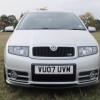
I have been lurking lol on this forum for a while now so thought I would put some pictures up of my car as I spent a little time yesterday giving it a good clean. Comments welcome.

DSCF4550.jpg

DSCF4545.jpg

DSCF4548-1.jpg

DSCF4546.jpg

DSCF4547.jpg

DSCF4549.jpg

DSCF4551.jpg

I do have a Superpro dogbone mount to be fitted along with Eibach Superpro lowering springs and also a Whiteline adjustable rear anti roll bar, but with the poor weather coming Im probaly going to wait til spring before I fit the suspension items as I cant see the point for another harsh winter. I do also have some 17" Spiders waiting to be refurbished at some point again I will wait til the new year I think before fitting them. Boring choice of wheel I know but I think they are the best OEM+ wheels for the Fabia. Thanks for looking.

Lovely example mate looks similar to someones :p

I must say I do like your headlights to. And dont worry about the spiders mate, they suit the fabia perfectly.

  • Author

Cheers mate, yeah like I mentioned I think the spiders are ideal for the oem+ look. Roll on the spring now.

Weeey i recognise this ;)

  • Author

I thought you would fella lol!

nice motor enjoy

  • Author

Cheers, I'm considering getting the chrome part of the grille sprayed in the same colour as the bodywork. I'm toying with the idea of carbon fibre wrapping the air vents in the dash as my gear gaitor surround is already done by the cars one previous owner.

Edited by redcupraboy

Silver ones are fastest :p

Looks great with those headlights and interior :)

Silver ones are fastest :p

Looks great with those headlights and interior :)

  • Author

Cheers for your comments.

Thanks for posting yer pics, I've been wanting to see how the lcr splitter looks on a silver Vrs, I think I need to source one!

Create an account or sign in to comment

Recently Browsing 0

  • No registered users viewing this page.

Important Information

Welcome to BRISKODA. Please note the following important links Terms of Use. We have a comprehensive Privacy Policy. We have placed cookies on your device to help make this website better. You can adjust your cookie settings, otherwise we'll assume you're okay to continue.

Account

Navigation

Configure browser push notifications

Chrome (Android)
  1. Tap the lock icon next to the address bar.
  2. Tap Permissions → Notifications.
  3. Adjust your preference.
Chrome (Desktop)
  1. Click the padlock icon in the address bar.
  2. Select Site settings.
  3. Find Notifications and adjust your preference.
