



Skip to content

Post your Mk3 Octavia photos!
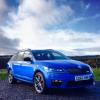
Featured Replies

I've fitted a K&N panel filter and removed the sound/snow baffle plate from inside the airbox, makes the car sound more "purposeful", and a little bit crisper on acceleration.


However I too would like to hear what it sounds like.

  • Replies 5.4k
  • Views 1.2m
  • Created
  • Last Reply

Top Posters In This Topic

Most Popular Posts

Posted Images

Please do give us the link to the video...I need a cure for my 220bhp motor that sounds like a 1.1 Fiesta!!

I've fitted a K&N panel filter and removed the sound/snow baffle plate from inside the airbox, makes the car sound more "purposeful", and a little bit crisper on acceleration.


However I too would like to hear what it sounds like.

Hopefully he will get the videos up, you guys have the TSi. This lad has the TDI will sound a lot different

jg4caa.jpg

2015%2008%20August%2016%205491%2070%20do


|The Octavia is in there, just not the main focus :-)

Its a tsi 220

Clip from inside

Oh crap you car on your avatar says Octavia 2.0 TDi gutted now haha

Its a tsi 220

Clip from inside

Thank you. Apart from the burble on gear changes it's difficult to hear any difference in the video. Any chance of hearing the Milltek from the outside on idle / revs?

I'd never considered getting my vrs in silver but having seen one the other day in the flesh and now your photo it really suits them.

Now that does sound good!! Do you mind me asking where you bought it from?

Milltek is not cheap.

well there are three options for connection - apple car play, android auto, smart link. I can't show you smart link as my phone is android so it will not use smart link to connect, a non android or apple phone would use smart link

My understanding is that the 3 Smartlink connectivity options are -apple car play, android auto and mirrorlink.

IIRC Certain model Android phones can use Mirrorlink. Tbh I havent looked into Windows phones.

My understanding is that the 3 Smartlink connectivity options are -apple car play, android auto and mirrorlink.

IIRC Certain model Android phones can use Mirrorlink. Tbh I havent looked into Windows phones.

Without a range of phones to try we're reliant on what skoda tell us. Pretty much in the dark in other words.

Sent from my XT1039 using Tapatalk

Haven't really taken any pics in the light yet but I have to say, those rear lights look stunning!

Edited by Bav96

Rear


Angled rear


Side

Edited by Bav96

Terrible quality but will upload some after work or tomorrow in the light :)

My understanding is that the 3 Smartlink connectivity options are -apple car play, android auto and mirrorlink.

IIRC Certain model Android phones can use Mirrorlink. Tbh I havent looked into Windows phones.


last night I plugged in an (android) HTC M8 and it came up via mirror link. Too cluttered, much prefer android auto interface

411582807.jpg


Sounds great :)

20% aftermarket tint done, car looks miles better although not the best picture :)


20150819_110220163_i_OS.jpg

My new O3 Elegance 1.6 TDI with DSG just before registration in Croatia imported from Germany, original owner was from France.

2lka0eu.png

Has LED clusters like VRS. Do different markets have different lights?

Sent from my iPad using Tapatalk

They are available on all UK models (except S) as a £175 option (std on L&K and VRS).

New pics with changes!


15ppil2.jpg


33bcx3d.jpg


2nuufet.jpg


2yujbbp.jpg


I love that red/black combination. If only my employer would allow for anything other than silver/alu rims...


En al año que viene voy a España con mi esposa y nuestros hijos, quizá te voy a mirar a la carretera ;).

Edited by Diango

I love that red/black combination. If only my employer would allow for anything other than silver/alu rims...

En al año que viene voy a España con mi esposa y nuestros hijos, quizá te voy a mirar a la carretera ;).

If that happens I hope you stop me and take a coffee with cars in the window [emoji1]

Create an account or sign in to comment

Recently Browsing 0

  • No registered users viewing this page.

Important Information

Welcome to BRISKODA. Please note the following important links Terms of Use. We have a comprehensive Privacy Policy. We have placed cookies on your device to help make this website better. You can adjust your cookie settings, otherwise we'll assume you're okay to continue.

Account

Navigation

Configure browser push notifications

Chrome (Android)
  1. Tap the lock icon next to the address bar.
  2. Tap Permissions → Notifications.
  3. Adjust your preference.
Chrome (Desktop)
  1. Click the padlock icon in the address bar.
  2. Select Site settings.
  3. Find Notifications and adjust your preference.
