



Skip to content

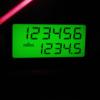
On a scale of 1 to 10...
Featured Replies

Yes, but then again, when I was choosing a numberplate for a new car, I'd a range to choose from, someone'd already had 686, and I picked 687!

i had 44444 on my odo the other day too

  • Author
i had 44444 on my odo the other day too

Copycat! :D

When my last octy went through 68000 , 68020 , 68030 and 68040 miles I had a little smile to myself.

Now that really is nerdy!

why? i dont get it....

why? i dont get it....

Lol

The Amiga used motorola CPUs.. the codes of them (rather like the modern day pentium/core duo) were mc68000 for the A500 and A600, mc68020 for the A1200 and mc68040 for the A4000

mode>

so ther :P

CG... ex-geek :rofl::rofl:

OK that really is geeky!!

I underestimated the mileage on the Octy - only 49.2K, not the 49.7K I thought :( Maybe if I do the Cat and Fiddle I can make 50K this month :)

So I had to make do with a lesser milestone in the other car.

Passat5000-1.jpg

Harder to catch than you might imagine as UK Passats don't show an odo over about 5km/h

I have official word that this sort of thing is very sad.

Shortly after I noticed Col's avatar I hit this figure as i arrived home :D

attachment.php?attachmentid=13299&stc=1&d=1171142317

13299.attach

  • 1 month later...
ooooh if I go for a reasonable drive this weekend I'll hit the big 50 in the RS. I always try to look out for these things, but I've never taken a photo... yet.

Seven weeks later I make the target :rofl:

I blame not getting to any Brisky meets :(

octavia50k.jpg

Create an account or sign in to comment

Recently Browsing 0

  • No registered users viewing this page.

Important Information

Welcome to BRISKODA. Please note the following important links Terms of Use. We have a comprehensive Privacy Policy. We have placed cookies on your device to help make this website better. You can adjust your cookie settings, otherwise we'll assume you're okay to continue.

Account

Navigation

Configure browser push notifications

Chrome (Android)
  1. Tap the lock icon next to the address bar.
  2. Tap Permissions → Notifications.
  3. Adjust your preference.
Chrome (Desktop)
  1. Click the padlock icon in the address bar.
  2. Select Site settings.
  3. Find Notifications and adjust your preference.
