




pab567
FREEDOMTech
-
Joined
-
Last visited
Everything posted by pab567
-
PM
-
You have Bolero MIB1 => no Croatian, no SmartLink possible
-
For SmartLink activation you have either contact your local SKODA dealer or have the unit hacked (pls do not ask how...)
-
Paste here first section from metainfo2.txt
-
It's rather not a common issue. Do you have possibility to use some diagnostics tool, e.g. VCDS, Vag Can Pro or OBD Eleven?
-
Regular update is 0253. But if your unit is hacked then I recommend to leave it as is...
-
All check your PMs
-
Depends on the files that are updated during such update.
-
Message sent
-
Probably GPS antenna is faulty - try any other, e.g. the cheap Chinese internal GPS antenna. If this doesn't help then I recommend to reset navigation calibration data - it can be done only with diagnostics interface, e.g. VCDS. Then you should drive a straight road approx. 1 km. Unfortuntely message with sw download link cannot be sent - probably @Gyp has mailbox size exceeded.
-
MOST (optical databus), not used in Fabia but used in other cars that can be equipped with the same infotainment unit (Octavia, Superb, Kodiaq, Karoq)
-
Yes - although I would rather think anout MIB STD2 PQ than Columbus RNS510
-
-
I've heard about SW 0480 from someone but so far have not seen it. All check your PMs.
-
Nope, this is the latest version.
-
Looks like your infotainment unit does not support displaying of 4 side sensors.
-
-
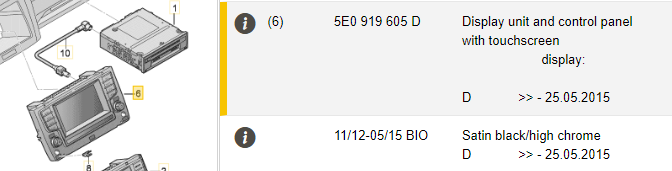
MIB1 Amundsen 5E0035874A + display 5E0919605D. I beleive you can buy second hand set for max. 150 GBP + cost of replacement by yoir Skoda dealer another 150 GBP. But if it's broken then being in your shoes I would think about retrofitting Amundsen MIB2 - with 6.5" screen you can have such set installed for approx. 350 GBP.

-
Let me know your VIN so I can check what is your infotainment system
-
If your car is 2013 then I cannot imagine screen cost of 900+ GBP... pls share VIN so I can check
-
Have you checked another phone?
-
Unfortunately I don't have it :(
-
I have gone this way with DNX525DAB and I was not happy with it. Why don't you retrofit Amundsen MIB STD2 PQ unit from yeti FL?
-
Check PM
-
Although updating unit from 02xx (so called SOP2) to higher SW is possible however it's not just a simple update - it requires unit to be hacked first and then reflashed with especially modified final SW. Moreover, from my experience I do not recommend for units installed in SEAT LEON 5F to go higher than SOP3 as then you might be affected with some incompatibility between infotainment unit and BCM that requires adjusting of coding and adaptation of BCM while from the features point of view going higher than SOP3 does not bring any new features. Unfortunately all I can share with you is latest official SOP2 SW - you have download link on PM.



