
Yogi-Bear
Members
-
Joined
-
Last visited
Everything posted by Yogi-Bear
-
It’s one of the icons on the main menu.
-
You can access the manual through the infotainment system. Depending on what you want from the manual, this may or may not work for you. Out of interest though, what do you mean by “hard work to read”? Are you complaining about the manual itself or the format (PDF)? IMHO, it’s about as good as any car manual I’ve ever had (yes, they’re all pretty dire), so just curious what you mean by this?
-
You might be out of luck... All 4x4 variants in the UK come with the off-road mode, which narrows down the potential of finding someone on here that has done this. But yes, there is no way of selecting it through the normal drive selection menu/button - it needs the off-road button to activate. Whether or not you can get around this is another matter. And no, it doesn't require dynamic chassis control - that's just adaptive suspension (soft/normal/hard), nothing more.
-
I very much doubt it would get any of those. But then I will actually be surprised if there is one at all, to be honest.
-
Available on the manual section of Skoda's website... May be of interest to see how the smart dials work, if nothing else.
-
Current vRS has 245PS TSI engine, compared to 200PS (max) on the Sportline. The DSG box is the same 7-speed box on all petrol engines, I think (although I could be wrong on that one). And the vRS comes with adaptive suspension (comfort (soft), normal, sport (hard)) as standard, but this available as an option on the Sportline as well. Aside from the engine, the key differences are pretty much cosmetic - you could add all the kit the vRS has as standard to a Sportline. Scout version hasn't been available in the UK for a very long time... didn't realise it was still going in other markets. There may be a vRS in the future - the Mk1 vRS didn't turn up until a couple of years after launch. It's only worth waiting for if you really want the engine, but there are no guarantees there will be one, and if there is, it could be a hybrid rather than pure petrol.
-
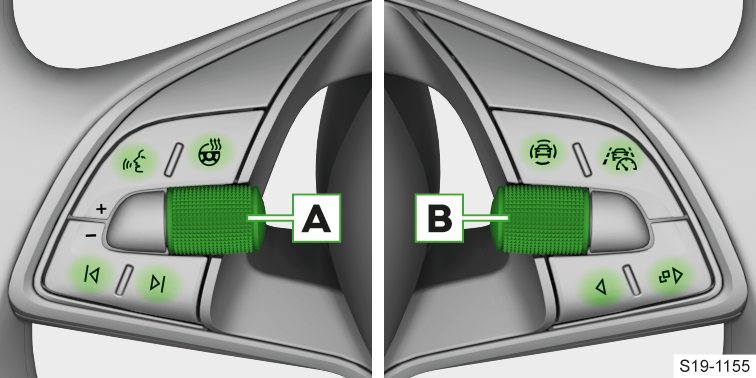
Are you sure it's a 'lane assist' button...? If it's the top-right button on the right hand side, then that's for Travel Assist (combination of ACC and Lane Assist).
-
<joke> No, because he's got a manual gearbox! </joke> That would be funny though 🤣.
-
The volume dial in the bottom left of your photo. The one with the power button that is not in its correct orientation... which apparently triggers some people if left like that.
-
So yes, it is the same as Apple Maps - but that only shows one suggestion. Neither hides the map in the way the in-built system does.
-
Because the car thinks you're incapable of driving somewhere without setting the sat nav, and so it's suggesting places you go frequently. If you never use the sat nav, then it'll never suggest anything, but it'll still show that screen. Don't take it personally, it's the same for everyone if you have the map displayed when you stop. To be fair - CarPlay (Apple Maps) does the same... it suggests somewhere it thinks you might be going every time you set off. No idea if Google Maps / Android Auto is the same, but it wouldn't surprise me.
-
For what it's worth, I think you're worrying over nothing. I tend to do mainly short journeys, and I've not had any issues so far in either of the Kodiaqs that I've owned. I had a diesel Octavia before that - was doing long journeys when I got it, but then started working from home, and by the time I got rid of it, it was trying to do a re-gen more often than not because of the short journeys. As an aside, VAG are starting to take the **** with their 'advice' on how their cars should be driven - a friend with an ID.4 was told he should only charge it to 80% under normal circumstances, and if he charges it to 100%, to make sure he uses it to <80% within 12 hours of it finishing charging. No idea if Enyaq owners are told the same, or if this was one dealer talking rubbish.
-
Given that I very much doubt it's possible to just swap the units in and out due to all the coding / component protection / etc. that the car has these days, I'd be getting a quote from a dealer to swap the unit and presenting that to whoever it is that scratched the screen.
-
It's no higher than the top of the steering wheel. And it's a smaller screen than in a lot of cars these days.
-
The issue is that the cover can come off the mountings when driving - not that it touches anything when it is parked up and not moving. What you've done there is spend £60 on a fire hazard. If you take your vehicle to a Skoda dealership, they should be able to look up the recalls that are applicable to your car, and one of those should be for the engine cover - at which point they should source you a new version for free. ...one usually starts a new topic 😉. I think the simple answer, however, is to bring yourself kicking and screaming into the 21st century and rip your CDs to mp3 (or other compatible format of choice) and use a USB stick. Or hook your phone up and use Spotify/Apple Music/other streaming service of choice. Even if you could physically connect a CD drive to the system, I'd bet the MIB3 unit (as opposed to the MIB2 unit in your old L&K) won't even know what one is.
-
For what it’s worth, it still hasn’t happened since having been serviced. Maybe, just maybe, one of the software updates they applied did actually fix it… Still not holding my breath though.
-
If my local dealer is to be believed, some time in the New Year, with deliveries due to start in Q2. According to the configurator (which is never wrong 😂) - the SE L Executive and SportLine are still available to order, or more precisely, they don't have the 'This trim is available from stock only' label next to them.
-
Mine went in for its second service a couple of weeks ago... and there were quite a few items on the list. Not only did it get a replacement engine cover, but it also hasn't exhibited this fault with Travel Assist since. It would go weeks without doing it, so I'm not holding my breath just yet, but it may well have been fixed.
-
Hmmm. Looks like they're trying to copy the LR Defender.
-
I think there’s a whole MkII forum you should post this sort of thing in… 😉. I’m trying not to jump to conclusions. My first instinct when I saw the MkI facelift was that it was uglier than the original. Now, I think the original looks very dated and the facelift looks much better. Again, my first instinct when I saw the MkII was that it is very fugly; if I do stick with a Kodiaq for my next car, then it would have to be a SportLine or a vRS - there’s no way I could go with the silver d-pillar - but that’s likely to make it very expensive, at which point I’m going to be seriously looking at alternatives in the value-for-money stakes.
-
In my defence, the service bloke said there was nothing about an engine cover on the job sheet when he gave me the keys back this afternoon, so I didn’t push it home… but when I checked after getting home, I nearly fainted as I discovered they had fitted one. Will see if I can check the part no. on it at some point.
-
What’s interesting is that Skoda (or VAG) seem to think they can make the subscription model work in cars. Even BMW have admitted defeat and are apparently stopping doing subscriptions for extra functionality (heated seats being one of them!). To be honest, couldn’t care less if the car doesn’t have SatNav - as long as CarPlay works, I’m sorted. Very rarely use the built-in SatNav now, and never use the other functionality (media player, radio, etc.).
-
There’s a difference between not being able to turn something off… and it always defaulting to being on when you start the car. There are too many things nowadays that have a default you can’t change, and you have to set to your personal preferences every time you use the thing (not just talking about cars!).
-
Errr, no you don't. Pull the ACC stalk forward to engage/set speed. Then press the Travel Assist button on the steering wheel to engage that. Lane assist will be on permanently, unless you turn it off in the menu, the 'adaptive' part will activate with the travel assist. You sure? I can turn it off in the assists menu... does that not deactivate it completely? Can't say I've ever tried as I don't want to turn it off.
-
Indeed - but it still doesn't keep it bang in the middle of the lane like it did in the pre-facelift version. Or, at least, that's my perception, just as the OP's. I actually prefer it because it's less... intrusive - but it did take a bit of getting used to.